Published September 14, 2026
Stop Rekeying and Get Paid Faster: Mobile Payments for Contractors
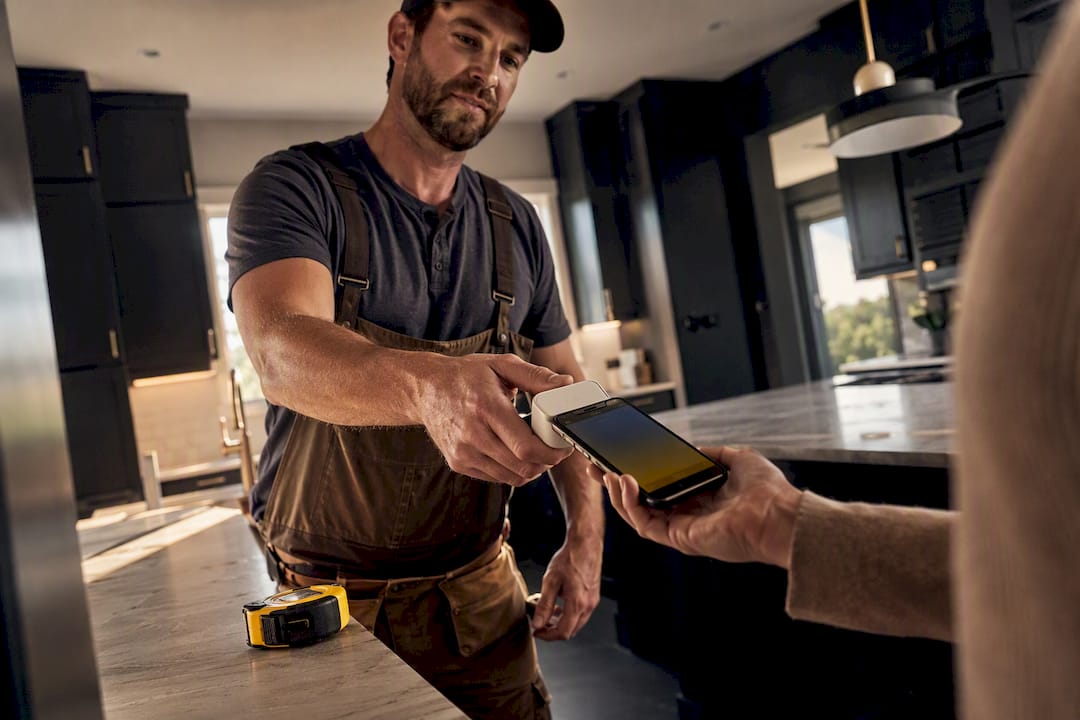
Yes, your contracting business should accept mobile payments, and the reason is simple: getting paid on-site closes jobs faster and keeps cash moving instead of sitting in a mailbox. The main tradeoff to watch is fees and setup discipline, so pick one method, confirm it works offline, and get your team trained before your next big job.
TL;DR:
Mobile payment methods should match each project’s specific moment, size, and location to ensure smooth cash flow and reduce workflow mismatches.
Tap-to-pay and payment links provide quick, convenient options for small jobs or remote transactions, while card readers and ACH suit larger or in-person payments.
Offline support, integrated invoicing, clear fee structures, and job-level reporting are crucial features when selecting a mobile payment provider for field use.
Consistently applying a single payment method for about a month helps crews build reliable habits, reducing errors and speeding up collections.
Using integrated platforms like ServlyPro minimizes manual re-entry, improves reconciliation speed, and automates follow-ups, increasing revenue growth and cash flow.
Table of Contents
-
Mobile Payments for Contractors: What It Looks Like on the Job
-
Card Readers, Tap-to-Pay, Links, or ACH: Picking the Right Method
-
How to Choose the Right Mobile Payment Solution for Your Contracting Business
Mobile Payments for Contractors: What It Looks Like on the Job
Mobile payments for contractors aren’t one tool. They’re a set of collection methods that fit different moments in a job, from the deposit you take before you order materials to the final invoice you send after cleanup. Understanding where each method fits is the difference between a smooth payday and a customer who “forgot” to mail a check.
Picture a kitchen remodel with three payment touchpoints. The office admin sends a payment link for the deposit before the crew shows up. The foreperson collects a progress payment with a Bluetooth card reader once cabinets are installed. The lead technician taps the customer’s phone against their own for the final balance the moment the punch list is done. Three different tools, three different moments, one job.
Here’s how the methods typically map to real roles on a crew:
-
Card readers (Bluetooth or plug-in dongles) work best for the foreperson or lead tech who needs to swipe or dip a card at the property, especially for larger progress payments.
-
Tap-to-pay (phone-native NFC) fits fast, small-ticket jobs where a technician wants to finish the transaction without pulling out separate hardware.
-
Payment links sent by SMS or email let office staff collect deposits or final balances from customers who aren’t standing in front of you, which matters for remote approvals or multi-property clients.
-
In-app invoices tied to a job record let anyone on the team generate a bill that already reflects the scope, materials, and labor logged for that visit.
-
ACH or bank transfer links suit large invoices, like a full roof replacement or HVAC system swap, where card fees would eat into margin.
The pattern that works across trades is matching the method to the moment, not forcing every job through the same collection channel. A plumber collecting a $180 service call doesn’t need the same setup as a general contractor invoicing a $40,000 addition, and treating both the same way is how businesses end up with clunky, mismatched workflows.
Card Readers, Tap-to-Pay, Links, or ACH: Picking the Right Method
Every contractor eventually asks the same question: which payment method actually fits my business? The honest answer depends on your average ticket size, how often you have signal at the jobsite, and whether your customers expect to pay in person or online. Here’s how the four main categories stack up.
-
Card readers (Bluetooth or plug-in dongles). These pair with a phone or tablet and read chip or swipe cards directly. They’re reliable for higher-ticket jobs where you want a physical device customers recognize, and most processors charge a lower rate for “dipped” or chip transactions than for manually keyed ones. The tradeoff is hardware: you need to charge it, carry it, and replace it if it breaks or gets lost on a truck.
-
Tap-to-pay (phone-native NFC). No extra hardware required. The customer taps their card or phone against your phone, and the transaction processes in seconds. This is the fastest-growing category for field service because it removes the “where’s the reader” fumbling that slows down small jobs. Compatibility depends on both your phone and the customer’s card or wallet supporting NFC, which is now standard on most modern devices.
-
Payment links and digital invoicing A link sent by text or email works well for deposits, remote approvals, and any customer who isn’t standing in front of you when payment is due. Payment link and tap-to-pay workflows tailored for contractors show up increasingly in trade-focused platforms because they cut hardware friction and let customers pay on their own schedule, which matters for jobs with property managers or out-of-town owners.
-
ACH and bank transfer. For large invoices, ACH usually carries the lowest fee structure of any digital method, often a flat rate instead of a percentage. The catch is clearing time. Where a card transaction settles in one to two business days, ACH can take three to five, so it’s better suited to big-ticket jobs where the customer isn’t expecting same-day funding anyway.
-
Cash and checks. These aren’t disappearing, especially with older customers or smaller residential jobs. The key is recording them the same way you’d record a digital transaction: tied to the job, dated, and logged before the crew leaves the property. A check that gets stuffed in a glovebox for two weeks is the single most common cause of “lost” payments contractors report.
Some contractor-focused processors advertise jobsite invoicing, tap-to-pay, and offline-capable devices as standard features specifically because trade businesses don’t operate in office buildings with steady WiFi. That’s the filter to apply to every method above: does it work when your crew is in a basement or a rural job with one bar of signal?
How to Choose the Right Mobile Payment Solution for Your Contracting Business
Picking a provider isn’t about chasing the lowest advertised rate. It’s about matching a handful of practical criteria to how your crew actually works.
-
Offline support comes first. Offline credit card processing exists specifically because merchants often work where connectivity is limited or unavailable, and a contractor in a basement or rural job site is exactly the scenario this feature was built for. If a provider can’t explain how it handles a dropped connection mid-transaction, that’s a disqualifier, not a minor gap.
-
Integrated invoicing matters more than it sounds. A payment tool that doesn’t connect to your job record forces someone to re-key the amount, the customer name, and the line items into a separate invoicing system, which is where errors and disputes start.
-
Ask about fee shapes before you ask about the rate. Keyed-in transactions typically cost more than tapped or dipped ones, and ACH usually costs less than either but settles slower. Ask a provider directly: what’s the rate for card-present versus keyed, and what’s the actual funding timeline, not the marketing timeline.
-
Reporting needs to work at the job level. You want to see which invoice a payment applied to, not just a lump deposit in your bank account. This is what makes month-end reconciliation take fifteen minutes instead of an afternoon.
-
The customer experience should feel effortless. A saved card, a one-tap payment link, or a simple tap-to-pay interaction reduces the friction that causes customers to delay paying at all.
Pro Tip: Before signing with any processor, ask them to walk you through exactly what happens when a card transaction is captured offline and the phone reconnects an hour later. If the answer is vague, keep shopping.
Merchant services pages built for trades often highlight integrated reporting, fraud prevention, and dedicated support as the trust signals contractors should be asking about, and that’s a fair checklist to bring into any sales conversation.
Setting Up Mobile Payments and Keeping the Books Straight
Getting from zero to accepting mobile payments for contractors doesn’t take long, but skipping steps here is what causes headaches three months in.
-
Set up the account and verify banking details. Confirm your business name, tax ID, and bank account are entered correctly before you process a single dollar, since a mismatch here delays your first payout.
-
Pair your device and run a test sale. Whether it’s a card reader or tap-to-pay, run a small test transaction and refund it immediately to confirm the money lands in the right account and the receipt looks correct.
-
Decide your deposit rule and stick to it. Many trades collect an upfront deposit on larger jobs. Whatever your number is, apply it consistently so customers know what to expect before you show up.
-
Match the collection method to the moment. Take card payments on-site for jobs that finish in one visit; send a link when the customer isn’t present or when the final invoice includes change orders that need review first.
-
Document every job before you leave the property. Photos, materials used, and a signed completion note attached to the invoice make disputes far easier to resolve, since you have proof of what was delivered and when.
-
Reconcile weekly, not monthly. Match payments to invoices every week so a missed payment gets caught in days, not at month-end when the trail has gone cold. For refunds or disputed charges, resolve them inside the same job record rather than as a standalone adjustment, so the history stays intact.
The ServlyPro guide to accepting payments on-site walks through this exact sequence for teams switching from paper invoices to digital collection for the first time.
Security and PCI Basics Every Contractor Should Know
PCI compliance sounds like a corporate problem, but it applies to any business that touches card data, including a two-person plumbing outfit. The PCI Security Standards Council publishes merchant guidance that boils down to a few practical steps for small field service businesses: never store raw card numbers on a device or spreadsheet, use a processor that tokenizes card data automatically, and password-protect every phone or tablet used for payments.

Tokenization is the piece that matters most in practice. It means your processor replaces the actual card number with a scrambled code the moment a transaction happens, so even if a device is lost or hacked, there’s no usable card data sitting on it.
For offline transactions specifically, verify two things with your provider: how long a captured offline payment takes to settle once connectivity returns, and what happens if that payment is later declined. Some providers hold offline transactions for a short authorization window; others process them immediately upon reconnection and flag failures after the fact.
-
Never write down or text a customer’s full card number, even for a “quick fix.”
-
Use a PIN or biometric lock on any device that processes payments.
-
Keep a simple log of transaction ID, job address, and amount for every payment, which shortens dispute resolution dramatically if a customer later contests a charge.
-
Confirm your provider encrypts data in transit, not just at rest.
Security in the field isn’t really about huge investments in software. It’s about closing the small gaps, like an unlocked phone or a card number scrawled on a work order, that create real liability.
How ServlyPro Cuts the Admin Out of Getting Paid
The biggest hidden cost in contractor payments isn’t the processing fee. It’s the time spent re-keying the same job information into three different systems: the quote, the invoice, and the payment record. Integrated systems that combine invoicing and on-site payment capture reduce re-keying and make it far easier to document exactly what a payment was for if a customer disputes it later.
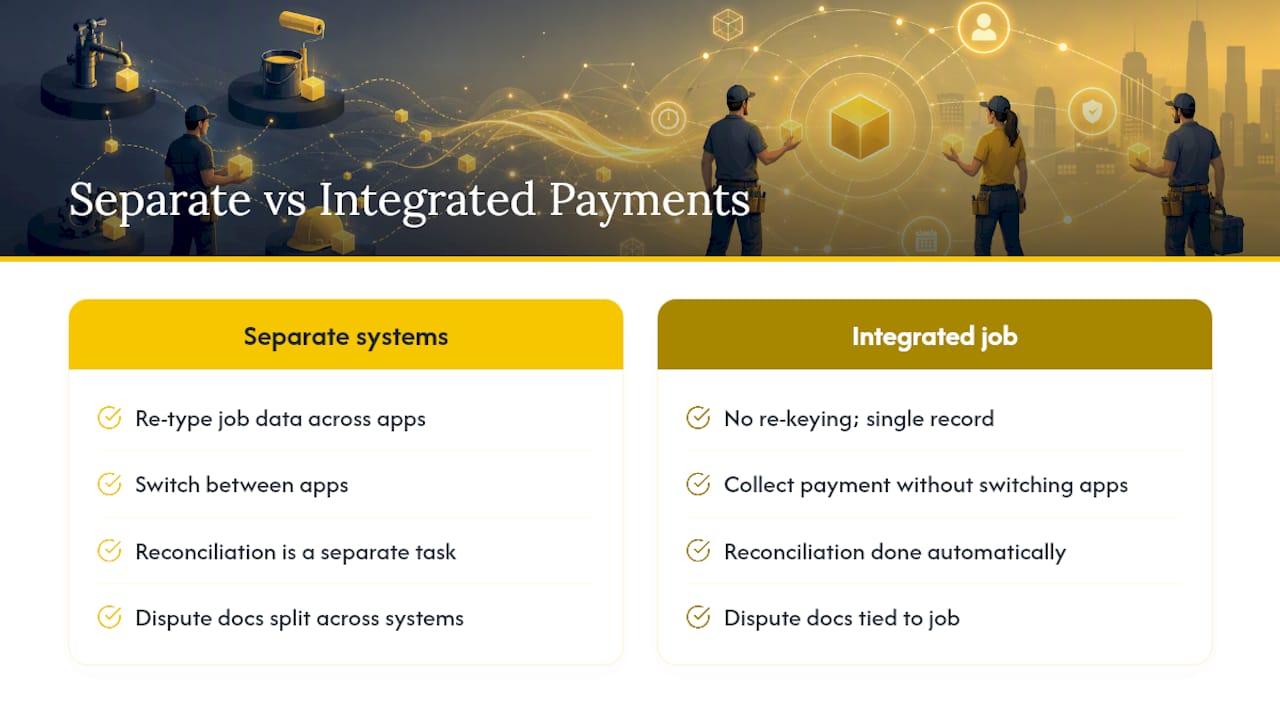
ServlyPro builds payment acceptance directly into the job record, so a technician who generates an AI-powered quote, gets it approved, and finishes the work can collect payment without switching apps or retyping a single line item. That job record, quote, invoice, and payment sit in one place, which means reconciliation isn’t a separate task, it’s already done by the time the crew leaves the driveway.
Businesses using ServlyPro’s integrated automation for quotes, scheduling, and invoicing have reported up to 60 percent revenue growth alongside meaningful time savings, largely because fewer manual handoffs mean fewer missed follow-ups and faster payment cycles.
Pro Tip: If your current setup requires copying an invoice number from one app into another to log a payment, that’s the exact re-keying step that causes the most billing disputes. Look for a platform where the payment lives inside the same record as the job.
Automated follow-up on unpaid invoices is the other piece that matters here. A system that reminds customers automatically about an outstanding balance does the collections work your office admin shouldn’t have to chase by phone.
What Contractors Get Wrong About Choosing a Payment Method
Most contractors shopping for a payment solution start by comparing processing rates down to the tenth of a percent, and that’s the wrong first filter. Reliability in the field, and how cleanly a payment reconciles against the actual job, matters more than shaving a few basis points off a transaction fee.
Start small. Pick one method, tap-to-pay or payment links are usually the easiest entry point, and run it consistently for a month before layering in a second option. Trying to roll out card readers, ACH, and payment links all at once is how teams end up with three half-trained workflows instead of one that actually sticks.
Expect a short adjustment period. Your crew will need a week or two to build the habit of collecting payment before they leave a job instead of “billing it later.” Once that habit forms, the time between job completion and cash in the bank shrinks dramatically, and that’s the entire point of moving to mobile payments in the first place.
— ServlyPro
Get Paid Faster With ServlyPro’s Built-In Payment Tools
ServlyPro gives contractors something most standalone payment apps can’t: a single platform where scheduling, AI-generated quotes, job tracking, and payment collection all live together. Instead of bouncing between a scheduling app, a separate invoicing tool, and a third app for taking card payments, your team works from one job record from first estimate to final receipt.
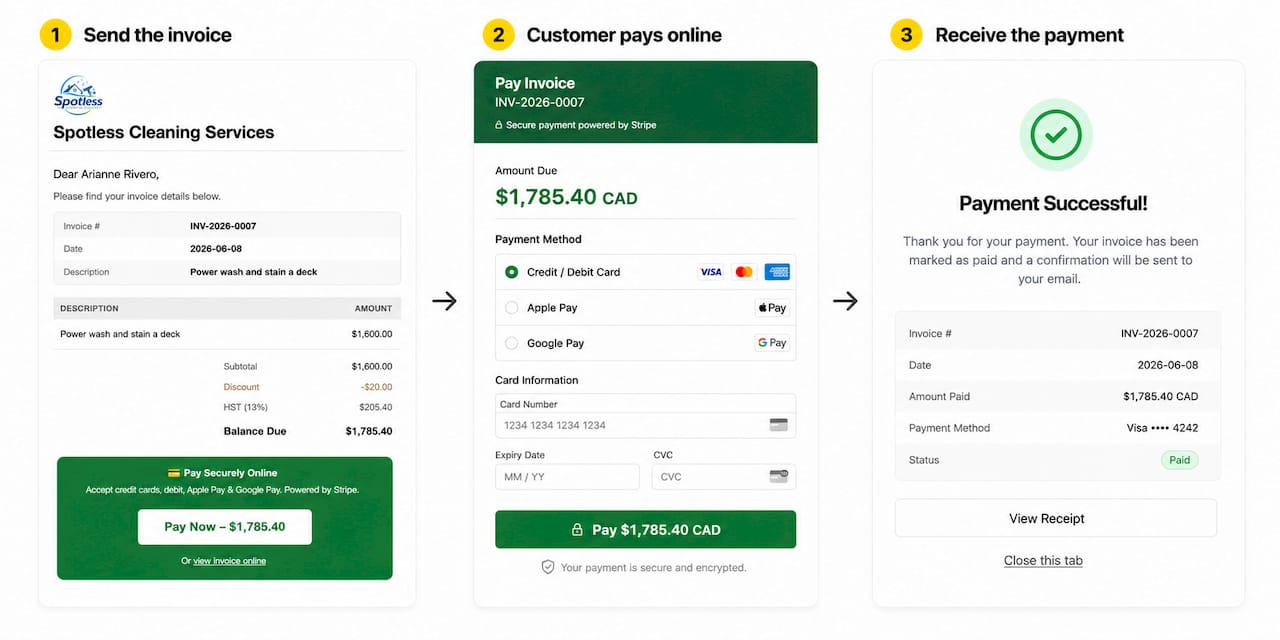
That matters most at the moment of getting paid. When a payment is captured directly against the job it belongs to, there’s no re-keying, no mismatched invoice numbers, and no scrambling to figure out which job a deposit applied to three weeks later. Fewer manual steps means fewer disputes and faster reconciliation, which is exactly where most contracting businesses lose time and money without realizing it. ServlyPro’s online and on-site payment features work alongside job scheduling and automated follow-ups so an unpaid invoice doesn’t just sit quietly waiting for someone to notice.
If your business is ready to stop juggling separate tools for quoting, scheduling, and getting paid, start a trial of ServlyPro’s field service management software and see how a connected job record changes your time-to-cash.
Sources
For deeper background on the standards and provider practices referenced in this guide, these resources are worth bookmarking:
FAQ
Can I use Zelle to pay contractors?
Zelle works for personal transfers between people who trust each other, but it offers no buyer protection, no invoice trail, and no dispute process, which makes it a poor fit for business transactions where documentation matters.
What are the downsides of mobile payments?
The main downsides are processing fees that vary by transaction type, occasional connectivity issues in remote job sites, and the need for basic security habits like device locks and tokenized card handling to stay PCI compliant.
What is the best contractor billing app?
The best option is one that ties invoicing directly to the job record instead of running as a separate app; platforms like ServlyPro build quoting, scheduling, and payment collection into a single workflow to avoid re-keying and reduce disputes.
What is the easiest way to pay contractors?
For customers, tap-to-pay or a text-based payment link is typically the fastest and least confusing option, since it requires no app download and settles in seconds without extra hardware.
Do mobile payments work without internet at the jobsite?
Many providers support offline transaction capture that processes automatically once the device reconnects, though contractors should confirm settlement timing and decline handling with their specific provider before relying on it for large payments.