Published August 29, 2026
How to Accept Payments On Site Without Slowing Down Your Team

You can accept payments on site through mobile tap-to-pay, countertop terminals, QR codes, or payment links, and you can accept them online through hosted checkout pages, buy buttons, or embedded APIs. The fastest low-effort starting point is a payment link. The strongest long-term setup is an integrated omnichannel platform that connects payment collection directly to your scheduling and invoicing, so a finished job turns into a paid invoice without you touching a spreadsheet.
Most service businesses need a mix of these, not just one:
-
Mobile tap-to-pay on a technician’s phone for quick on-site jobs
-
Countertop or portable terminals for higher-volume or storefront work
-
QR codes and payment links for zero-hardware collection
-
Hosted checkout or embedded APIs for booking deposits and online payments
Whichever combination you pick, expect deposits to land in your bank account in 1 to 2 business days once a transaction settles.
Key Takeaways
An integrated omnichannel payment setup, one that connects on-site collection, online checkout, and invoicing into a single workflow, gets service businesses paid faster than any standalone payment tool.
| Point | Details |
|---|---|
| Start simple, scale up | Use payment links to launch fast, then move to an integrated platform as job volume grows. |
| Expect 1 to 2 day settlement | Most integrated processors deposit funds to your bank account within 1 to 2 business days. |
| Test before you launch | Run sandbox tests covering declined cards, refunds, wallets, and chargebacks before going live. |
| Prioritize integration over rate | A platform tied to invoicing saves more in admin time than a slightly lower transaction fee. |
| Connect jobs to payments | ServlyPro links job completion directly to invoicing and payment capture to reduce manual follow-up. |
Table of Contents
What Does It Actually Mean to Accept Payments On Site?
“Accepting payments on site” used to mean a card swiper bolted to a cash register. It now covers anything from a technician tapping a customer’s card against a phone in a driveway to a QR code taped to a work van. The mechanics behind all of it run through the same four layers: the gateway, the processor, the merchant account, and increasingly, the all-in-one provider that bundles all three.
A payment gateway captures and encrypts card data at the point of sale. A processor routes that data between the card networks and the banks involved. A merchant account is the business bank account that actually receives the funds. All-in-one providers, the model most small and mid-size service companies now use, collapse these layers into a single dashboard and a single monthly relationship.
Every transaction follows the same lifecycle regardless of provider:
-
Authorization: the card issuer confirms funds are available
-
Capture: the business confirms the sale and requests the funds
-
Settlement: the processor moves money to the merchant account
-
Reconciliation: the business matches the deposit to the original invoice or job
Tokenization is what makes modern providers manageable for a small business. Instead of storing raw card numbers, the system stores a token, a randomized stand-in that’s useless if stolen. This is why all-in-one providers significantly reduce your PCI compliance burden compared to running your own payment infrastructure. If you have development resources and complex needs (custom checkout flows, deep CRM integration), an API or SDK gives you control. If you don’t, a no-code payment link or hosted page gets you live in an afternoon.
Which In-Person Payment Method Fits Your Field Team?
The right on-site setup depends less on your industry and more on how your team moves through the day. A plumber doing five house calls has different needs than a landscaping crew billing at the curb after a two-hour job.
-
Tap to Pay on a phone. Best for technicians who need to collect payment the moment a job wraps, with no extra hardware to charge, carry, or lose. Works well for HVAC repair calls, small electrical jobs, and single-visit cleaning appointments.
-
Countertop terminals and fixed POS. Makes sense for storefronts, retail counters, or any business where customers come to you, such as an auto detailing shop or a appliance repair front desk.
-
Portable or handheld readers. Built for multi-stop field teams, moving crews, or curbside pickup, where a technician needs a dedicated device that survives a truck bed better than a personal phone.
-
QR codes and payment links. The zero-hardware option. Print a QR code on an invoice or text a payment link after a job, and the customer pays from their own phone. Square’s hardware and dashboard lineup shows how far this category has expanded, letting a single business run terminals, mobile readers, and link-based payments under one login.
Beyond picking the device, a few operational details separate a smooth setup from a frustrating one: reliable cell or WiFi connectivity at the job site, automatic digital receipts, a clear tipping prompt if your trade supports it, and signature capture for larger transactions. Hardware costs vary widely, from a free mobile card reader to several hundred dollars for a rugged handheld terminal, so match the investment to your call volume.
Pro Tip: If your team splits time between the shop and the field, standardize on one provider across both. Running a separate terminal system at the counter and a different app in the truck creates two sets of reports you have to reconcile by hand at the end of the month.
How Should Your Website Collect Payments?
Online collection breaks into four tiers, and most service businesses climb through them as they grow rather than picking one and staying there forever.
-
Payment links and buttons are the fastest way to start. You generate a link or embed a button, share it by text or email, and the customer pays on a hosted page. No website changes, no developer, live in minutes. PayPal’s Payment Links work this way and even generate a QR code version for in-person use, blurring the line between “online” and “on-site” collection.
-
Hosted checkout pages give you a branded, dedicated payment page linked from your site, a step up in polish from a raw payment link but still requiring no custom development.
-
Embedded checkout puts the payment form directly on your own page, keeping the customer from ever leaving your site, at the cost of more setup work.
-
Full API integration gives developers total control over the payment experience, usually reserved for businesses with custom booking software or complex recurring billing.
Whichever tier you choose, support for digital wallets like Apple Pay and Google Pay matters more than it might seem. One-click wallet payments reduce checkout friction and tend to lift conversion, especially for mobile customers paying a deposit from a text message link. The most common use cases for service businesses are collecting deposits before a job starts, charging booking fees to reduce no-shows, and running recurring billing for maintenance contracts.
The catch with standalone links and buttons: they scale poorly once your needs get more complex. Recurring billing, automated tax handling, and customer history all eventually push growing service businesses toward an integrated platform instead of a folder of one-off payment links.
How Do You Connect Payments to Your Job Workflow?
The gap between “we accept payments” and “we get paid fast” almost always comes down to what happens between the job finishing and the invoice going out. If that step requires someone to remember to write an invoice, log into a payment app, and manually mark the job paid, you’ve built three places for money to slip through the cracks.

An integrated field service platform closes that gap by triggering the payment request the moment a job is marked complete. ServlyPro’s online payment tools connect directly to job status, so a completed appointment can generate an invoice and a payment link automatically, with card-on-file options for repeat customers who don’t want to re-enter payment details every visit.
A few pieces of that integration matter more than they get credit for:
-
AI-generated quotes that convert into invoices without re-keying line items, shortening the time between “job approved” and “job paid”
-
Automated follow-ups on unpaid invoices instead of a technician manually texting customers for money
-
Webhooks and APIs that sync payment status, transaction IDs, and receipts back into your scheduling system in real time
-
Unified reporting so a payment taken on a job site and one taken through your website land in the same reconciliation view
The gap this closes: Businesses using automated follow-ups instead of manual chasing see meaningfully faster collections, because the system reminds customers before a balance goes stale rather than after it’s already awkward to bring up.
Unifying online and in-person data into one dashboard is the difference between spending Sunday night reconciling three apps and spending five minutes confirming a report.
What Security Steps Actually Matter Before You Go Live?
You don’t need to become a security expert to accept payments responsibly, but skipping the basics is how small businesses end up with chargebacks they can’t explain or a compliance audit they weren’t ready for.
-
Use hosted or redirected checkout wherever possible. When the payment form itself lives on your provider’s servers rather than yours, most of your PCI compliance burden shifts to them.
-
Confirm tokenization is enabled. Card numbers should never touch your own servers or spreadsheets in raw form; a token should stand in for the real number in every system that references the transaction.
-
Run a full sandbox test before launch. Test a successful charge, a declined card, an expired card, a wallet payment, a partial refund, a full refund, and a chargeback simulation before you ever process a real customer’s card.
-
Turn on basic fraud monitoring from day one, even if it’s just the default settings your provider offers. Waiting until after your first fraudulent transaction is the wrong time to configure it.
Pro Tip: Sandbox testing is the step most small businesses skip, and it’s the one payment infrastructure experts flag as the most common real-world failure point for service providers going live for the first time.
What Do Payment Fees and Settlement Timing Really Cost You?
Every payment quote you get bundles together a few separate costs, and the headline rate rarely tells the whole story. You’re typically looking at interchange fees set by the card networks, a processor markup on top of that, a fixed fee per transaction (often a flat cents-per-swipe charge), and sometimes a monthly platform fee for access to reporting or hardware.
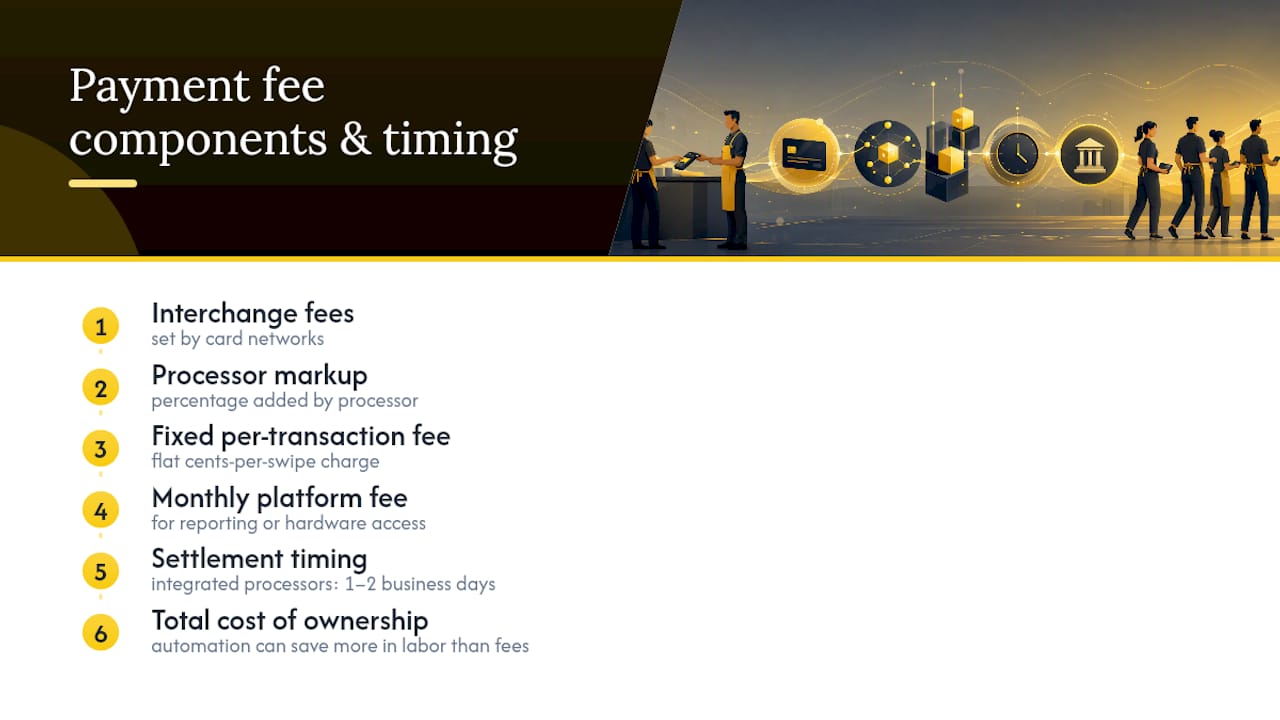
Settlement timing matters just as much as the fee itself for cash flow planning. Most integrated processors deposit funds within 1 to 2 business days, though the exact timing can shift based on your account history, transaction size, and whether a payment was flagged for manual review.
The number that gets ignored most often is total cost of ownership. A slightly higher per-transaction fee can be the cheaper option overall once you factor in the hours your team spends reconciling mismatched records, chasing unpaid invoices, or manually handling chargebacks. A platform that automates that work can save more in labor than it costs in fees, especially once your job volume climbs past a handful of transactions a week.
How Do You Choose the Right Payment Setup?
Run any provider or setup you’re considering through this checklist before committing:
-
Does it integrate with your booking and invoicing? If payment data lives in a separate silo from your job records, you’re signing up for manual reconciliation forever.
-
Does it support mobile, on-site collection? Confirm tap-to-pay or a handheld reader option exists if your team works in the field.
-
Does it offer clear reporting and reconciliation tools? You should be able to see online and in-person transactions in one view.
-
Can you test it in a sandbox before going live? Any provider that can’t offer test mode is a provider you should question.
-
Are the fees actually transparent? Ask directly about interchange pass-through, monthly minimums, and any early termination costs.
-
What’s the chargeback policy, and what are the support SLAs? Get a straight answer on how disputes are handled and how fast support responds when a payment fails.
Watch for red flags: pricing that requires a sales call to understand, no test or sandbox mode, limited integration options, or long contract terms that lock you in before you’ve proven the setup works for your business.
A sensible path for most service businesses: start with payment links to get moving fast, then scale into an integrated platform once volume or complexity (recurring billing, multiple technicians, high transaction counts) makes manual reconciliation painful.
How Do You Launch Payment Acceptance Without Disruption?
Going live doesn’t need to be complicated if you follow the sequence in order rather than skipping ahead to hardware before your accounts are verified.
-
Set up your merchant or provider account and verify your bank details so deposits land where they should.
-
Decide between hardware and payment links based on how your team works, then provision test devices or generate test links.
-
Integrate payments into your invoicing and booking flow, and turn on receipts and tipping options if relevant to your trade.
-
Run full sandbox tests, covering sample card types, wallet payments, refunds, and offline scenarios, before touching a live transaction.
-
Pilot with a small group of real customers before rolling the setup out to your whole team.
-
Train staff on the new flow and reconcile the first 30 transactions manually to confirm everything lines up before trusting the automation fully.
What’s Overrated in the Payments Advice You’ve Read Elsewhere
Most payments guides treat the payment moment as an isolated event: pick a processor, compare rates, done. That framing misses the actual cost center for service businesses, which isn’t the transaction fee. It’s the hours spent chasing unpaid invoices, re-entering data between a payment app and a scheduling tool, and manually reconciling a countertop terminal against an online payment link at month end.
The conventional advice to “shop for the lowest rate” also falls apart once you account for total cost of ownership. A quarter-point difference in processing fees matters far less than whether your payment system talks to your job calendar and your invoicing automatically.
What we’d prioritize first isn’t the payment method at all. It’s whether job completion, invoicing, and payment collection live in the same system. Get that connected first, then optimize hardware and fees. Most businesses do it backward, and it costs them more in admin hours than it ever saves in transaction rates.
Get Paid the Moment the Job Is Done
ServlyPro closes the gap between finishing a job and getting paid for it. Instead of juggling a separate payment app, a paper invoice, and a follow-up text, ServlyPro connects job completion directly to invoicing and payment capture, so a technician marking a job done can trigger a payment link automatically.
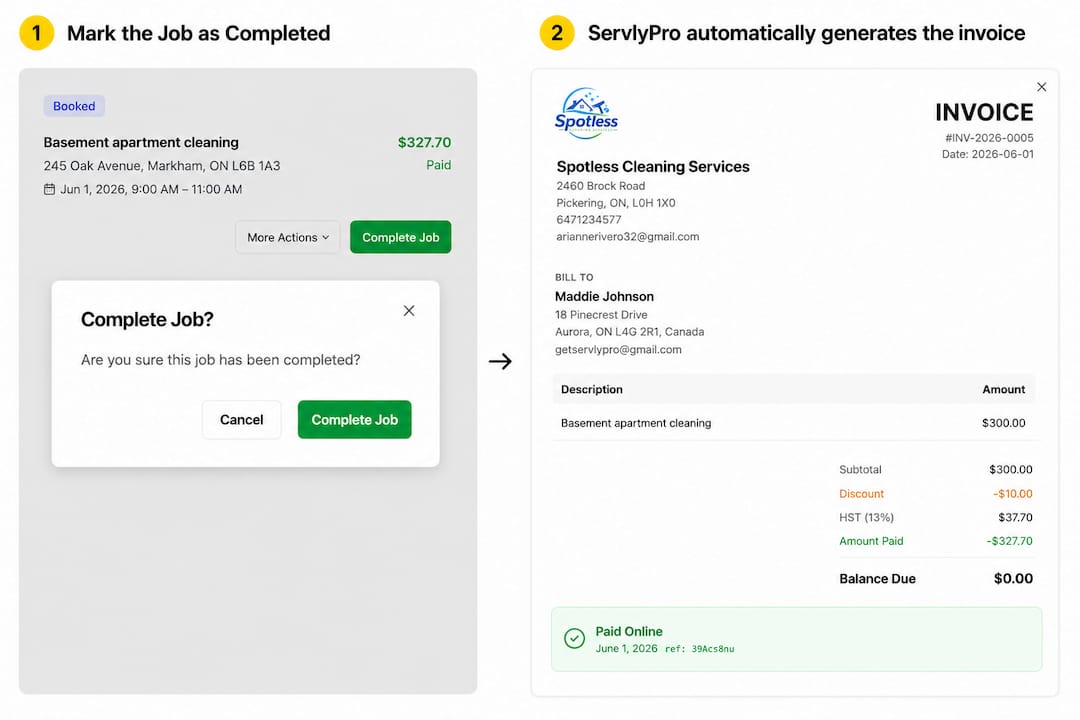
The platform pairs online payments with AI-generated quotes, automated invoice follow-ups, and card-on-file billing for recurring customers, all inside one dashboard instead of three disconnected tools. Businesses using ServlyPro’s automated workflows have reported up to 60% revenue growth by cutting the admin time that used to sit between a completed job and a deposited payment. If your current setup means chasing invoices instead of running jobs, start a trial and see how quickly payments move once your workflow is connected end to end.
Frequently Asked Questions
What’s the fastest way to start accepting payments on site? A payment link or QR code is the quickest option. You can generate one in minutes with no hardware and no developer work, then text or print it for customers to pay from their own phone.
Do I need a merchant account to accept payments online? Not necessarily. All-in-one providers bundle the gateway, processor, and merchant account into a single sign-up, which is why most small service businesses use them instead of setting up a standalone merchant account.
How long does it take to get paid after a transaction? Most integrated processors settle funds to your business bank account within 1 to 2 business days, though the exact timing depends on your account history and the provider’s payout schedule.
Is Tap to Pay on a phone secure enough for a small business? Yes. Modern Tap to Pay relies on the same tokenization and encryption standards as a physical card terminal, so the card number is never stored or transmitted in raw form.
Can I accept payments both on site and online with the same system? Yes, and it’s the recommended approach. Unifying online and in-person transactions in one dashboard prevents the reconciliation errors that come from tracking payments across separate apps.
Sources
-
Payment Links: Accept Payments Without a Website | PayPal US
-
Square Payments: Accept Payments Online, In-Store, or On The Go