Published August 15, 2026
The Landscaping Invoicing Guide That Gets You Paid Faster

The fastest way to get paid is a clear, itemized invoice sent within 24 hours of completing the job, with at least one embedded digital payment option and a consistent billing cadence. That single operational shift, more than any other change, shortens the time between finishing a job and seeing money in your account. This landscaping invoicing guide covers every field, template, and workflow step your business needs to collect reliably and protect your margins.
Three actions to implement today:
-
Send invoices the same day. Every hour you wait after a job is completed reduces the likelihood of same-week payment.
-
Itemize every line and assign a unique invoice number. Clients who can see exactly what they’re paying for dispute less and pay faster.
-
Embed a payment link and schedule one automated reminder. Giving clients a one-click path to pay removes the single biggest friction point in collections.
ServlyPro automates all three: it generates invoices from completed job records, embeds payment links, and schedules follow-up reminders without any manual steps from your team.
Pro Tip: Set a team rule that no crew leaves a job site without the invoice already sent from a mobile device. That habit alone eliminates the end-of-week billing backlog that stalls cash flow.
Key Takeaways
Sending itemized invoices within 24 hours, with embedded payment links and an automated reminder sequence, is the most reliable way to shorten collections and protect your landscaping business’s cash flow.
| Point | Details |
|---|---|
| Send invoices same day | Invoices sent within 24 hours of service completion reduce disputes and speed payment consistently. |
| Nine fields are non-negotiable | Every invoice needs business info, invoice number, service date, itemized lines, tax, totals, and payment terms. |
| Match invoice type to job | Use deposit invoices (30%) for installs, recurring batch invoices for maintenance, and progress invoices for phased projects. |
| Automate your reminder sequence | A four-step reminder cadence (day -3, due date, day +7, day +15) recovers most overdue balances without confrontation. |
| ServlyPro automates the full cycle | ServlyPro generates invoices from job records, embeds payment links, and runs follow-up sequences automatically. |
Table of Contents
-
Which invoice template format works best for your landscaping jobs?
-
When should you upgrade from templates to field-service software?
Which invoice template format works best for your landscaping jobs?
Landscaping invoice templates are available in four formats, and the right one depends on how your business operates day to day.
Format options and their advantages:
-
Word (.docx): Best for one-off jobs where you want to write custom service descriptions. Easy to edit, easy to email as a PDF attachment.
-
Excel or Google Sheets: Ideal for batch invoicing recurring maintenance routes. Formulas handle subtotals, tax, and totals automatically. Google Sheets adds mobile access and real-time collaboration.
-
Fillable PDF: Useful for field crews who need a locked, professional-looking document they can complete on a tablet and send on the spot.
Template use cases by job type:
-
Quick per-visit residential mow: Word or fillable PDF, sent same day.
-
Monthly recurring maintenance batch: Google Sheets with a row per service date, one invoice per client per billing period.
-
Deposit invoice for a hardscape install: Excel with separate line items for deposit amount, scheduled progress payments, and final balance.
-
Final invoice for a multi-week project: Word or PDF with a reference to the original estimate number and any approved change orders.
When you import any template into your workflow, customize three fields before your first send: your business logo, your accepted payment instructions (ACH routing, card link, or check payable-to), and your contractor license number where your state requires it. Place tax notes and any required disclosures in the footer so they appear on every invoice automatically.
Pro Tip: If your business runs more than 15 recurring accounts, move off manual templates and into a field-service platform. The time you spend copy-pasting and checking formulas costs more than a monthly software subscription.
| Format | Best for | Key advantage | Limitation |
|---|---|---|---|
| Word (.docx) | One-off or custom jobs | Easy narrative descriptions | No auto-calculation |
| Excel | Batch recurring billing | Formulas, sortable history | Desktop-heavy |
| Google Sheets | Mobile teams, recurring routes | Real-time access, shareable | Requires Google account |
| Fillable PDF | Field crews, on-site sends | Professional, locked layout | Hard to edit after saving |
What every landscaping invoice must include
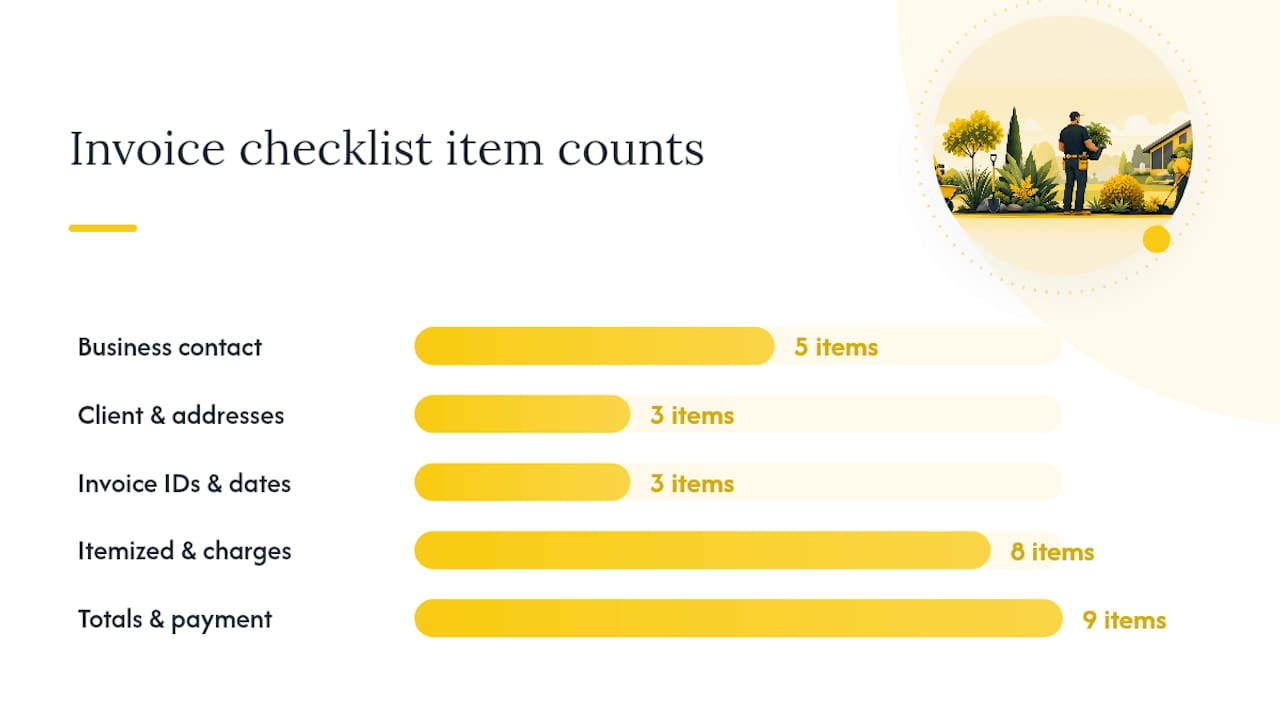
Nine fields form the minimum invoice that gets paid reliably: business contact information, invoice number, invoice date, customer name, property address, service date, itemized line items, subtotals with tax, and the final balance due.
Complete field checklist:
-
Business name, address, phone, email, and contractor license number
-
Client name and billing address (separate from the service address when different)
-
Service/property address
-
Unique invoice number (sequential, never reused)
-
Invoice date and service date(s)
-
Itemized lines: description, quantity, unit, unit price, and line total for each service
-
Labor hours and rate, materials with markup, equipment charges
-
Subtotal, applicable tax, any discounts, and total due
-
Payment terms (Net 7, Net 15, Net 30, or Due on Receipt)
-
Accepted payment methods and a direct payment link
-
Late-fee policy (e.g., 1.5% per month on balances past due)
-
Reference to the original estimate or purchase order number
Writing service descriptions that prevent disputes:
Vague descriptions invite pushback. Compare these two line items:
Weak: “Lawn maintenance — $185”
Strong: “Mowed 8,500 sq ft; edged driveway and walk; blower finish — 0.75 crew-hrs @ $95/hr + $113.75 materials”
The second version tells the client exactly what was done, how long it took, and how the price was calculated. Disputes drop when clients can match the invoice to what they saw on their property.
Write service descriptions as if the client wasn’t home. Assume they need to reconstruct the visit from your words alone. Include the square footage treated, the specific areas serviced, the crew time, and any materials applied. That level of detail protects you in a dispute and signals professionalism to every client who reads it.
Pro Tip: For chemical applications, pesticide treatments, or fertilizer programs, note the product name and application rate on the invoice line. Some states require it, and it protects you if a client later questions a lawn condition.
According to landscape billing best practices, sending itemized invoices promptly and including clear payment terms are the two factors most consistently linked to faster payment and fewer disputes.
Which invoice type fits your job?
Not every landscaping job uses the same invoice structure. Matching the invoice type to the job protects your cash flow and gives you the right collection leverage if a client goes silent.
| Invoice type | When to use it | Typical terms |
|---|---|---|
| Estimate/Quote | Before work starts — not an invoice, no payment due | Signed approval required before work begins |
| Deposit/Retainer | Material-heavy installs, new clients | 30% of total contract value, due before mobilization |
| Progress/Milestone | Multi-week installs, phased projects | Tied to completion milestones (e.g., grading done, plants in) |
| Recurring Maintenance | Weekly, biweekly, or monthly service routes | Billed in advance or on a set date each period |
| Final Invoice | Project wrap-up, punch-list complete | Balance due, references all prior invoices and change orders |
| Per-Event | Storm cleanup, snow removal, one-time services | Due on receipt or Net 7 |
Collection strategy by invoice type:
-
For recurring maintenance accounts, your primary leverage is service suspension. A client who misses two billing cycles gets a written notice that service pauses until the account is current. This works because the service has ongoing value they don’t want to lose.
-
For installation projects, milestone billing combined with mechanic’s-lien rights gives you legal protection on qualifying work. Calendar your preliminary notice deadlines and lien filing windows by state, because missing them forfeits your rights.
-
Deposit invoices for installs should require a substantial upfront payment, especially when you’re purchasing materials before the first shovel hits the ground. That deposit covers your material cost exposure if the project stalls.
-
Recurring billing models such as equal monthly, seasonal flat, per-visit, and base-plus-add-on each trade off predictability against client acceptance. Equal monthly billing smooths your revenue across slow winter months and is often the single biggest cash-flow stabilizer for maintenance-heavy businesses.
How to calculate your true cost and set a billable rate
Your invoice amounts are only defensible if they’re built on real cost math. Many landscaping owners underprice labor because they calculate base pay but skip the fully-loaded rate.
Step-by-step billable rate calculation:
-
Start with the crew member’s base hourly pay (example: $22/hr).
-
Add payroll taxes: roughly 7.65% for FICA, plus state unemployment (varies). Example adds $1.68/hr.
-
Add workers’ compensation insurance (rates vary by state and job class; use your actual rate). Example: $2.20/hr.
-
Add benefits (health, PTO accrual, etc.). Example: $3.00/hr.
-
Add equipment cost per hour (depreciation, fuel, maintenance divided by annual hours). Example: $8.50/hr for a mower and trailer share.
-
Add overhead allocation (shop, insurance, vehicles, admin staff divided by billable hours). Example: $6.00/hr.
-
Apply your target profit margin (20–30% is typical for maintenance; 25–35% for installs). Example at 25%: multiply the sum by 1.25.
Rounding to $55/hr is reasonable. Charging $30/hr on a job that costs you $43 to deliver is how landscaping businesses lose money on busy weeks.
When converting an estimate into a deposit invoice, document the approved estimate number on the deposit invoice and note that the deposit amount will be credited against the final balance. If scope changes occur mid-project, issue a written change order before doing the additional work, then reference the change order number on the progress or final invoice. That paper trail is what makes disputed invoices defensible.
Industry benchmarks suggest maintenance crews typically bill in the $45–$75 per crew-hour range for standard residential work, while specialized services such as irrigation installation, tree work, or hardscaping often command $75–$120+ per crew-hour depending on market and complexity.
How to send invoices and collect faster
The billing lifecycle that consistently shortens collections runs: same-day invoice → automated reminder sequence → escalation. Sending invoices within 24 hours and offering multiple digital payment options materially speeds collections and reduces disputes.
Send cadence:
-
Send the invoice the same day service is completed, ideally before the crew leaves the property.
-
For recurring maintenance routes, batch all invoices for the period on a fixed date (e.g., the 1st of the month for the prior month’s services, or the 1st for the coming month if billing in advance).
-
Always use the service date and the invoice date as separate fields. Clients and accountants both need them.
Payment methods to accept:
-
ACH bank transfer: lowest processing fees (often under 1%), best for recurring and commercial accounts.
-
Credit/debit card: higher fees (typically 2.5–3.5%), but clients pay faster. Worth offering for residential and one-time jobs.
-
Digital wallets (Zelle, Venmo for Business): convenient for small residential clients, but confirm your accounting can track them.
-
Check: still common in commercial landscaping. Set a clear mailing address and note it on every invoice.
Automated reminder schedule:
-
Three days before the due date: friendly reminder with the payment link.
-
On the due date: brief confirmation that payment is due today.
-
Day 7 past due: direct follow-up noting the account is overdue and late fees may apply.
-
Day 15 past due: phone call plus written notice; for recurring accounts, issue a service-suspension warning.
Pro Tip: Keep reminder language factual and non-accusatory. A message like “Hi [Name], just a reminder that invoice #1042 for $385 is due today. You can pay here: [link]. Let us know if you have any questions” gets paid more often than anything that sounds like a collection notice.
ServlyPro’s follow-up automation handles this entire sequence without manual sends, including retry logic for failed card payments.
When should you upgrade from templates to field-service software?
Templates work well when your volume is low and your jobs are simple. They stop working when you’re managing more than 15–20 recurring accounts, spending more than two hours a week chasing payments, or missing invoices because jobs weren’t logged.
Tool categories and what they offer:
-
Spreadsheet templates: Free, flexible, zero learning curve. No automation, no payment links, no reminders.
-
Accounting and invoicing systems: Handle invoicing and basic payment tracking. Require manual job entry and don’t connect to your field crew’s workflow.
-
Field-service platforms: Connect scheduling, job completion, invoicing, and payment in one system. Invoices generate from completed job records, payment links are embedded automatically, and reminders run on a schedule.
What to require from any invoicing tool:
-
Auto invoice generation from job records
-
Embedded payment links (ACH and card)
-
Recurring billing with configurable billing dates
-
Retry logic for failed payments
-
Automated follow-up reminders
-
Integration with QuickBooks or your accounting system
-
Mobile invoicing for field crews
-
Materials tracking that feeds invoice line items directly
Pro Tip: The clearest trigger for upgrading is this: if you’ve ever completed a job and not invoiced it within the same week, you need automation. One missed invoice per week at an average ticket of $200 is over $10,000 in unbilled revenue per year.
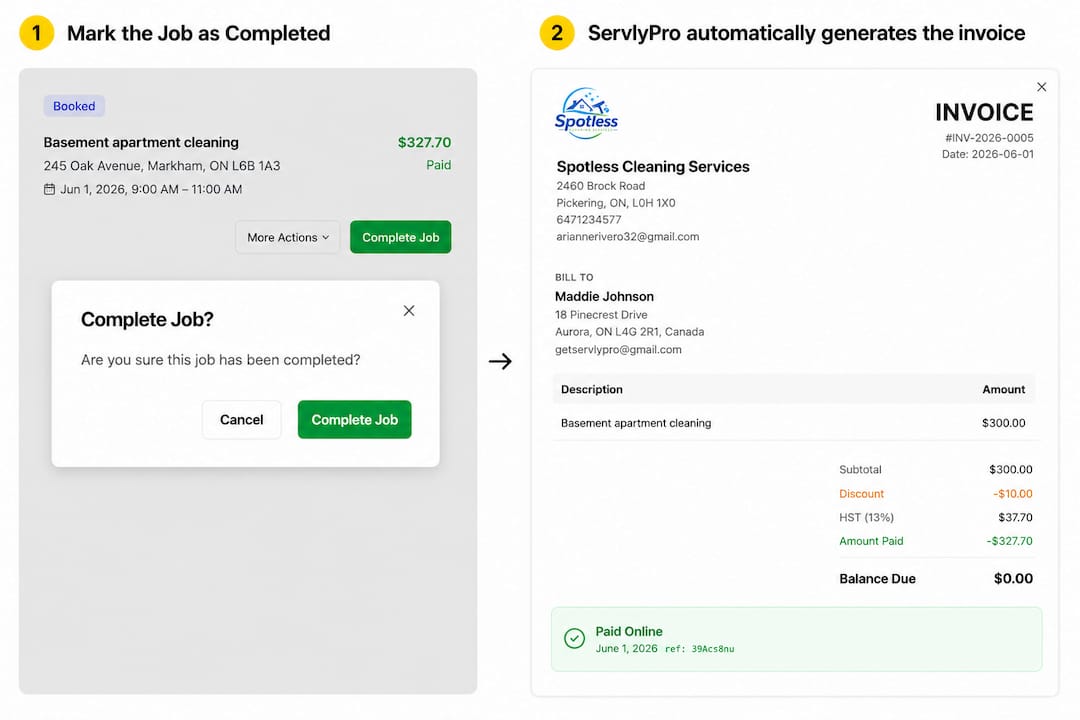
ServlyPro’s landscaping job management platform connects your schedule to your invoices. When a job is marked complete, the invoice generates automatically with the correct service dates, crew hours, and materials. Better job scheduling also means cleaner service logs, which means fewer disputed line items.
Upgrade triggers to watch for:
-
You manage 15+ recurring accounts and batch invoicing takes more than 90 minutes.
-
You’ve had two or more missed invoices in a single month.
-
A client has disputed a line item you couldn’t document because the crew didn’t log it.
-
You’re manually sending payment reminders more than once a week.
Bookkeeping, tax, and record-keeping basics for landscapers
Good invoicing and good bookkeeping are the same habit. Every invoice your business sends should tie to a matching record in your books.
Bookkeeping checklist per invoice:
-
Job ID and service address
-
Crew hours logged (by employee or crew)
-
Materials used with purchase receipts attached
-
Invoice number and invoice date
-
Payment method received and date of deposit
-
Bank deposit record matching the invoice amount
Sales tax rules for landscaping services vary significantly by state. Some states tax labor, some tax materials only, and some tax both depending on the service type. Confirm your state’s rules with your state Department of Revenue or a qualified accountant before applying tax to invoices. This article provides general information only and is not a substitute for professional tax or legal advice. Consult a licensed accountant for guidance specific to your state and business structure.
Retain all invoices, receipts, and payment records for a minimum of three years for federal tax purposes, and up to seven years if your state requires it or if you work on commercial contracts that may be audited. Link each invoice to its corresponding bank deposit in your accounting system so reconciliation is straightforward at year-end.
For installation projects, mechanic’s lien rights give you a legal claim against the property if a client doesn’t pay. Lien timelines and preliminary notice requirements vary by state, and missing a deadline forfeits your rights. Calendar your preliminary notice deadlines at the start of every qualifying project and verify your state’s specific requirements with a construction attorney.
Pro Tip: Photograph every completed job before your crew leaves. Store the photos linked to the job record in your field-service software. If a client disputes a line item six weeks later, you have timestamped visual proof of the work.

Three sample invoices you can copy right now
These examples give you copy-ready invoice structures for the three most common landscaping billing scenarios.
Sample 1: Small single-visit residential invoice
Invoice structure note: For a single-visit residential job, keep the invoice to one page. List each service as its own line item with quantity, unit, rate, and total. Payment terms of “Due on Receipt” or “Net 7” are standard for residential maintenance. Include a direct payment link in the email body and again in the invoice footer.
Sample 1 fields:
-
Invoice #: 1042 | Invoice Date: June 3, 2026 | Service Date: June 3, 2026
-
Client: Sarah M. | Property: 412 Elm Street, Springfield
-
Line 1: Lawn mowing, 8,500 sq ft — 0.75 hr @ $55/hr = $41.25
-
Line 2: Edging, driveway and front walk — 0.25 hr @ $55/hr = $13.75
-
Line 3: Blower finish, all hard surfaces — 0.25 hr @ $55/hr = $13.75
-
Subtotal: $68.75 | Tax (if applicable): $0.00 | Total Due: $68.75
-
Payment Terms: Due on Receipt | Accepted: Card, ACH, Check
Sample 2: Progress billing for a hardscape install
Progress billing protects your cash flow on multi-week projects. Issue three invoices: a deposit before mobilization, a mid-project materials invoice at a defined milestone, and a final invoice on completion.
Numbered invoice sequence:
-
Deposit Invoice (#2001): 40% of $12,000 contract = $4,800 due before work begins. Note: “Deposit per signed estimate #E-0088. Balance invoiced at project milestones.”
-
Progress Invoice (#2002): Materials and labor through grading and base installation = $3,600. Note: “Milestone 1 complete per estimate #E-0088. Prior deposit: $4,800 credited to final.”
-
Final Invoice (#2003): Remaining balance = $3,600 (plus any approved change orders). Note: “Final balance. All work complete per contract. Prior payments: $4,800 deposit + $3,600 progress = $8,400 applied.”
Pro Tip: Always reference the original estimate number on every progress invoice. Clients who approved a written estimate rarely dispute progress invoices that clearly tie back to it.
Sample 3: Recurring monthly maintenance batch invoice
For a client on a weekly maintenance program, batch all visits into one monthly invoice rather than sending four separate ones. List each service date as its own line.
Convert-quote-to-invoice checklist:
-
Confirm the client signed or approved the original estimate.
-
Copy all approved line items to the invoice exactly as quoted.
-
Add any approved change orders as separate line items with their own reference numbers.
-
Verify quantities match the job log before sending.
-
Attach the signed estimate as a PDF alongside the invoice.
Your “before you hit Send” invoicing checklist
Run through this list before every invoice goes out. It takes under two minutes and prevents the most common billing errors.
Pre-send checklist:
-
[ ] Invoice number is unique and sequential
-
[ ] Invoice date and service date(s) are both filled in
-
[ ] Client name and billing address are correct
-
[ ] Service/property address is listed separately
-
[ ] Every service line has a description, quantity, unit, rate, and total
-
[ ] Labor and materials are listed as separate line items
-
[ ] Subtotal, tax, and total due are calculated correctly
-
[ ] Payment terms are stated (Net 7, Net 15, Due on Receipt)
-
[ ] Late-fee policy is visible
-
[ ] At least one payment method with a direct link is included
-
[ ] Original estimate or PO number is referenced
-
[ ] Completion photos or job notes are attached for larger jobs
-
[ ] Your contractor license number appears where required
Suggested invoice email body:
Hi [Client Name], please find attached invoice #[XXXX] for $[Amount], due [Date]. You can pay online here: [Payment Link]. Let us know if you have any questions. Thank you for your business.
That’s it. Short, polite, and gives the client everything they need to pay in one read.
Pro Tip: Attach a photo of the completed work to every invoice for jobs over $500. Clients who can see the finished result before they open the invoice pay faster and dispute less.
-
Send the invoice with the email above.
-
Set a reminder to follow up on day 3 before the due date.
-
If unpaid on the due date, send the day-of reminder with the payment link again.
-
At day 7 past due, call the client directly and follow up in writing the same day.
The one billing change that actually moves the needle
Most landscaping businesses that struggle with collections aren’t missing a template. They’re missing a system. The single change that consistently improves cash flow is combining same-day invoicing with embedded payment links and automated reminders, because it removes every friction point between completing the work and receiving payment.
When your crew finishes a job and the invoice goes out before they’re back at the shop, clients receive it while the work is still fresh in their minds. They’re more likely to approve it, less likely to question it, and far more likely to click a payment link in the same email than to write a check three days later. ServlyPro clients who adopt this workflow report measurable reductions in days sales outstanding, because the system handles the follow-up sequence automatically rather than relying on someone remembering to send a reminder.
One caution: don’t apply a single billing cadence to every client type without testing it. A commercial property manager on Net 30 terms operates differently from a residential homeowner on Net 7. Test your reminder timing and payment method mix by client segment, and adjust based on what actually gets paid fastest in your specific market.
Stop chasing invoices with ServlyPro
Your billing process should run itself. ServlyPro gives landscaping businesses a complete invoicing workflow that generates invoices from completed jobs, embeds payment links, runs automated reminders, and retries failed payments without any manual steps.
What ServlyPro handles for your invoicing:
-
Automated invoice generation from job records
-
Embedded ACH and card payment links on every invoice
-
Recurring billing with configurable billing dates and advance billing
-
Retry logic for failed card payments
-
Automated follow-up reminders on your schedule
-
Materials management that feeds invoice line items directly
-
Reporting that shows outstanding balances, payment history, and DSO
The result: less time chasing payments, fewer missed invoices, and a billing process your team can run from a phone in the field.
Ready to stop sending manual reminders? Start your 7-day free trial and have your first automated invoice workflow running the same day you sign up.
Sources
-
How to collect landscaping invoices — the 2026 owner-operator playbook
-
Invoice Template for Landscapers: Free Templates and How to Bill Every Job | Novo
-
Landscaping Invoice Template (Plus Seasonal Billing Tips) | Nudge
-
Recurring Billing for Landscaping Companies: A Complete Guide | ReliaBills
For state-specific sales tax rules, lien filing requirements, and record-retention obligations, verify current requirements with your state Department of Revenue and a licensed accountant or construction attorney in your jurisdiction.