Published August 26, 2026
Collect Job Deposits Fast: 3 Scripts for Contractors

Require a deposit on every job with real risk exposure. This guide gives you the scripts, invoice fields, and contract language to make it stick, so bookings confirm faster and no-shows drop.
TL;DR:
Deposits should be 25 to 50% for project work, with higher percentages or full prepayment for smaller, low-cost bookings to prevent disputes.
Prompt collection within minutes of booking, using secure payment links via SMS or email, significantly improves deposit conversion rates.
Document deposits clearly in contracts and invoices, including refund and cancellation policies, to make them enforceable and reduce client disputes.
Set clear, written deposit refund conditions and establish a strict deadline with reminders to prevent late or disputed payments.
Automating deposit requests and follow-ups streamlines cash flow, reduces manual effort, and ensures consistent enforcement of deposit policies across all bookings.
Table of Contents
Why Require a Deposit Before You Collect Job Deposits?
A deposit does two things at once: it filters out clients who aren’t serious, and it puts cash in your account before you spend money on their behalf. If you’re buying materials, blocking off a full day, or turning away other work to hold a slot, you’re carrying the risk until the client pays. A deposit shifts some of that risk back where it belongs.
Certain scenarios make a deposit close to mandatory rather than optional:
-
A new client with no payment history with your business
-
A job requiring upfront material purchases (custom fixtures, ordered parts, specialty finishes)
-
Long lead times between booking and start date, where a client has weeks to change their mind
-
Limited scheduling slots you’re turning other work away to hold
-
Any job type with a history of cancellations or no-shows in your business
Single-session work, like a one-time cleaning or a repair visit, usually calls for a simpler deposit or full prepayment. Multi-week projects need a different structure entirely, often tied to milestones rather than a flat percentage. The core rule either way: never let your deposit exposure outpace your delivery capacity. If you’ve collected more than you can deliver against on short notice, you’ve created a liability, not a cash cushion.
How Much Should You Ask For?
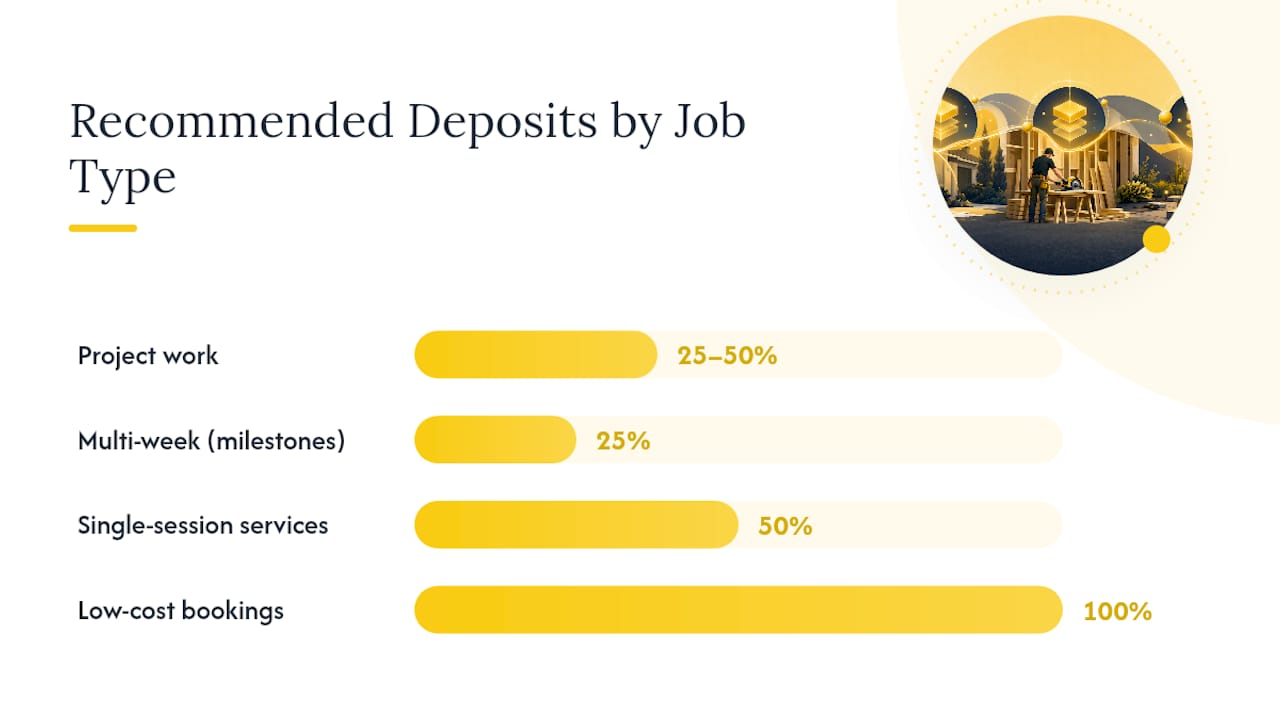
Most service businesses land in a fairly narrow range once they’ve been burned by underpricing their deposits. For standard project work, 25 to 50% upfront is the norm across trades from remodeling to landscaping.
Common deposit structures by job type:
-
Project work (remodels, installs, large landscaping jobs): 25 to 50% at signing
-
Multi-week projects: milestone model, often 25/50/25
-
Single-session services (repairs, one-time cleanings, inspections): 50% deposit or full prepayment
-
Low-cost bookings under roughly $150 to $200: 100% prepayment to avoid chasing a small balance
Deposit benchmark: Trade groups and contractor associations consistently point to the 25 to 50% range as the working standard for project-based service work, adjusted up when materials or scheduling risk is higher.
Flat fees make more sense than percentages when a job’s total cost is uncertain until you’re on site, or when you’re protecting a specific expense like a special-order part. New clients generally warrant the higher end of your range; repeat clients with a solid payment history are a reasonable place to relax the policy slightly, as long as you’re consistent about who gets the exception and why.
How Do You Actually Collect the Deposit?
Speed matters more than most business owners assume. A deposit request sent same day, ideally within minutes of booking, converts far better than one sent the next morning after the client’s excitement has cooled. Payment links delivered by SMS or email remain the fastest, most reliable way to close that gap.
Here’s the workflow that works for most trades:
-
Confirm the job verbally or in writing (scope, date, price).
-
Generate a payment link immediately and send it by text and email.
-
The client pays through a branded checkout page.
-
You get an instant notification and lock the schedule slot.
-
A confirmation and receipt go out automatically.
For phone bookings, a virtual terminal lets you key in a card over the phone without asking the client to read out numbers twice. It’s slower than a link but works well for clients who prefer to just talk it through.
Payment method matters for both cost and speed; freelancers may find helpful options in this instant payment tools guide. Cards process instantly but carry processing fees, typically fine for smaller deposits where speed wins. For large deposits on big-ticket jobs, ACH or wire transfers cost less and leave a stronger paper trail, worth the extra day or two of clearing time. Whichever method you choose, insist on a traceable, secure channel rather than cash or personal Venmo transfers that leave no clean record if a dispute comes up later.

Pro Tip: Set your payment link to auto-expire after 48 hours. It creates gentle urgency and keeps you from tracking stale links across a dozen open conversations.
How Should You Document and Record Deposits?
A deposit only protects you if it’s documented before the money changes hands, not after. That means the terms belong in your proposal and contract, not just buried on an invoice the client sees for the first time when they’re already annoyed. Deposit invoices reduce disputes specifically because they lay out the numbers in plain language before work starts.
Your deposit invoice should include:
-
A clear “Deposit” label, not just a generic line item
-
The deposit amount and the project total
-
Remaining balance owed and its due date
-
Accepted payment methods
Your contract clause needs a few specific elements too: refund conditions, how the deposit gets allocated against the final bill, cancellation terms, and exactly when work begins relative to payment clearing.
A written deposit clause that spells out refund conditions and allocation terms is what makes the deposit enforceable rather than just a polite request. Verbal agreements collapse the moment a client decides they don’t like the outcome.
On the bookkeeping side, a deposit isn’t revenue the day it lands. It’s a customer deposit, a current liability, until you actually deliver the work and issue the final invoice. At that point, you apply the deposit against the invoice and recognize the revenue. QuickBooks and similar platforms handle this with a dedicated liability account. Reconcile deposits weekly rather than monthly. Small businesses lose track of partial payments fast when they let it slide.
What Happens When a Deposit Gets Disputed or Refunded?
Set your refund window before you ever need it, not while you’re arguing with a client. State plainly which situations are non-refundable (materials already ordered, scheduling loss with no time to rebook) and which qualify for a partial or full return.
For missed deposit deadlines, a simple three-step sequence keeps things fair and firm:
-
Send a reminder 24 to 48 hours before the deadline
-
Give one firm cutoff date, stated in writing at booking
-
Release the schedule slot if payment hasn’t landed by the cutoff
Written terms and dated receipts do most of the heavy lifting when a dispute lands on your desk. A documented deposit clause turns a “he said, she said” argument into a reference document both sides already agreed to, which makes collections far less painful if it ever comes to that.
Scripts, Templates, and a Faster Workflow
Once your policy is set, the bottleneck becomes execution. The businesses that collect deposits consistently are the ones that removed the manual steps, not the ones with the strictest policy on paper.
Three scripts you can use today:
-
Phone: “To lock in your slot, I’ll send a secure link right now for the deposit, it’s 30% of the total. You’ll get a text in the next minute.”
-
SMS: “Thanks for booking with us! Here’s your deposit link: [link]. This secures your appointment on [date].”
-
Invoice email: “Attached is your deposit invoice for [job]. Amount due: $[X]. Remaining balance of $[Y] is due on completion.”
Remaining balance: $1,680.00 due on completion.
Sample clause: “A non-refundable deposit of [X]% is due upon signing. Deposits are applied to the final invoice. Cancellations within 48 hours of the scheduled start forfeit the deposit.”
| Task | Manual approach | Automated approach |
|---|---|---|
| Sending deposit request | Type invoice, email separately | One click, sent by SMS and email |
| Payment reminder | Manual follow-up call | Scheduled automatic reminder |
| Applying deposit to invoice | Manual math, re-entry | Auto-applied at billing |
Why Consistency Beats a Perfect Policy
Most service businesses don’t lose money because their deposit percentage is wrong. They lose it because the policy changes client by client, and staff forget to send the request at all. The fix isn’t a better number, it’s a workflow that fires the same way every single time a job gets booked. Businesses that automate this step report meaningful time savings and steadier cash flow, because the deposit ask stops depending on someone remembering to do it. Adopt one of the workflows above this week and run it on every new booking without exception.
— ServlyPro
Let ServlyPro Handle the Deposit Chase for You
Manually sending payment links, tracking who paid, and chasing remaining balances eats hours every week that most contractors would rather spend on the job site. ServlyPro’s online payment tools generate a deposit link the moment a quote is approved, send it by text and email automatically, and apply the payment straight to the invoice once it clears.
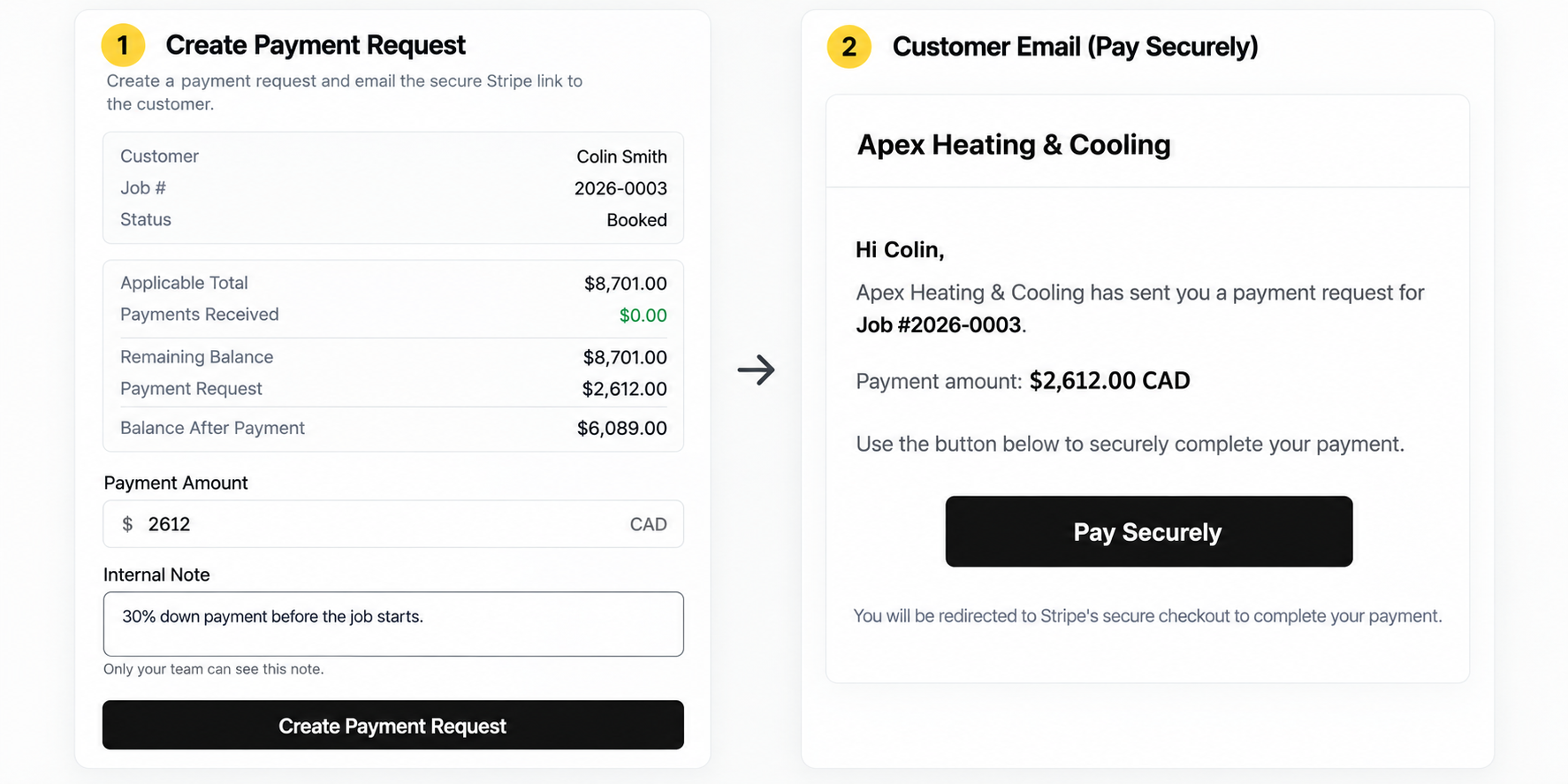
Reminders go out on their own schedule too, through automated follow-ups that nudge clients who haven’t paid without you drafting another text. Reconciliation happens in the background instead of at month end when you’re squinting at a spreadsheet trying to remember which deposit belongs to which job. If you’d rather build your quotes with deposit terms baked in from the start, the AI-powered quote generator handles that too.
Start a free trial and set up your first automated deposit workflow on the U.S. contractor scheduling platform today.