Published September 7, 2026
Keep Your Voice: Draft First Follow-Up Automation for Trades

The best way to automate customer follow-up combines three things: rule-based triggers that decide who gets contacted, templated multi-step sequences that keep the cadence consistent, and draft-first AI that writes the message but never hits send without a human checking it first. Start with email, SMS, and internal tasking for your team, since those three channels cover most of the sales and service cycle. Businesses that build this correctly see faster response times, more booked jobs, and fewer leads and quotes that quietly die in an inbox.
TL;DR:
Trigger-based automation responding within hours reduces the likelihood of leads going cold or quotes being ignored, especially when combined with multi-channel touchpoints.
Building accurate segmentation, real-time triggers, and strict pause-stop rules is essential to prevent annoyance and maintain trust in automated follow-ups.
Small businesses should start with one pilot sequence, thoroughly test it over a few weeks, and assign ownership to optimize response rates before scaling.
AI drafting is safest when used for generating initial messages, with human approval required to avoid errors that could damage customer trust.
Proper integration across CRM, email, SMS, and task management systems ensures timely responses and maintains customer data consistency for effective follow-up sequences.
Table of Contents
-
Core Components: Triggers, Channels, Segmentation, and Templates
-
Metrics and Experiments That Prove the Automation Is Working
-
ServlyPro in Practice: Automated Follow-Up for Service Businesses
What Does It Mean to Automate Customer Follow-Up?
Automating customer follow-up means building a system that watches for specific triggers, like an unanswered quote or a job that finished three days ago, and responds with the right message on the right channel without you manually remembering to do it. That’s a different animal than a scheduled email blast. A blast goes to everyone at the same time regardless of what they’ve done. A true follow-up workflow automation responds to behavior: it fires when a customer opens a quote but doesn’t approve it, when an invoice hits its due date, or when someone hasn’t booked a second job in ninety days.
The distinction matters because generic scheduling treats every customer the same. Behavioral automation treats each customer according to where they actually are in the relationship.
Service and sales businesses tend to lean on this kind of automation in a handful of recurring situations:
-
Sales leads that go cold within hours if nobody follows up fast
-
Quote approvals sitting unanswered because the customer got busy, not because they said no
-
Invoice reminders that need a nudge before a payment becomes a collections problem
-
Onboarding check-ins for new customers who need reassurance in the first week
-
Re-engagement for past customers who haven’t booked in a while
Speed matters more than most business owners assume. Automated sales follow-up works best when it spans the entire sales cycle rather than a single touch, combining trigger-based messages with task assignments so a lead never falls through a gap between a marketing email and a sales call. The same logic applies to a plumbing quote or a landscaping estimate: the business that responds first usually wins the job, and automation is what makes “first” possible without someone staring at a dashboard all day.
Core Components: Triggers, Channels, Segmentation, and Templates
Every follow-up workflow rests on four building blocks, and getting any one of them wrong is how automation turns from helpful to annoying.
Triggers fall into four categories:
-
Behavioral — a customer opens a quote, clicks a link, or ignores three emails in a row
-
Event-based — a job gets marked complete, an invoice gets generated, a warranty is about to expire
-
Time-based — 24 hours after a quote goes out, 30 days after the last service call
-
Manual — a technician flags a customer as “needs a callback” from the field
Channel rules should follow the urgency and the relationship, not habit. Email works for quotes, invoices, and anything with detail. SMS wins for time-sensitive nudges, like an appointment reminder or a quote that expires in 48 hours, since customers move between channels and a coordinated approach across email, SMS, and in-app touches outperforms isolated single-channel blasts. A phone task, assigned to a real person, is the right call whenever the deal size is large enough that a human voice changes the outcome, or when a customer has already gone quiet through two automated channels.
Segmentation data you need before you build anything: contact status (lead, active customer, past customer), the date and outcome of the last interaction, and the specific job or quote details tied to the message.
Pause and stop rules protect the relationship. Any reply should pause the sequence immediately. A “do not contact” flag or an opted-out phone number should hard-stop every channel, not just the one where the customer complained.
Pro Tip: Build your stop rule before you build your sequence. If a customer replies “not interested” and still gets message four of five two days later, you’ve lost more trust than the automation ever earned you.
Ready-to-Use Sequence Templates You Can Deploy This Week
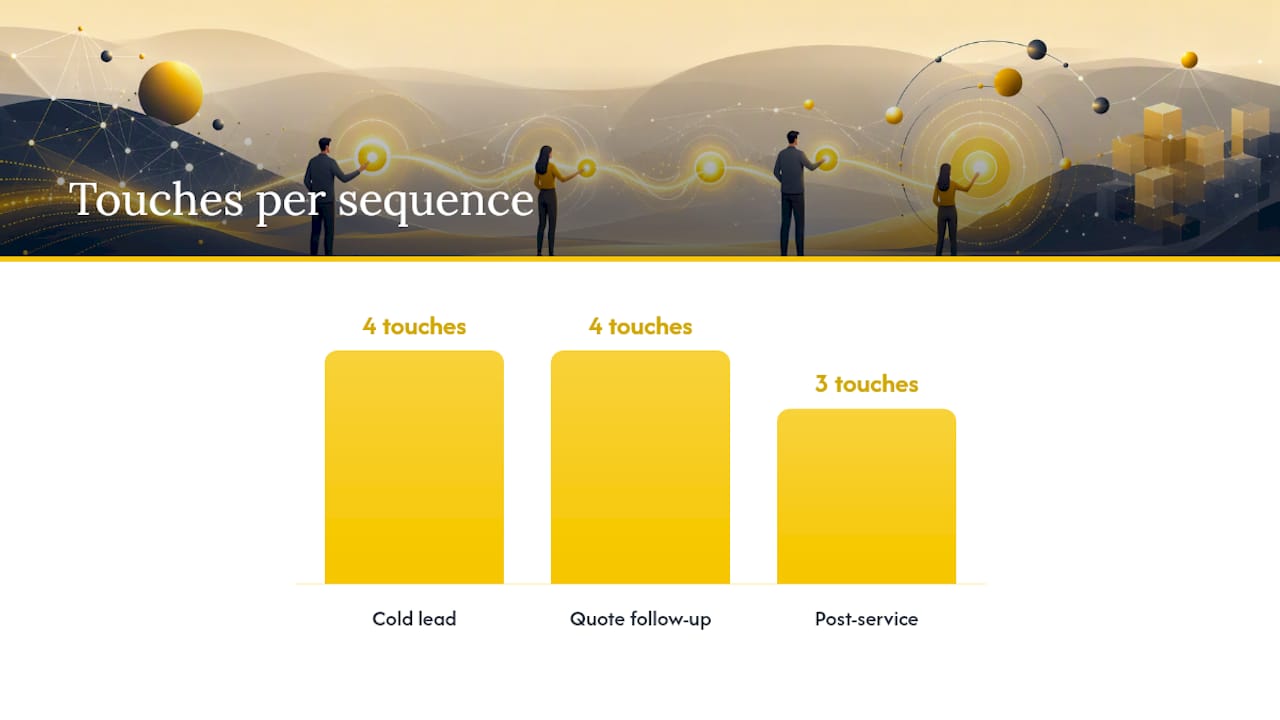
Three sequences cover the majority of what a service business needs, and each one has clear branching logic so it doesn’t run on autopilot into an annoyed customer.
1. Cold lead / speed-to-lead sequence
-
Minute 5: automated SMS confirming receipt (“Thanks for reaching out about {{service}} — we’ll follow up shortly”)
-
Hour 1: email with pricing range and next steps
-
Day 2: phone task assigned to a rep if no reply, following the general recommended timing
-
Day 5: final email, then move to a 90-day nurture list
-
Stop rule: any reply or booked appointment ends the sequence instantly
2. Quote follow-up sequence
-
Day 1: email with the quote attached and a clear approval link
-
Day 3: SMS nudge (“Any questions on your {{service}} quote? Reply here”)
-
Day 7: phone task if the quote is high-value; automated email if it’s lower value
-
Day 14: final “quote expiring” message, then archive
-
Branch: if the customer opens the quote three times but doesn’t approve, escalate to a phone task early, since that’s a high-intent signal worth a human touch
3. Post-service check-in sequence
-
Day 1 after job completion: automated “how did it go” email or SMS
-
Day 3: request for a review if no negative signal was flagged
-
Day 90: re-engagement message tied to seasonal or maintenance needs, timing adjusted to business norms
Useful variable fields across all three: {{first_name}}, {{service_type}}, {{quote_amount}}, {{technician_name}}, and {{last_service_date}}. A short template snippet like “Hi {{first_name}}, just checking in on the {{service_type}} quote we sent over” reads as personal because it references something real, not because a person typed it live. You can find ready-made copy for these exact moments in a library of quote follow-up email templates.
Which Tools and Integration Patterns Actually Work?
The right architecture depends on how many systems already hold your customer data, not on which tool has the flashiest feature list.
CRM-native sequences make sense when your CRM is already the single source of truth for contacts, jobs, and quotes. You avoid data duplication and the sequence logic lives right next to the record it’s acting on. The tradeoff is that CRM-native automation tends to be weaker at cross-channel orchestration than a dedicated engagement platform.
Customer engagement automation platforms, the category tools like Braze and Intercom occupy, matter most once you’re coordinating messages across more than two channels and need unified customer profiles driving personalization at scale. That level of orchestration is often overkill for a ten-person service business but becomes valuable once you’re managing thousands of active contacts across email, SMS, and in-app messaging simultaneously.
Lightweight workflow stacks are the fastest way to prove a concept. Pairing a no-code automation tool like n8n with Gmail or a spreadsheet lets a small team build a working draft-first flow in a few hours rather than weeks.
Whatever stack you choose, four integration concerns will bite you if ignored:
-
Real-time event triggers, not nightly batch syncs, or your “fast” follow-up arrives a day late
-
Identity resolution across email, phone, and account records so the same customer isn’t treated as three strangers
-
Deliverability monitoring, since a sequence that lands in spam is worse than no sequence at all
-
Opt-out syncing across every channel, so a stop in one place stops everywhere
A CRM built for service businesses solves a lot of the identity-resolution problem by keeping contact status, job history, and quote details in one record from the start.
AI Drafting and the Human-in-the-Loop Pattern
The safest architecture separates two jobs that most people mash together: deciding who needs a message, and writing what the message says. Rules should own the first job. AI should only ever own the second. In a draft-first setup, a trigger fires, AI drafts a personalized message referencing the actual quote or job, and that draft sits waiting for a person to approve, edit, or discard it before it goes anywhere.
This matters because AI drafting a message and AI sending a message carry very different risks. A draft with a wrong price or an awkward tone costs you thirty seconds of editing. That same error sent automatically costs you a customer’s trust.
A handful of controls keep this pattern from breaking down in practice:
-
Give the AI a tight system prompt and access to the actual customer notes and job history, not a generic “write a follow-up email” instruction
-
Cap the number of automated attempts per sequence, typically three to five, before it routes to a human
-
Log every draft, edit, and send for an audit trail you can review monthly
-
Flag consent status clearly so the AI never drafts a message to someone who opted out
Pro Tip: Reserve fully automatic sending for low-stakes, high-volume messages like appointment reminders. Anything involving price, a complaint, or a first-time customer should pass through a human for at least the first ninety days of any new sequence.
Launch Checklist: How to Ship Your First Automation
Getting a follow-up sequence live doesn’t require a big-bang rollout. It requires a tight pilot and a willingness to fix what’s broken before scaling it.
-
Audit your data — confirm you have clean fields for contact status, last interaction date, and job or quote details before building anything on top of them
-
Pick one pilot sequence — quote follow-up or speed-to-lead usually delivers the fastest visible return, since both sit directly on top of revenue you’re already close to capturing
-
Build the workflow — map every trigger, channel, and stop rule before writing a single line of message copy
-
Test with real contacts — run it against 20 to 30 live conversations before opening it up to your full list, and check deliverability on every channel
-
A/B test one variable at a time — subject line, timing, or channel order, never all three at once
-
Roll out in stages — pilot for two to four weeks, optimize based on what actually happened, then scale to additional sequences with the same review discipline
This mirrors the seven-step approach recommended for automated sales follow-up: audit, build, test, then scale, with orchestration across every channel you’re using along the way. Businesses that skip the testing step almost always discover their mistake in the form of an angry customer reply, which is a far more expensive way to learn.
Metrics and Experiments That Prove the Automation Is Working
Three primary KPIs tell you whether a sequence is pulling its weight: reply rate, meetings or bookings generated per sequence, and time-to-first-reply. If time-to-first-reply drops from six hours to twelve minutes after you launch a speed-to-lead sequence, that’s the clearest signal you have that the automation is doing its job.
Secondary metrics matter just as much for long-term health: deliverability rate, unsubscribe or opt-out rate, and revenue per sequence once you can trace a booked job back to a specific automated touch. Dashboards that combine engagement metrics with revenue outcomes let you prioritize which sequences deserve more investment and which ones need a rewrite.
Worthwhile experiments to run once a sequence has a few weeks of data:
-
Shift cadence timing by a day and compare reply rates
-
Swap the channel order (SMS first vs. email first) for the same trigger
-
Test two subject line styles against each other
-
Vary personalization depth: a generic template versus one referencing the specific job or quote amount
ServlyPro in Practice: Automated Follow-Up for Service Businesses
ServlyPro builds these exact patterns directly into its platform rather than requiring you to stitch four tools together. Quote and invoice follow-up automation fires the moment a quote sits unanswered or an invoice ages past its due date, using the same trigger logic described above. The built-in customer CRM keeps contact status, job history, and quote details in one place, which solves the segmentation problem before you ever build a sequence.
Businesses report meaningful gains from closing this exact gap. The relevant pieces line up with the playbook throughout this article:
-
Quote follow-ups that fire automatically the day approval stalls
-
Invoice reminders that reduce the manual chasing owners used to do themselves
-
A pilot-first setup where one sequence goes live, gets reviewed, then scales
-
Reporting that ties follow-up activity back to booked revenue
Templates for these exact moments are available in ServlyPro’s service follow-up email library.
Start Small, Protect Your Voice, Then Scale
The businesses that get the most out of follow-up automation don’t launch five sequences at once. They pick one, assign a single owner who checks every draft for the first stretch, and only expand once the numbers back it up.
Give someone on your team explicit ownership of the pilot sequence. Without an owner, nobody notices when a template starts sounding stale or a stop rule stops working. Keep human review in place for the first 30 to 90 days no matter how good the AI drafts look on day one; the mistakes that matter usually show up in week six, not week one. Then rewrite your templates using the actual replies and objections real customers send back. That feedback loop is worth more than any amount of upfront planning.
— ServlyPro
Automate the Follow-Ups That Are Costing You Jobs Right Now
Every unanswered quote and every invoice that goes quiet is revenue sitting in limbo, and missed follow-ups cost more than most business owners realize once you add up the jobs that simply never got a second touch. ServlyPro was built specifically for trades businesses that need quote follow-ups, invoice reminders, and customer records working together instead of scattered across a CRM, a spreadsheet, and a phone’s text app.
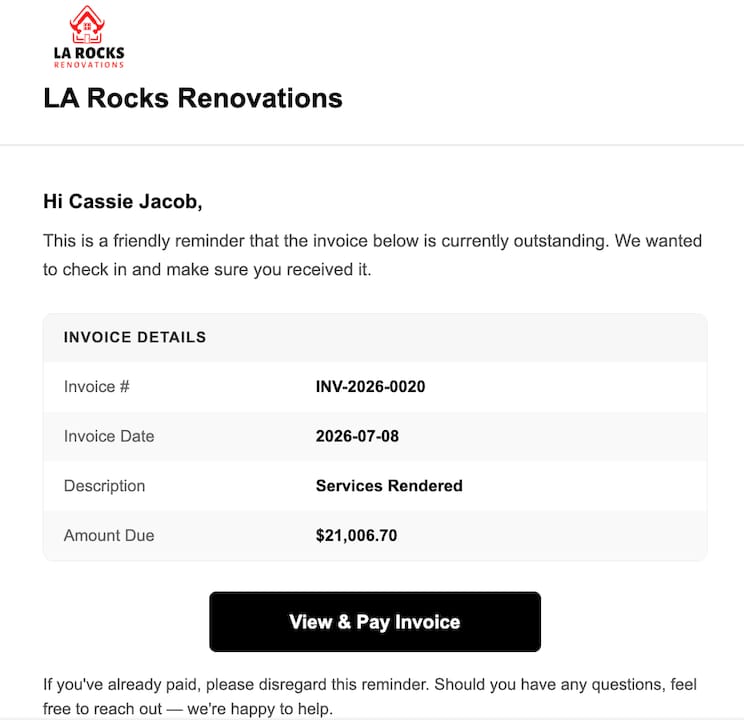
Some platforms offer quote and invoice follow-up automation that applies this trigger-and-cadence logic alongside job scheduling and AI-assisted quoting, so teams aren’t managing a separate tool just for follow-up. If you’re running a plumbing, HVAC, cleaning, or landscaping business and quotes are going stale in your inbox, start a 7-day trial and turn on your first quote follow-up sequence at Getservlypro.
Sources
For deeper technical grounding, Twilio’s overview of customer engagement automation covers CDP-driven orchestration, while Intercom’s guide details onboarding and reactivation examples. monday.com’s sales follow-up guide offers a step-by-step build process, and ExpressPlanner’s late-payment guidance is worth reading for invoicing-specific sequences.