Published August 12, 2026
Quote Follow-Up Email Templates for Service Businesses

After you send a quote, the single most effective move is a short receipt-check email sent 48–72 hours later with the quote attached and one direct question. According to Zendesk, the first follow-up should arrive within 24 hours for verbal proposals and within 48–72 hours for emailed quotes. Keep it brief, reattach the document, and ask only one thing. That combination removes friction, confirms the client has what they need, and gives them an easy reason to reply.
Template A — Emailed quote follow-up:
Subject: Re: Your Quote from [Your Business Name]
Hi [Client Name], just checking you received the quote I sent on [date]. I’ve attached it again below. Do you have any questions, or are you ready to move forward?
[Your Name] | [Phone Number]
Template B — Verbal or hand-delivered estimate:
Subject: Your Estimate from [Your Business Name] — Quick Check-In
Hi [Client Name], following up on the estimate we discussed on [date]. I’ve put the details in writing and attached them here. Does the scope and price look right to you?
[Your Name] | [Phone Number]
Both messages work because they confirm receipt, reattach the quote to remove any “I can’t find it” barrier, and end with a single yes/no question. A client who just needs a nudge can reply in one word.
Key Takeaways
Consistent, well-timed follow-ups are the single most reliable way to convert sent quotes into booked jobs, and the difference between winning and losing often comes down to one well-placed message.
| Point | Details |
|---|---|
| Send the first follow-up fast | Email within 48–72 hours of sending a quote; verbal proposals warrant a follow-up within 24 hours. |
| Run 3–5 touches over 14 days | Space touches at Day 2–3, Day 5–7, Day 7–10, and Day 10–14, each with a distinct goal. |
| One CTA per message | A single yes/no question or scheduling ask gets more replies than a multi-part ask. |
| Scope-down instead of discounting | Offer a reduced-scope first phase when price is the objection — it protects margin and builds trust. |
| ServlyPro automates the cadence | ServlyPro’s quote follow-up automation triggers the full sequence from the moment a quote is sent. |
Table of Contents
-
What are the best quote follow-up email templates by scenario?
-
Scripts for plumbing, HVAC, cleaning, landscaping, and roofing
-
ServlyPro turns your quotes into confirmed jobs automatically
What are the best quote follow-up email templates by scenario?
Not every follow-up serves the same purpose. HubSpot’s research on follow-up sequences confirms that organizing touches by use case and trigger, rather than sending the same message repeatedly, increases reply rates and keeps the conversation moving. Each template below has a distinct goal, a subject line, and a single CTA.
1. Receipt confirmation (Day 2–3)
Subject: Re: Your Quote from [Business Name]
Hi [Client Name], I wanted to make sure the quote I sent on [date] came through clearly. I’ve reattached it here. Everything in the scope covers [one-line summary, e.g., “full HVAC replacement for the main floor”]. Does this look right, or do you have questions before deciding?
Personalization prompt: Reference the specific job address or the site visit date.
2. Value-add follow-up (Day 4–7)
Subject: One thing I forgot to mention about your [service] quote
Hi [Client Name], I wanted to add a quick note to the quote I sent. Happy to walk you through it on a quick call if that helps. Would [day] or [day] work for you?
Personalization prompt: Tie the added detail to something the client mentioned during the site visit.
3. Budget pre-empt (Day 5–7)
Subject: Flexible options on your [service] estimate
Hi [Client Name], if the price on the quote gave you pause, I have a couple of options that might work better for your budget. I can adjust the scope or phase the work differently. Would it help to talk through what’s most important to you?
Personalization prompt: Mention the specific line item most likely to cause sticker shock (materials, labor rate, permit fees).
4. Timeline nudge (Day 7–10)
Subject: Scheduling update for [Client Name]'s project
Hi [Client Name], I’m booking [month] jobs now and wanted to give you first pick of available dates before the calendar fills. The quote I sent on [date] is still valid until [expiration date]. Want me to hold a slot for you?
Personalization prompt: Name the specific week or date range you have open.
5. Social proof / case study (Day 7–10)
Subject: A quick example from a similar job
Hi [Client Name], I recently finished a [similar project type] for a client in [nearby area] and thought you might find it useful. [One sentence describing the outcome.] Happy to share photos or a reference if that would help you feel confident moving forward.
Personalization prompt: Match the trade, project size, or neighborhood to the client’s situation.
6. Scheduling frame (Day 8–11)
Subject: Can we find 10 minutes this week?
Hi [Client Name], I’d love to answer any questions about the quote before you decide. I have [two specific time slots] open this week. Does either work, or would you prefer I call you at a time that suits you?
Personalization prompt: Offer times that reflect your actual availability to keep the conversation real.
7. Quote expiration reminder (Day 10–13)
Subject: Your quote expires [date] — quick heads-up
Hi [Client Name], the pricing on your quote is valid until [date]. After that, material costs may change. If you’d like to lock in this price, just reply here or call me at [phone number].
Personalization prompt: Only send this if your quote genuinely has an expiration date — never fabricate urgency.
8. Scope-down option (Day 10–14)
Subject: A smaller starting point for [Client Name]
Hi [Client Name], if the full project isn’t the right fit right now, I can put together a reduced-scope option that handles the most urgent part first. Would that be worth a quick conversation?
Personalization prompt: Identify the highest-priority item in the original quote and lead with that.
9. Final break-up email (Day 14+)
Subject: Closing out your quote — no pressure
Hi [Client Name], I haven’t heard back and I don’t want to keep filling your inbox. I’ll close out this quote on my end, but if the timing changes or you have questions later, I’m always happy to reconnect. Best of luck with the project.
Personalization prompt: Keep this one warm and brief. No guilt, no pressure.
Pro Tip: To reuse any template without sounding like a template, swap two tokens every time: the specific job detail (e.g., “the 3-ton Carrier unit we discussed”) and a time reference tied to your actual schedule (“I’m booking the week of [date]”). Those two swaps make a canned message read like a personal note.
When should you send each follow-up after a quote?
Prospeo’s analysis of quote follow-up cadences recommends 3–5 touches over 14 days, with each message adding new value rather than repeating the same ask. After that active window, move to long-term nurture rather than continued chasing.
| Touch | Day Range | Channel | Primary Goal |
|---|---|---|---|
| 1 | Day 2–3 | Confirm receipt, reattach quote | |
| 2 | Day 5–7 | Email or SMS | Add value, pre-empt budget objection |
| 3 | Day 7–10 | Phone or email | Clarify scope, offer scheduling |
| 4 | Day 10–14 | Soft close, expiration reminder | |
| 5 | Day 14+ | Break-up / long-term nurture trigger |
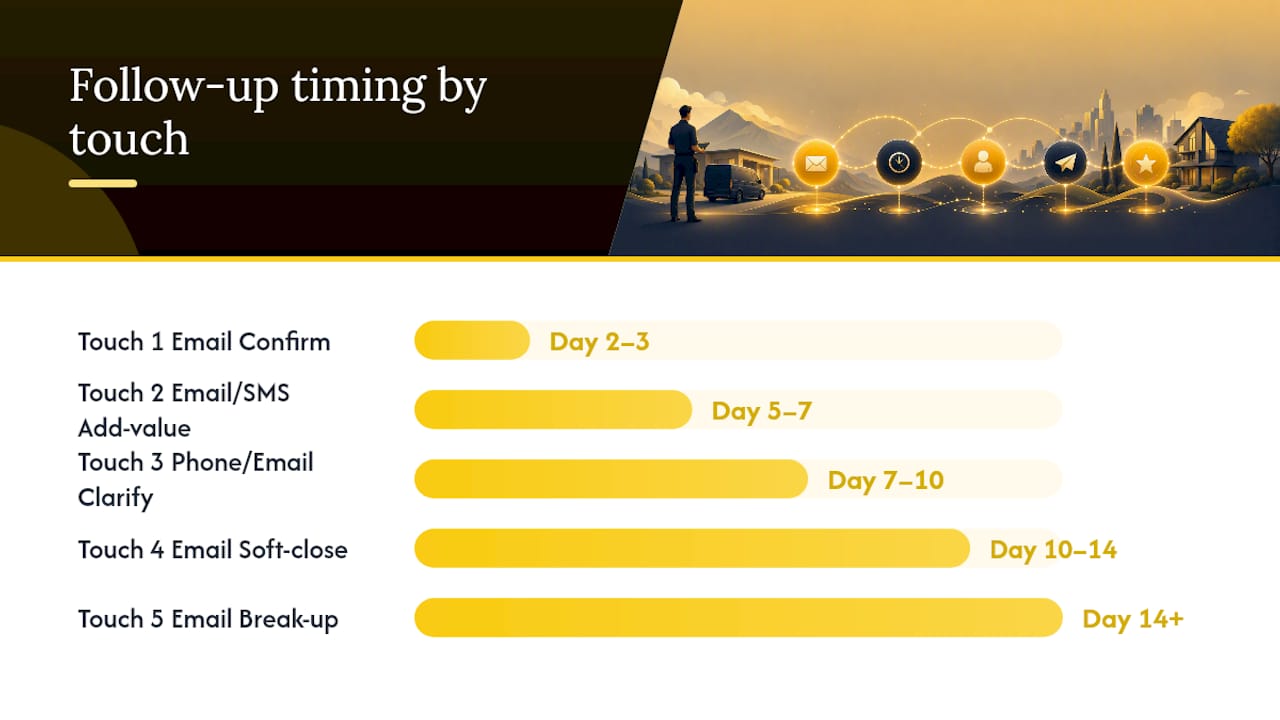
QuoteTier’s follow-up framework reinforces the value of mixing channels: an early email to confirm receipt, a mid-sequence phone call for clarification, and a break-up email if no response arrives after two weeks.
Channel guidance by touch:
-
Email works best for Touches 1, 2, and 4 because it’s low-pressure, easy to reference, and keeps the quote attached.
-
SMS is effective for Touch 2 or 3 if you have written consent. Open rates for SMS tend to run higher than email, making it a strong check-in channel for short messages like “Did you get a chance to look at the quote I sent?”
-
Phone or voicemail fits Touch 3 best, roughly one week in, when email and SMS have shown engagement but no reply. Keep voicemails under 30 seconds and reference the quote by job address or service type.
After Day 21 with no response, stop active follow-up and move the contact to a monthly nurture list. A quarterly check-in email (“We’re booking spring jobs — want me to resend your estimate?”) keeps the door open without burning the relationship.
How do you write a polite, effective quote follow-up?
The structure of a strong follow-up email is simple: open with the answer (confirm the quote exists and is attached), add one helpful sentence, and close with one micro-CTA. Three to four sentences is the right length for most service business follow-ups. Longer messages get skimmed or ignored.
Tone to aim for: helpful and direct, not apologetic or aggressive. Avoid phrases like “I just wanted to check in” (weak and filler-heavy) or “I need to hear back from you by Friday” (pressure-heavy). Replace them with “I wanted to make sure you have everything you need” and “Whenever you’re ready, I’m here.”
Four high-conversion CTAs for quote follow-ups:
-
Yes/no question: “Does this scope look right to you?” — lets the client reply in one word.
-
Pick a time: “Would Tuesday or Thursday work for a quick call?” — removes the scheduling back-and-forth.
-
Single clarifying question: “Is there a part of the quote you’d like me to break down further?” — surfaces objections early.
-
Scope choice: “Would you prefer to start with [Phase 1] and add the rest later?” — gives the client control without discounting.
HubSpot’s follow-up research shows that a single goal and a single question per message increases the chance of a one-word reply that moves the sale forward. Two questions in one email split the client’s attention and often result in no answer at all.
Short example (small repair job):
Hi Maria, just making sure the quote for the water heater replacement came through. I’ve reattached it here. Ready to schedule, or do you have questions first?
Higher-value project version:
Hi David, following up on the full HVAC replacement quote I sent on March 14. I’ve reattached the detailed breakdown. If the equipment specs or the phased payment option raised any questions, I’m happy to walk through them on a quick call this week.
The difference is one extra sentence that acknowledges the complexity of a larger job. The CTA stays singular.
Subject lines that get your quote follow-up opened
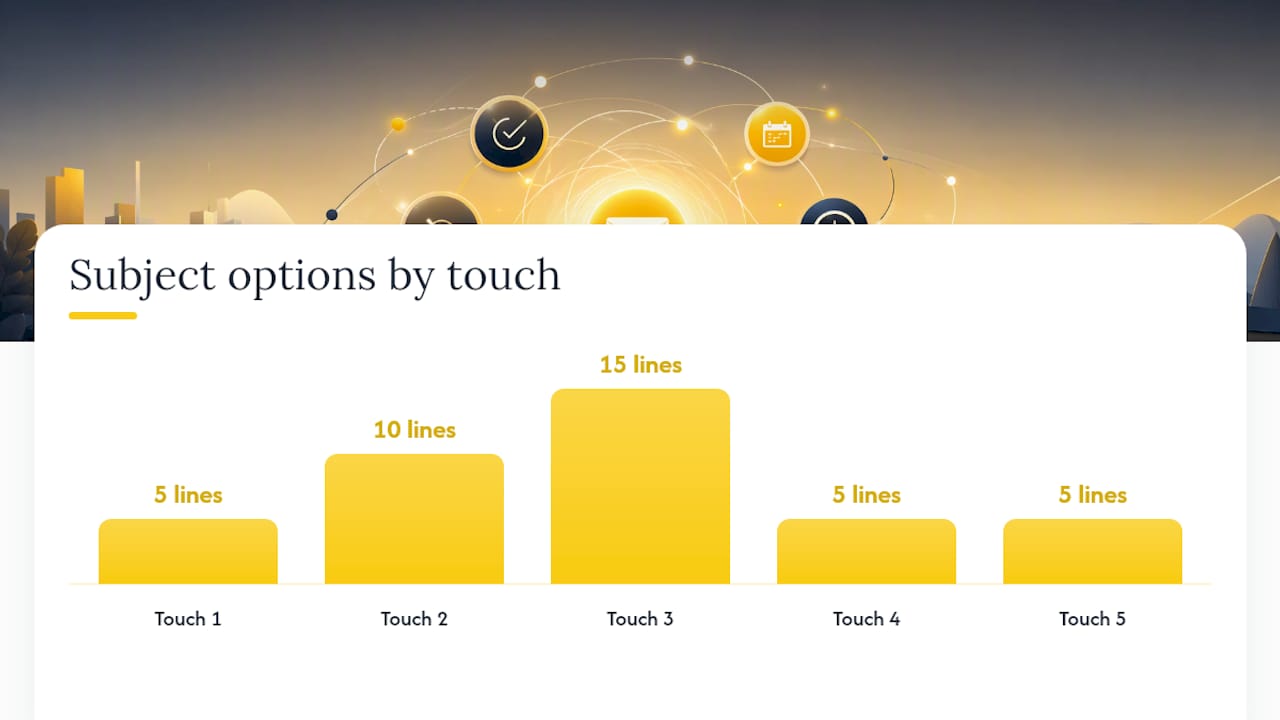
Subject lines under roughly 41 characters tend to perform better on mobile, where most clients read email first. Writemail recommends referencing the original quote or project in the subject, threading with “Re:” to improve open rates, and avoiding urgency language that reads as pressure.
Receipt-check subjects (use on Touch 1):
-
Re: Your quote from [Business Name]
-
Quick check — did my quote come through?
-
[Client Name] — your estimate is attached
-
Following up on your [service] quote
-
Re: [Job address] estimate
Question-based subjects (use on Touch 2–3):
-
Any questions about your quote?
-
One thing worth knowing about your estimate
-
Did the [service] quote answer everything?
-
Quick question about your [service] project
-
Something I wanted to add to your quote
Value-add subjects (use on Touch 2–3):
-
A note on your [service] options
-
Flexible pricing for your [project type]
-
One more option for your [service] estimate
-
Warranty info I forgot to include
-
Your [service] quote + a scheduling update
Timeline and expiration subjects (use on Touch 3–4):
-
Booking [month] now — want to hold a spot?
-
Your quote is valid until [date]
-
[Month] schedule is filling up
-
Last chance to lock in this price
-
Holding a slot for [Client Name]'s project
Break-up subjects (use on Touch 5):
-
Closing out your quote — no hard feelings
-
Should I close this out?
-
No pressure — just checking one last time
-
Wrapping up your [service] estimate
-
Still interested? (No worries if not)
Two quick A/B testing rules:
-
Threading vs. fresh subject: Threading with “Re:” works well for Touches 1–3 because it signals continuity. For Touch 4 or 5, a fresh subject line can re-engage a client who stopped opening the thread.
-
Urgency phrasing: Phrases like “URGENT” or “Final notice” lower trust in service business contexts. A factual deadline (“quote valid until March 31”) outperforms manufactured urgency every time.
Use-case tags for quick selection:
-
Small repair: Receipt-check and question-based subjects
-
Large project: Value-add and timeline subjects
-
Residential: Conversational, first-name subjects
-
Commercial: More formal, project-reference subjects
Scripts for plumbing, HVAC, cleaning, landscaping, and roofing
Trade-specific language signals that you understand the client’s situation. A generic follow-up reads like a form letter. These scripts include personalization tokens in brackets.
Plumbing
Hi [Client Name], following up on the quote for [job type, e.g., “main line replacement at [address]”]. Plumbing issues tend to get worse with time, so I wanted to make sure you had everything you need to decide. If the permit cost or the timeline raised any questions, I’m happy to clarify. Ready to schedule, or would a quick call help?
Personalization tokens: job address, permit line item, urgency of the issue (active leak vs. preventive work).
Common objection: “It’s more than I expected.” Reply: “I can break the work into two visits — the most urgent part first — and quote the second phase separately.”
HVAC
Hi [Client Name], just checking in on the [equipment type, e.g., “Carrier 3-ton system”] quote I sent on [date]. With [season] coming up, booking slots are filling quickly. The quote includes [warranty or efficiency detail]. Want me to hold a start date for you?
Personalization tokens: equipment brand/size, season, efficiency rating, financing option if available.
Common objection: “I’m getting another quote.” Reply: “Completely fair — if it helps, I’m happy to walk you through exactly what’s included so you can compare apples to apples.”
For HVAC businesses managing multiple quotes at once, accurate estimates that reduce price pushback start with detailed line items that clients can actually read.
Electrical
Hi [Client Name], following up on the electrical quote for [job description, e.g., “panel upgrade at [address]”]. All work is performed to current NEC code and includes a permit and inspection. If the permit timeline or the scope of the panel work raised questions, I’m glad to explain. Does the quote cover what you had in mind?
Personalization tokens: permit reference, NEC code version, panel amperage, inspection timeline.
Common objection: “Can you do it without the permit?” Reply: “Unpermitted electrical work creates liability for you as the homeowner and can affect your insurance — I include the permit to protect you.”
Landscaping
Hi [Client Name], following up on the quote for [project type, e.g., “spring cleanup and mulching at [address]”]. I have crews available starting [date range] and wanted to give you first pick before the schedule fills. The quote covers [brief scope summary]. Want to lock in a date?
Personalization tokens: project type, start date window, specific materials (mulch type, plant species), crew size.
Common objection: “I want to wait until the weather is more settled.” Reply: “That’s reasonable — I can hold your spot for two more weeks and confirm closer to the date.”
Cleaning
Hi [Client Name], following up on the cleaning quote for [property type/address]. The quote includes [frequency, scope, e.g., “weekly service covering all common areas”]. If you’d like to adjust the frequency or add any rooms, I can update the price quickly. Ready to set a start date?
Personalization tokens: property type, service frequency, specific rooms or areas, any green-product preference mentioned.
Common objection: “We had a bad experience with a previous cleaner.” Reply: “I understand — I’d suggest starting with a trial clean so you can see the standard before committing to a regular schedule.”
Roofing
Hi [Client Name], following up on the roofing quote for [address]. The estimate covers [scope, e.g., “full shingle replacement with ice-and-water shield on the north slope”]. Roofing windows are weather-dependent, so I wanted to check whether you’d like to get on the schedule before [month]. Any questions about materials or the warranty?
Personalization tokens: shingle brand/grade, warranty length, ice-and-water shield detail, weather window.
Common objection: “Your price is higher than the other quote I got.” Reply: “Happy to compare line by line — the difference is usually in the underlayment spec or the warranty terms, and I can show you exactly where.”
How does automation improve your quote follow-up results?
Manual follow-ups get skipped. A technician finishes a job, sends a quote, and then the next call comes in. Three days later, the follow-up still hasn’t gone out. ServlyPro’s analysis of missed follow-up costs shows that unanswered estimates represent direct revenue loss, and that automating the follow-up sequence is one of the fastest ways to recover it.
What automation does for your follow-up cadence:
-
Sends Touch 1 automatically the moment a quote is marked “sent” in your system
-
Applies the right template based on quote value, trade type, or client tag
-
Escalates to SMS or flags for a manual phone call if email goes unread after a set number of days
-
Tags the quote in your CRM so your sales owner knows exactly where each job stands
What should stay manual: Touch 3 (the mid-sequence phone call) and any message that references a specific conversation detail the system doesn’t have. Automation handles the cadence; your team handles the nuance.
Basic automated sequence using ServlyPro’s quote follow-up automation:
-
Trigger: Quote status changes to “Sent”
-
Day 2: System sends Template A (receipt confirmation) with quote attached
-
Day 5: System sends Template 2 (value-add) based on quote category
-
Day 7: If no open/reply detected, system sends SMS check-in (requires consent)
-
Day 10: System sends expiration reminder with quote link
-
Day 14: System flags quote for manual review or sends break-up email
-
Post-sequence: Contact moves to monthly nurture list automatically
ServlyPro features mapped to follow-up problems:
-
AI quote generator: produces accurate, detailed quotes faster so follow-ups start sooner
-
Quote follow-up automation: triggers the sequence the moment a quote is sent
-
Quote approvals: sends clients a one-click approval link that eliminates the back-and-forth
-
Schedule nudges: prompts clients to book once they approve, converting approvals into confirmed jobs
Pre-send checklist: what to confirm before you hit send
A follow-up that references the wrong price, a broken attachment link, or the wrong client name does more damage than no follow-up at all. Run through this list before every send.
Attachment and quote details:
-
Quote is attached or a direct link to the quote is included
-
Price matches the most recent version (not a draft with outdated figures)
-
Expiration date is visible and accurate
-
Scope summary matches what was discussed on-site
Contact and project details:
-
Client’s name is spelled correctly in the greeting
-
Project address or job reference matches the quote
-
Your phone number and business name appear in the signature
-
If scheduling, your available dates are real and current
CTA check:
-
One clear question or action only — not two
-
If asking to schedule, include specific time options
-
Reply-to address is monitored (not a no-reply inbox)
Compliance basics:
-
Your business name and physical address appear in the email footer (required under CAN-SPAM)
-
An opt-out mechanism is present for marketing emails (transactional quote follow-ups have more flexibility, but including one is best practice)
-
For SMS follow-ups: you have written or documented consent from the client before texting. The Telephone Consumer Protection Act (TCPA) requires prior express consent for marketing texts; a signed service agreement or a consent checkbox at booking satisfies this requirement in most states
-
Never send to a contact who has previously opted out
The follow-up approach that actually closes service jobs
Most service business owners underestimate how much a consistent follow-up cadence matters, not because clients are ignoring them, but because life gets in the way. A homeowner gets your quote on a Tuesday, intends to reply, and then forgets. Your follow-up on Day 3 isn’t annoying. It’s the reminder they needed.
The pattern that works most reliably in field service quoting isn’t discounting. It’s offering a scope-down option. When a client hesitates on price, the instinct is to cut the rate. The better move is to identify the most urgent part of the job and offer to start there. A client who says yes to a smaller first phase almost always books the rest within 60 days. That approach protects your margin and builds trust at the same time.
Follow-up language should also reflect your contract value. A $300 drain cleaning and a $15,000 HVAC replacement warrant different tones, different levels of detail, and different cadences. The templates in this guide are designed to scale: keep the short ones short for small jobs, and add one or two sentences of context for larger projects where the client needs more reassurance before committing.
The break-up email is the most underused tool in service business follow-up. Sending it after multiple unanswered touches removes pressure, signals professionalism, and, counterintuitively, often triggers a reply. Clients who were genuinely busy, not uninterested, tend to respond when they feel the door is about to close without drama.
ServlyPro turns your quotes into confirmed jobs automatically
Sending a quote is the easy part. The revenue lives in what happens next, and most service businesses lose jobs not because their price was wrong but because the follow-up never went out.
ServlyPro’s field service management software for U.S. contractors connects your quoting and follow-up in one place. When you send a quote, the platform triggers a follow-up sequence automatically: receipt confirmation on Day 2, a value-add message on Day 5, an expiration nudge on Day 10, and a break-up email if the client goes quiet. Your team gets a flag when a manual call is needed. Nothing falls through.
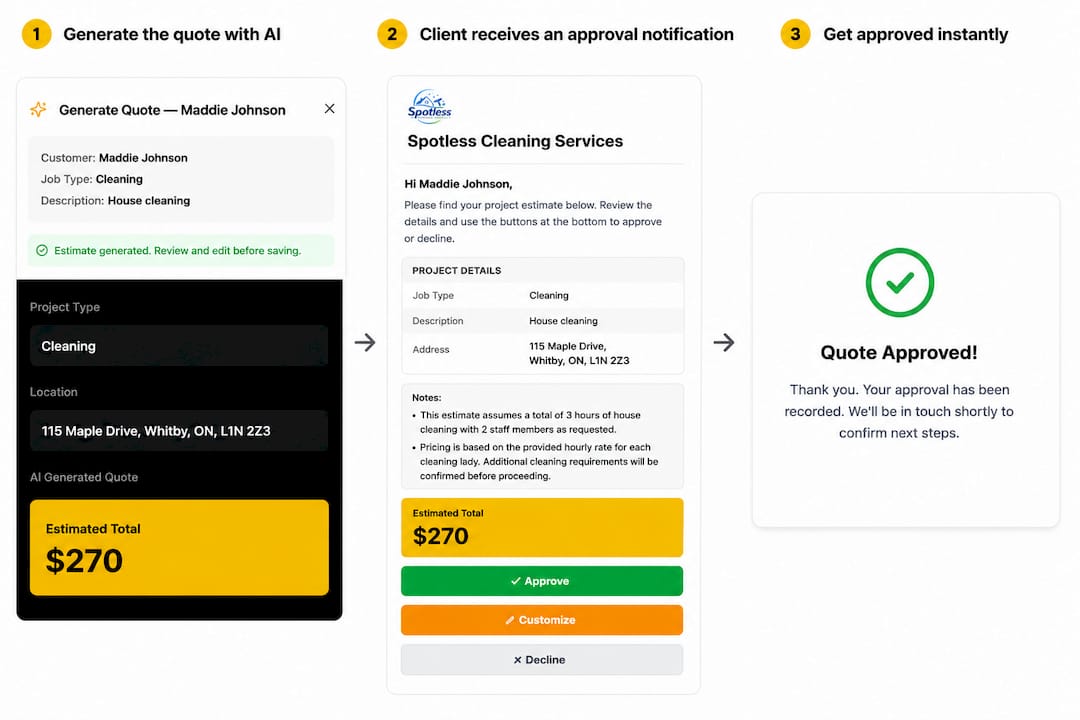
The AI quote generator builds accurate, detailed estimates in minutes, which means your follow-up sequence starts sooner and your clients get a professional document they can actually read. Quote approvals let clients sign off with one click, and schedule nudges convert approvals into booked jobs without a phone tag loop.
Book a demo to see how the follow-up automation works with your trade and quote volume.
Sources
-
18 best sales follow-up email examples + templates — Zendesk
-
How to Follow Up on a Quote: Templates and Timing — QuoteTier