Published September 13, 2026
Managers’ 4-Step HVAC Dispatching Playbook to Cut Response Time Fast
The fastest gains in HVAC dispatching come from four changes: standardized intake, skill-based routing, real-time visibility, and disciplined KPI tracking. Businesses that adopt these together typically see faster response times, higher first-time fix rates, and fewer wasted truck rolls within a few weeks. The rest is refinement.
TL;DR:
Matching technicians by skill and certification before routing improves first-time fix rates and prevents misallocation of resources.
Implementing standardized intake forms, daily dispatch huddles, and real-time check-ins reduces missed details and appointment no-shows.
Automated ETA notifications and parts logging on-site cut response times and invoicing delays, increasing operational efficiency.
Regular review and gradual adjustment of dispatch rules ensure the system adapts to staffing changes and seasonal demand shifts effectively.
Using dispatch software with features like automatic route optimization, skill-based matching, and in-field communication accelerates response times and service quality.
Table of Contents
-
1. Actionable HVAC Dispatching Tips for Day 1 Through Day 90
-
2. How Do You Build a Repeatable Dispatcher Training Program?
-
3. What Belongs on a Standardized Intake and Triage Checklist?
-
5. What Check-Ins and Customer Updates Actually Reduce No-Shows?
-
9. How Should You Handle Emergency and After-Hours Dispatching?
1. Actionable HVAC Dispatching Tips for Day 1 Through Day 90
You don’t need a full software overhaul to see movement in your numbers. Most of these technician dispatching tips can start this week, with the heavier operational shifts landing by day 90.
-
Run dispatcher ride-alongs in week one. Put your dispatcher in the truck for a full day so they understand what a “quick fix” actually looks like on-site, not just on paper.
-
Start daily dispatch huddles. A 10-minute morning check-in with a simple escalation script (“if a job runs 45 minutes over, call the dispatcher immediately”) prevents afternoon chaos.
-
Build a standardized intake form. Mandatory fields should include equipment age, symptom description, access instructions, and whether the customer has had prior service calls.
-
Tag technicians by skill and certification. Match EPA 608 certification, refrigerant-handling experience, or commercial rooftop unit training to job types before assigning anyone.
-
Optimize routes by geographic block with advanced field service scheduling software. Group calls by zone and front-load priority or no-cool emergency jobs earlier in the shift.
-
Automate ETA alerts. Customers who get a text 30 minutes before arrival cancel and reschedule less often.
-
Enable field payment capture and parts logging. Techs closing out jobs on-site with recorded parts usage cuts invoicing delays dramatically.
-
Enforce three check-ins per job: arrival, start of work, and completion. This alone catches scheduling drift before it snowballs into a missed afternoon appointment.
Pro Tip: Assign one person to own the escalation script and update it monthly. A script that’s never revised becomes noise your team learns to ignore.
By day 90, you should have a working intake form, a routing rule set, and a dispatcher who’s ridden along with several different technicians across residential and commercial routes to gain experience.
2. How Do You Build a Repeatable Dispatcher Training Program?
Good dispatchers aren’t born knowing HVAC terminology or which tech handles a failing capacitor versus a failing compressor. A structured program closes that gap fast.
-
Core skills to train: reading intake forms for red flags, matching skill tags to job types, running role-play scenarios for angry-customer calls and no-access situations.
-
Shadowing cadence: one full week of desk shadowing, followed by two ride-alongs in week two, per BDR Co.'s dispatcher training framework.
-
30/60/90 milestones: week one is shadowing, week two is supervised ride-alongs, week three is supervised solo dispatching, month two introduces QA scorecards, and month three brings full certification for independent duty.
-
Promotion or retraining triggers: a dispatcher who hits 90% or better on QA scorecards for two consecutive months is ready for more complex routing decisions; one who consistently misjudges urgency needs another round of ride-alongs before taking solo shifts.
Ride-alongs and structured scripts consistently close the gap between what dispatchers assume and what techs actually face on-site, according to recent HVAC dispatcher training guidance.
3. What Belongs on a Standardized Intake and Triage Checklist?
Every missed detail on an intake call turns into a second truck roll. NetSuite’s dispatch research points to mandatory intake fields and urgency categorization as two of the biggest error-reduction levers available.
-
Mandatory fields: customer name and address, equipment make/model/age, symptom description, access notes (locked gate, dog on property, tenant vs. owner), and prior service history.
-
Three-tier triage: emergency (no heat/no cool in extreme weather, gas smell) gets a 1 to 2 hour response window; urgent (partial system failure) gets same-day; routine (maintenance, minor noise) gets 24 to 72 hours.
-
Upfront surfacing scripts: ask directly about parts availability concerns, permit requirements for commercial jobs, and access restrictions before the tech is ever dispatched.
4. Should You Route by Proximity or by Skill Match?
Proximity alone is the laziest routing rule you can run, and it shows up in your first-time fix rate. BuildOps’ field service dispatching guide recommends matching technicians by certification and specialty first, then optimizing for distance within that pool.
-
Skill and certification matching: send your commercial refrigeration specialist to the rooftop unit call, even if a closer generalist tech is available for a simpler job.
-
Front-load and buffer: schedule your highest-priority calls in the morning and leave 30 to 45 minute buffers at the end of each tech’s day to absorb overruns.
-
Override rules: let dispatchers override automated routing manually when a customer specifically requests a returning tech or when a job’s complexity exceeds what the algorithm flagged.
5. What Check-Ins and Customer Updates Actually Reduce No-Shows?
Confusion, not bad service, causes most dispatch complaints. Clear check-in discipline fixes that.
-
Required tech check-ins: arrival at the job site, start of diagnostic or repair work, and job completion, all verified through the dispatch platform rather than a phone call.
-
Customer-facing updates: an ETA text when the tech is dispatched, a delay notice if the previous job runs long, and a completion summary with next steps.
-
Escalation paths: if a tech hasn’t checked in within 15 minutes of an expected milestone, the dispatcher calls directly; if a job runs more than an hour over estimate, the dispatcher notifies the next customer automatically.
Pro Tip: Give dispatchers a pre-written delay text template. Typing an apology from scratch under pressure wastes time and often sounds worse than a calm, pre-approved message.
Mandatory check-ins and real-time dashboards are what keep small delays from becoming missed appointments, according to BuildOps.
6. Which KPIs Should Actually Drive Dispatch Decisions?
Tracking metrics for the sake of a dashboard is wasted effort. Track the ones that change how you assign work.
-
Response time: from call received to tech dispatched, reviewed daily for emergency calls and weekly in aggregate.
-
First-time fix rate: the percentage of jobs closed without a return visit, tracked weekly by technician and by job type.
-
Tech utilization: billable hours versus total scheduled hours, reviewed weekly to catch overbooking or underused capacity.
-
Travel time per job: flags routing inefficiencies before they compound across a full week’s schedule.
Skill-based routing and front-loaded priority work directly improve first-time fix rates, per BuildOps’ analysis of dispatch operations.
Review exceptions daily and trend lines weekly. A dropping first-time fix rate for one technician usually points to a training gap, not a bad day, and it’s your signal to schedule a ride-along before the numbers get worse.
7. Which Dispatch Software Features Actually Matter?
Not every feature on a vendor’s list changes your daily operations. The ones that do: skill tags tied to job assignment rules, automatic route optimization, ETA notifications sent without dispatcher intervention, parts and inventory linkage so techs know what’s on the truck, mobile job notes, and in-field payment capture.
-
Skill tags and automated matching remove the guesswork dispatchers do manually every morning.
-
Route optimization cuts drive time between jobs, which directly raises the number of calls a crew handles per day.
-
ETA notifications reduce inbound “where’s my tech” calls that eat dispatcher time.
-
Parts and materials linkage prevents a tech from arriving without the capacitor or contactor the job actually needs.
Centralizing customer history and asset data into the dispatch flow is one of the more overlooked ways to cut repeat visits, since dispatchers stop relying on memory or scattered notes to know what a unit needed last time.
Platforms built specifically for HVAC job scheduling and dispatch fold these features into one board instead of forcing dispatchers to juggle a spreadsheet, a texting app, and a separate parts list. NetSuite’s research on dispatch operations backs this pattern: automating repeatable dispatch decisions frees dispatchers to focus on the exceptions that actually need a human judgment call.
8. How Often Should You Review and Update Dispatch Rules?
Dispatch rules aren’t a “set it and forget it” system. Staffing changes, seasonal demand shifts, and new technician hires all mean the rules you wrote in January may be wrong by July.
-
Run a quarterly review with your lead dispatcher, operations manager, and one senior technician in the room.
-
Pilot one change at a time. A/B a routing rule in a single zone for two weeks before rolling it out company-wide.
-
Collect field feedback directly from technicians who flag routing or intake problems dispatchers can’t see from the office.
Small, contained experiments beat sweeping changes, since testing one routing rule at a time in a limited area shows you what actually works before you commit the whole fleet to it.
9. How Should You Handle Emergency and After-Hours Dispatching?
A no-heat call at 11 p.m. in January doesn’t wait for your morning huddle. After-hours dispatching needs its own rules, separate from your daytime playbook.
Start with a clear on-call rotation that every technician knows in advance, not one assembled by text message the night something breaks. Pair that with an after-hours triage script: gas smell or carbon monoxide concerns get an immediate emergency response regardless of time, while a noisy but functioning system waits until morning. Your intake form should flag whether a call qualifies for after-hours emergency rates, so customers know the cost before a truck rolls.
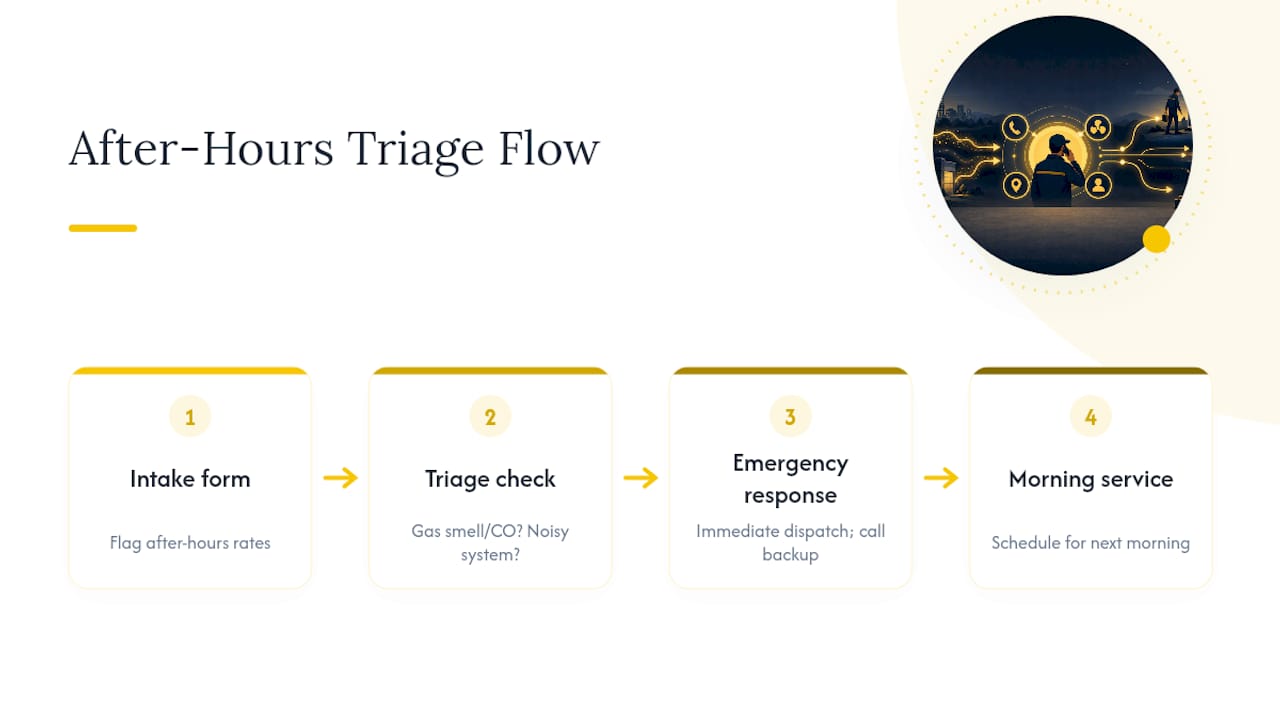
Staffing matters more than most owners plan for. If your on-call tech is already on a job when a second emergency comes in, your dispatcher needs authority to call a backup tech immediately rather than waiting for a supervisor’s approval at midnight. Build that authority into your written dispatch policy, not just your dispatcher’s informal understanding of “how things usually go.” ConnectWise’s dispatching guidance specifically recommends a written policy with response-time rules and a dedicated dispatcher role, precisely because ad hoc decisions at 2 a.m. tend to be inconsistent.
Finally, track after-hours calls separately in your metrics. A spike in emergency calls during a cold snap tells you something different than a steady trickle year-round, and it should change how many techs you keep on-call each season.
An Operator’s View on Dispatch Trade-Offs
Start small and measure fast rather than automating everything at once. The best dispatch operations still lean on a trained dispatcher’s judgment alongside system rules, and a burned-out dispatcher will undermine even the best software you buy.
— ServlyPro
Put These Dispatching Tips on Autopilot
Every tip in this article, from skill tags to ETA alerts to parts logging, is a manual workaround until your software actually enforces it. Certain dispatch software automates routing rules, real-time check-ins, and customer notifications to reduce errors common with manual methods like group texts and notes.
The platform matches technicians to jobs by skill tag automatically, sends ETA notifications without a dispatcher lifting a phone, and keeps a live job board so you can see exactly where every truck stands at any moment. Its AI-powered quote generator also speeds up the estimate step that often stalls a job before it ever reaches dispatch. If you’re running a single crew or a fleet of twenty, the fastest way to know whether it fits your operation is to pilot it with one team for two weeks. Start a free trial through ServlyPro’s service business software for U.S. contractors and measure your response time and first-time fix rate before and after.
Sources
-
A Guide to Less Chaotic Field Service Dispatching | BuildOps
-
HVAC Dispatcher Training In 2026: Building The Backbone … | BDR Co.
FAQ
Is being an HVAC dispatcher a hard job?
It’s demanding rather than difficult in a technical sense. Dispatchers juggle urgent calls, technician schedules, and customer expectations simultaneously, which is why structured training and ride-alongs matter so much for new hires.
How do you become a better HVAC dispatcher?
Ride along with technicians regularly, learn to triage calls by real urgency rather than how upset the customer sounds, and use a dispatch platform that surfaces skill matches and job history instead of relying on memory.
Can an HVAC technician or dispatcher earn $100,000 a year?
Experienced HVAC technicians in high-demand markets or supervisory dispatch roles can reach that income level, though it depends heavily on region, certifications, and whether the role includes commercial work.
What’s a simple way to start dispatching if I’m new to it?
Begin with a standardized intake form, a basic three-tier triage system, and one dispatcher who owns the daily schedule. A platform like ServlyPro’s job scheduling tools can enforce these rules automatically once you’ve defined them.