Published August 1, 2026
AI for Field Service: The Manager’s 2026 Playbook

AI for field service reliably delivers higher first-time-fix rates, faster dispatch, and measurable productivity gains when paired with the right organizational changes. The single best next step for most operations leaders: run a focused scheduling pilot over 30–90 days with clear success criteria before expanding to predictive maintenance or technician enablement.
Bottom-line benefits to know before you read further:
-
BCG research shows AI-first deployments can significantly raise productivity and profit per technician when change management accompanies the technology rollout.
-
Scheduling is the fastest visible win. AI processes technician skills, location, parts availability, and traffic in seconds, compressing dispatch decisions that would otherwise take minutes.
-
ServlyPro brings AI-powered scheduling, automated quoting, and visual job tracking to trade businesses out of the box, making it a practical pilot starting point for HVAC, plumbing, electrical, and cleaning operations.
Your immediate next step: Assemble your ops lead, IT lead, and one or two pilot technicians this week. Run a baseline diagnostic on your current scheduling performance, define three success metrics, and scope a 60-day pilot. That team and that scope are all you need to get started.
Table of Contents
-
How long does implementation take, and what drives the cost?
-
What data privacy and security practices apply to field service AI?
-
What integration challenges should you expect with existing FSM systems?
-
What change management practices work best for field service teams?
-
ServlyPro gives your trade business a faster path to AI-driven results
What does “AI for field service” actually mean?
Artificial intelligence in field service management (FSM) refers to adaptive, data-driven systems that make or recommend decisions based on patterns in operational data, going well beyond rule-based automation that simply triggers a fixed action when a condition is met.
Core capabilities you will encounter:
-
Predictive maintenance: Machine learning models analyze sensor telemetry, asset history, and environmental data to flag likely failures before they happen, reducing unplanned outages and repeat visits.
-
Intelligent scheduling and dispatch: Algorithms weigh technician skills, location, parts on hand, traffic, and SLA windows simultaneously to assign the right person to the right job at the right time.
-
Technician enablement (RAG/knowledge systems): Retrieval-augmented generation (RAG) tools surface relevant manuals, wiring diagrams, and repair histories in seconds, reducing escalations on complex jobs.
-
Computer vision inspections: Image recognition models assess equipment condition from photos or video feeds, flagging anomalies a technician might miss on a visual walkthrough.
-
Conversational automation: Natural language processing (NLP) handles customer booking, status updates, and basic troubleshooting through chat or voice, freeing dispatchers for complex decisions.
-
Parts intelligence: Demand-forecasting models anticipate spare parts needs, cutting stockouts and excess holding costs while improving first-time-fix rates.
Where traditional automation follows a script (“if job status = complete, send invoice”), AI adapts. It learns from outcomes, updates its recommendations as conditions change, and can handle ambiguity. AI agents take this further by executing multi-step tasks autonomously, such as scheduling a job, ordering a part, and notifying the customer, escalating to a human only when complexity or risk exceeds a defined threshold.
Managers searching for “field service automation” or “AI-driven service management” are usually describing the same capability set. The industry term is AI-enabled FSM, and that is the frame this guide uses throughout.
Where does AI create real value in field operations?
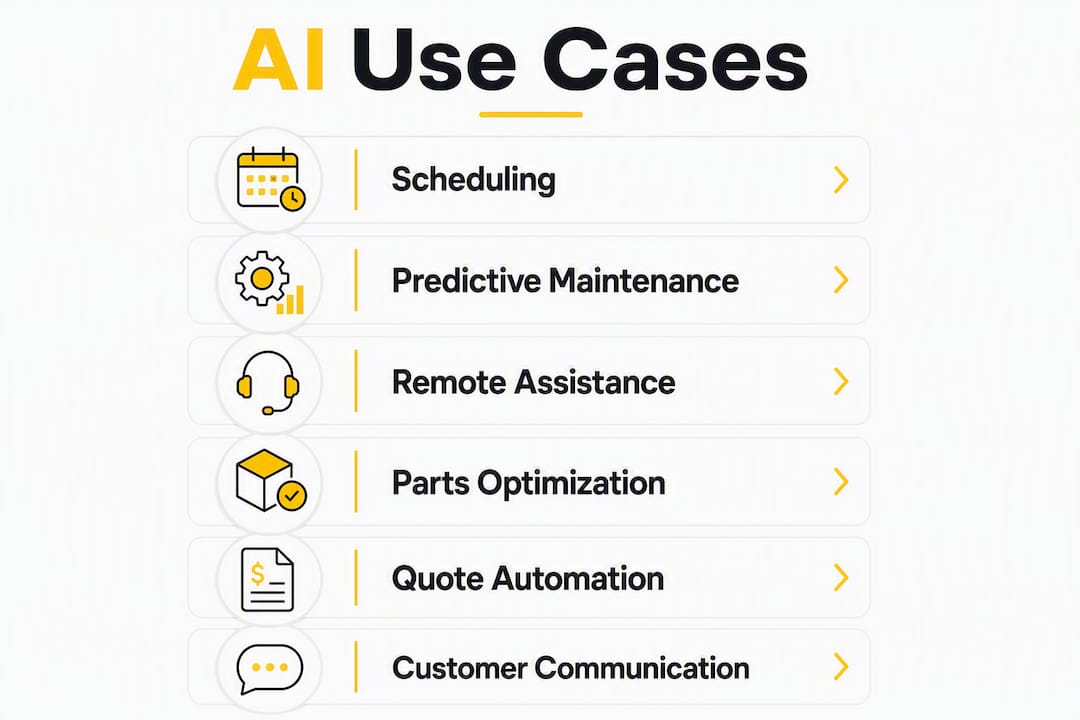
The six use cases below account for the majority of measurable ROI in field service today. They range from quick wins deployable in weeks to longer builds that require data maturity.
Predictive maintenance
IBM’s field service guide describes predictive maintenance as the use case that shifts service from reactive to strategic. IoT sensors feed real-time telemetry into ML models that detect degradation patterns and trigger a work order before a failure occurs. For HVAC or industrial equipment fleets, this means fewer emergency dispatches and lower repeat-visit rates. The data dependency is real: you need at least 6–12 months of labeled failure history before models become reliable.
Intelligent scheduling and routing
This is where most organizations see the fastest payback. An AI scheduler processes dozens of variables simultaneously, including technician certifications, current location, parts loaded on the van, customer SLA tier, and live traffic, and produces an optimized assignment in seconds. The result is more jobs completed per day and shorter travel time per job.

Remote technical assistance
Technician enablement tools using RAG can retrieve accurate documentation in under 10 seconds, compared with an industry average of more than six minutes spent searching manually. On a complex HVAC or electrical job, that gap is the difference between a confident fix and an unnecessary escalation.
Parts and inventory optimization
IBM notes that predictive parts intelligence anticipates spare parts demand to reduce stockouts and holding costs. When parts forecasting is connected to dispatch, technicians arrive with the right components, which directly lifts first-time-fix rates.
Automated quoting and estimate generation
AI quote tools pull job history, material costs, and labor rates to generate accurate estimates in minutes rather than hours. For trade businesses handling high volumes of residential or commercial service calls, this compresses the sales cycle and reduces quoting errors.
Customer communication automation
NLP-driven systems handle appointment confirmations, arrival notifications, and post-job follow-ups without dispatcher involvement. Customers get timely, accurate updates, and your team handles fewer inbound status calls.
Prioritization guidance: Scheduling and customer communication automation are the fastest wins for most trade operations. Predictive maintenance and parts intelligence require more data infrastructure and typically take 3–6 months to show meaningful results. Remote assistance tools deliver immediate operational confidence during a pilot and are worth layering in early.
Why scheduling is your fastest, most visible win
Scoop’s field service guide puts it plainly: scheduling is often the fastest, most visible AI win because algorithms process many variables in seconds that would overwhelm manual dispatch. The ROI is fast because you are compressing decision time and making better use of the workforce and parts you already have.
What an AI scheduler uses as inputs:
-
Technician skills and certifications
-
Current GPS location and shift availability
-
Parts loaded on each vehicle
-
Customer SLA tier and job priority
-
Live traffic and travel time estimates
-
Historical job duration by type and technician
What it produces:
-
Optimized job assignments with predicted ETAs
-
Automatic reassignment when a job runs long or a tech calls out
-
Contingency routing when traffic or parts availability changes
Before/after scenario: A dispatcher managing 20 technicians manually might spend 45–60 minutes each morning building the day’s schedule, then react to three or four disruptions throughout the day. An AI scheduler builds the same schedule in under two minutes and handles disruptions automatically, freeing the dispatcher to focus on customer escalations and complex coordination.
“Scheduling optimization compounds with inventory intelligence; better routing increases first-time-fix rates only if parts and skills are available at dispatch time.” — Scoop
Pro Tip: Run a simple control group during your pilot. Keep one dispatcher managing a subset of jobs manually while the AI handles the rest. Track jobs per day, travel time per job, and first-time-fix rate for both groups over 30 days. The gap between the two groups is your ROI evidence.
Common scheduling mistakes in HVAC and trade operations often stem from the same manual bottlenecks AI directly addresses.
What data and integrations do you need before AI can work?
Data and integrations are the gating factors. No AI system performs reliably on incomplete or disconnected data, so your pre-pilot checklist should confirm that the following are accessible and reasonably clean.
Mandatory data sources:
-
Work order history (job type, duration, technician, outcome)
-
Asset registry with canonical asset IDs and installation dates
-
Technician skills and certification records
-
Parts and inventory master with real-time stock levels
-
Customer and site records (CRM)
Strongly recommended:
-
IoT sensor telemetry for predictive maintenance use cases
-
Failure labels on historical work orders (what broke, why, how it was fixed)
-
HR scheduling data (shifts, availability, time-off)
-
ERP or accounting data for cost tracking
Data quality tips: Timestamps must be consistent and accurate. Asset IDs must be canonical across your FSM, ERP, and inventory systems. Missing failure labels are the most common reason predictive models underperform. If your historical data lacks them, plan a 3–6 month labeling exercise before expecting reliable predictions.
For latency-sensitive use cases like real-time routing or on-site diagnostics, edge computing and on-device inference reduce the round-trip to a cloud model. 5G connectivity on field devices makes this practical for most urban and suburban trade operations. In rural areas, offline-capable apps with local inference remain the safer architecture.
AI is moving toward autonomous routine decisioning, with standard scheduling and work order generation handled without human intervention by 2026. That autonomy only works when the underlying data is clean and connected.
How to implement AI in field service: from pilot to scale
The right sequence is a focused scheduling pilot first, then predictive maintenance and technician enablement as your data and adoption mature. BCG recommends a portfolio approach rather than isolated projects, treating early wins as data-generation engines that fund the next phase.
Implementation timeline
| Phase | Timeframe | Key Activities |
|---|---|---|
| Diagnostic and pilot | Months 0–2 | Baseline KPI capture, data audit, vendor selection, scheduling pilot with 2–5 techs |
| Proof of value and integration | Months 3–6 | Expand pilot, connect FSM/ERP/inventory, begin technician enablement tools |
| Scale and operating model | Months 6–9 | Full deployment, predictive maintenance rollout, workflow redesign, manager coaching |
Scheduling improvements can be operational within weeks; predictive maintenance typically needs 3–6 months for data maturity before results are meaningful.
Pilot checklist
-
Define scope: 2–5 technicians, one trade or service line, one geography.
-
Set three success metrics: first-time-fix rate, jobs per day, travel time per job.
-
Confirm minimum viable data: work order history (12+ months), asset registry, parts inventory.
-
Establish a control group for comparison.
-
Assign roles: ops sponsor, data lead, IT integration owner, field lead.
-
Set a go/no-go review at day 30 and a full evaluation at day 60.
Main cost drivers
-
Data engineering: Cleaning, labeling, and connecting existing data is often the largest upfront cost.
-
Integrations: Connecting FSM, ERP, inventory, and CRM systems requires API work and testing time.
-
License fees: SaaS FSM platforms with AI features vary widely; confirm per-user pricing and what AI modules are included.
-
Change management and training: Role-based training, manager coaching, and communication plans are non-negotiable budget items.
-
Sensor rollout: If predictive maintenance is in scope, IoT sensor installation adds hardware and installation costs.
Pro Tip: Treat your scheduling pilot as a data-generation engine. Every dispatched job creates labeled outcome data, including which technician completed it, how long it took, and whether the fix held. That data bootstraps your predictive maintenance models in phase two.
How do you measure ROI from an AI pilot?
Pick 3–5 primary KPIs tied to business outcomes. Tracking too many metrics in a pilot dilutes focus; tracking too few leaves gaps in your ROI case.
Core KPI framework
| KPI | Definition | Why It Matters | Measurement Note |
|---|---|---|---|
| First-time-fix rate (FTFR) | % of jobs resolved on the first visit | Directly reduces repeat dispatches and customer churn | Track per technician and per job type |
| Mean time to repair (MTTR) | Average time from job open to job close | Reflects technician efficiency and parts availability | Separate travel time from on-site time |
| Travel time per job | Average drive time per completed job | Scheduling quality indicator | Compare AI-managed vs. manual group |
| Technician utilization | % of available hours spent on billable work | Workforce efficiency measure | Include admin time to show full picture |
| Revenue per technician | Total revenue divided by active tech headcount | Profit impact of AI improvements | Track monthly; expect lag of 4–8 weeks |
BCG’s research shows AI-first deployments can significantly raise productivity and profit per technician when organizational change accompanies the technology. Use these improvements as your pilot target ceiling, not your baseline expectation.
Sample ROI calculation
-
Identify your current cost per job (labor + travel + parts + overhead).
-
Apply a conservative 15% reduction in travel time and a 5% improvement in FTFR.
-
Multiply the savings by your annual job volume.
-
Subtract pilot costs (data engineering, license, training).
-
Divide net savings by pilot cost to get a simple payback ratio.
A 200-technician operation running 40 jobs per day at an average cost of $180 per job can generate significant annual savings from even modest efficiency gains. Run the numbers with your actual figures before presenting to leadership.
How do workforce adoption and training affect your results?
BCG’s analysis is direct: roughly 70% of long-term AI value comes from re-engineering workflows and management layers, not from software itself. The biggest ROI lever is organizational change.
Adoption checklist:
-
Co-design workflows with technicians before the pilot launches, not after.
-
Involve frontline managers in defining what AI recommendations they can override and why.
-
Communicate the pilot’s purpose clearly: AI is a decision-support tool, not a replacement.
-
Assign a field lead who champions the tool and collects feedback daily during the pilot.
-
Review override rates weekly. High override rates signal a trust or accuracy problem worth addressing early.
Training checklist:
-
Role-based training: dispatchers, technicians, and managers each need different sessions.
-
On-the-job reinforcement: pair new AI-assisted workflows with a brief daily check-in for the first two weeks.
-
Measure adoption: track login rates, feature usage, and the number of AI recommendations accepted vs. overridden.
Pro Tip: Avoid framing AI as a performance monitoring tool. Technicians who feel surveilled disengage. Frame it as a tool that reduces their paperwork, gets them the right parts before they arrive, and helps them finish jobs faster. That framing is also accurate.
What governance and data risks should you plan for?
Three governance priorities apply to every AI rollout in field service: data quality and lineage, explainability and human oversight, and security and privacy.
Risk mitigation checklist:
-
Define human-in-the-loop thresholds before go-live. For example, allow autonomous scheduling only for jobs below a defined complexity score, and require dispatcher approval for high-value or safety-critical assignments.
-
Maintain audit trails for every AI-generated decision, including the inputs used and the recommendation made.
-
Establish data retention policies for sensor telemetry, work order records, and customer communications.
-
Apply role-based access controls so technicians see only their own job data and dispatchers see only their region.
-
Document SLA changes that result from AI-assisted scheduling so customers and contracts reflect new commitments.
U.S.-specific considerations: Field service AI applications that collect location data, biometric data (e.g., from wearables), or customer communications may trigger obligations under state privacy laws including the California Consumer Privacy Act (CCPA) and similar statutes in Virginia, Colorado, and Texas. Involve your legal or compliance team when sharing operational data with third-party AI vendors or when deploying customer-facing NLP tools.
Pro Tip: Measure exception rates as a safety KPI during early rollouts. If the AI escalates more than 20–25% of decisions to a human, the model is either undertrained or the autonomy threshold is set too low. Both are fixable, but you need the data to know which.
ServlyPro in practice: a trade-focused pilot example
ServlyPro is built specifically for trade businesses, covering HVAC, plumbing, electrical, cleaning, painting, flooring, roofing, and landscaping, among others. Its AI capabilities are designed to deliver value from day one of a pilot without requiring custom data engineering.
What ServlyPro supplies out of the box for a scheduling pilot:
-
AI-powered quote generation that pulls job history and material costs to produce accurate estimates in minutes
-
Job scheduling and calendar management with real-time assignment and team visibility
-
Visual job tracking via a Kanban board so dispatchers and managers see job status at a glance
-
Automated appointment reminders that reduce no-shows and inbound status calls
-
CRM and follow-up automation to keep customers informed without dispatcher involvement
-
Dashboard and reporting tools to track pilot KPIs in real time
Pilot template for a trade operation:
-
Scope: 3–5 technicians, one trade line (e.g., HVAC service calls), one metro area
-
Timeline: 60 days (30-day baseline capture + 30-day AI-assisted operation)
-
Success metrics: First-time-fix rate, jobs completed per day, quote-to-booking conversion rate
-
Data required: 12 months of work order history, current parts inventory, technician skill records
-
Roles: Ops sponsor (you), field lead (senior tech or dispatcher), IT contact for data export
Businesses using ServlyPro have reported up to 60% revenue growth and significant time savings on administrative tasks, according to the brand’s published results. The U.S. contractor platform is the recommended starting point for trade operations ready to run a structured pilot.
How do you evaluate AI-enabled FSM vendors?
Prioritize data access, explainability, integration effort, domain-specific capabilities, and change support. A vendor that cannot answer the questions below clearly during a demo is a risk.
Questions to ask during demos and POCs:
-
What data do you need from us, and in what format?
-
How does the model explain its scheduling or maintenance recommendations?
-
What is the typical integration effort with our existing FSM and ERP systems?
-
How often is the model retrained, and on whose data?
-
What audit logs are available, and who can access them?
-
What security certifications do you hold (SOC 2, ISO 27001)?
-
What are your support SLAs during and after go-live?
-
Can we run a time-boxed POC with our own data before committing?
POC checklist:
-
Define success criteria in writing before the POC starts.
-
Use a representative sample of your real data, not vendor-supplied demo data.
-
Run a parallel baseline operation for comparison.
-
Set a clear timeline: 30–60 days with a structured go/no-go decision.
Red flags to watch for:
-
Vendors who cannot show audit logs or explain model decisions.
-
Contracts that lock you into multi-year terms before a POC is complete.
-
AI features that require replacing your entire FSM stack rather than integrating with it.
-
Vendors with no domain experience in your specific trade or service type.
-
Promises of productivity gains without a defined measurement methodology.
How long does implementation take, and what drives the cost?
For most trade operations, a scheduling pilot is operational within 4–8 weeks. Predictive maintenance takes longer, typically 3–6 months, because the models need sufficient labeled failure data before their recommendations are reliable.
A full AI transformation across scheduling, predictive maintenance, technician enablement, and customer automation usually spans 12–18 months. The timeline is rarely driven by the software itself. Data engineering, integration work, and change management are the pacing factors in nearly every deployment.
The main cost drivers, in rough order of impact: data preparation and cleaning, FSM/ERP/CRM integration development, software licensing, role-based training and manager coaching, and IoT sensor hardware if predictive maintenance is in scope. Organizations that underestimate data preparation costs are the most common source of delayed pilots.
How do you align your organization before AI adoption?
Culture alignment before a pilot launch is not optional. Teams that feel AI is being done to them, rather than with them, produce the override rates and low adoption numbers that kill pilots.
Start with a stakeholder map. Identify who gains from AI (dispatchers freed from manual scheduling, technicians who arrive with the right parts) and who perceives a threat (managers whose judgment is being automated). Address both groups with honest, specific communication about what the pilot will and will not change.
Executive sponsorship matters, but the real work happens in the management layer between leadership and technicians. BCG describes this as the “messy middle,” the frontline managers who must be able to see, override, and refine AI decisions during the pilot to build trust and capture learning. Invest in that layer before you invest in the technology.
A practical pre-pilot checklist: hold a kickoff session with all affected roles, share the success metrics publicly, assign a named field champion, and commit to a feedback loop with a weekly 15-minute review during the first month.
What data privacy and security practices apply to field service AI?
Field service AI applications collect and process several categories of sensitive data: technician location, customer site access records, equipment telemetry, and in some cases audio or video from on-site interactions. Each category carries specific obligations.

Location data collected from technician devices is subject to state and federal regulations. In the U.S., employers generally have the right to track company-owned devices during work hours, but policies must be disclosed to employees in writing. Customer site data, particularly for commercial or government facilities, may be subject to contractual confidentiality requirements.
For customer-facing AI tools, including NLP chatbots and automated communications, CCPA and similar state laws require disclosure of data collection practices and the right to opt out. If your AI vendor processes customer data on your behalf, a data processing agreement (DPA) is required.
Security basics for AI deployments: encrypt data in transit and at rest, apply role-based access controls, conduct a vendor security review before go-live, and include AI systems in your annual penetration testing scope.
What integration challenges should you expect with existing FSM systems?
The most common integration challenge is data fragmentation. Most mid-sized field service operations run a combination of a legacy FSM platform, a separate ERP or accounting system, a parts inventory tool, and a CRM, often with no shared data model between them. AI systems need a unified view of all four to make reliable recommendations.
API availability is the first question to answer. Modern FSM platforms expose REST APIs that make integration straightforward. Older systems may require custom connectors, database-level extracts, or middleware platforms like MuleSoft to bridge the gap.
The second challenge is data latency. AI scheduling and routing tools need near-real-time data on technician location, job status, and parts availability. Batch integrations that update every few hours are insufficient for dynamic dispatch. Plan for event-driven or streaming integrations for the scheduling use case specifically.
A practical integration sequence: start with work order history and technician records (batch is fine for the pilot), then add real-time job status and location feeds, then connect inventory and parts data. Each layer adds AI capability and can be validated independently before the next is added.
What change management practices work best for field service teams?
Field service teams are mobile, time-pressured, and often skeptical of office-driven technology initiatives. Standard change management playbooks designed for desk workers need adjustment.
The most effective approach is co-design: involve two or three experienced technicians and a dispatcher in the pilot design process from the start. Their input on workflow friction, common job types, and data accuracy problems is operationally valuable and builds the internal advocacy you need for broader adoption.
Keep communication short and specific. A one-page pilot brief explaining what the AI does, what it does not do, and how technicians can flag problems is more effective than a town hall presentation. Pair it with a named point of contact for questions.
Recognize early adopters visibly. When a technician’s feedback leads to a workflow improvement, acknowledge it in a team meeting or internal channel. Small wins, shared publicly, build the momentum that carries a pilot into a full deployment.
Examples of successful pilot projects and case studies
Scheduling-first pilots consistently produce the clearest early results. A mid-sized HVAC operation running 15–25 technicians across a metro area is a common pilot profile. The typical pattern: a 30-day baseline measurement phase followed by a 30-day AI-assisted phase, with a control group of manually dispatched jobs running in parallel. The metrics that move first are travel time per job and jobs completed per day, usually within the first two weeks of AI-assisted dispatch.
Technician enablement pilots using RAG-based knowledge tools show fast results in operations with high job complexity or frequent new-hire onboarding. When technicians can retrieve wiring diagrams, error codes, or repair procedures in under 10 seconds rather than calling the office or searching a manual, escalation rates drop and job completion times improve.
ServlyPro trade-focused platform has supported pilots across HVAC, plumbing, and cleaning operations, with businesses reporting up to 60% revenue growth after adopting AI-assisted scheduling and quoting. The combination of automated quote generation and job scheduling in a single platform reduces the administrative overhead that typically slows pilot adoption in smaller trade operations.
Key Takeaways
AI for field service delivers the most reliable ROI when scheduling optimization is the first pilot, change management is funded as seriously as the technology, and data quality is confirmed before go-live.
| Point | Details |
|---|---|
| Start with scheduling | Scheduling pilots can be operational in weeks and produce measurable gains in jobs per day and travel time. |
| Change management drives value | BCG research shows roughly 70% of long-term AI value comes from workflow and management changes, not software alone. |
| Productivity gains are real | AI-first deployments can raise productivity by 20–30% and profit per technician by as much as 80% with full organizational commitment. |
| Data quality is the gating factor | Clean work order history, canonical asset IDs, and real-time inventory data must be confirmed before a pilot launches. |
| ServlyPro for trade pilots | ServlyPro’s AI-powered scheduling and quoting tools are built for trade operations and available for a 7-day free trial. |
The part most AI rollout plans get wrong
Most field service AI plans spend 80% of their planning time on the technology and 20% on the people. The actual value split runs the other way.
The vendors who sell AI scheduling and predictive maintenance tools are good at demonstrating their software. What they are less good at, and what most implementation plans underestimate, is the management layer work. Frontline managers in field service have spent years building mental models of their territories, their technicians, and their customers. An AI system that makes recommendations they cannot interrogate or override feels like a threat to their expertise, not a tool that supports it. That perception, left unaddressed, produces the override rates and disengagement that quietly kill pilots.
The organizations that get this right do one thing differently: they treat frontline managers as co-designers, not end users. They give managers the ability to see why the AI made a recommendation, override it with a logged reason, and watch the model improve based on that feedback. That loop builds trust faster than any training session.
Measure your pilot’s health not just by KPI movement but by override rates and manager confidence scores. If your managers trust the system enough to let it run, the KPIs will follow.
ServlyPro gives your trade business a faster path to AI-driven results
Running a field service AI pilot does not have to mean a six-month data engineering project before you see a single result. ServlyPro is built for trade businesses that need scheduling, quoting, and job management working together from day one, with AI features that are ready to use without custom integration work.
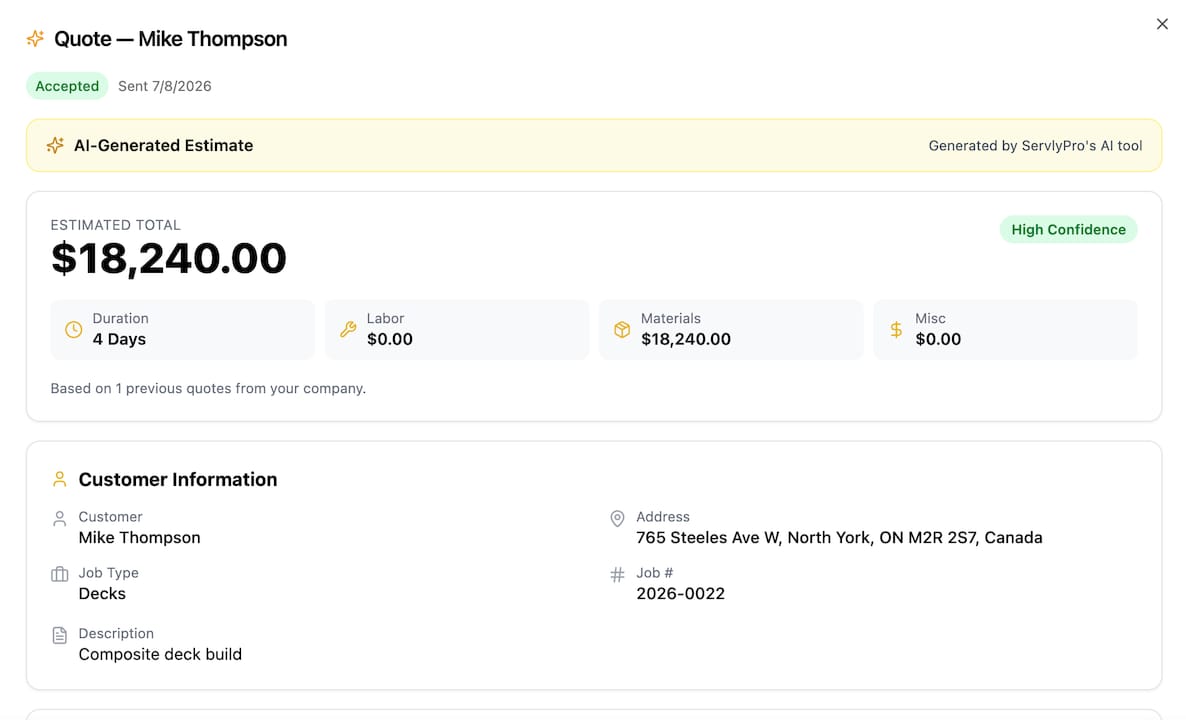
Your team gets AI-powered quote generation that cuts estimate time from hours to minutes, job scheduling software that assigns the right technician to every job in real time, visual job tracking that keeps your whole operation connected, and automated customer communications that reduce no-shows and inbound calls. Businesses using ServlyPro have reported up to 60% revenue growth and significant time savings on administrative work.
The U.S. contractor platform is the recommended starting point for trade operations ready to run a structured pilot. Start your 7-day free trial today and bring your ops lead, your field lead, and your first pilot scope. The diagnostic checklist is built in.
Key sources and further reading
The sources below were selected for their practical, evidence-based guidance on AI in field service, covering both strategic frameworks and operational specifics.
-
Building the AI-First Field Service Organization | BCG — The most cited strategic framework in this guide. BCG’s analysis of productivity gains, the 70% change-management value rule, and the portfolio approach to AI pilots.
-
The Guide to AI in Field Service Management | IBM — Covers predictive maintenance mechanics, IoT data dependencies, and parts intelligence in practical detail.
-
AI in Field Service: Complete Guide to Applications | Scoop — Practical guide covering scheduling ROI, pilot timelines, and the shift toward autonomous routine decisioning.
-
AI for Field Service | Circuit — Source for the sub-10-second documentation retrieval benchmark and technician enablement use case specifics.
-
How AI Can Give Field Service Technicians a Boost | Microsoft — Microsoft’s perspective on AI-assisted technician workflows and productivity tools in the field.
These sources represent a mix of management consulting research, enterprise technology guidance, and practitioner-focused operational content. Together they cover the strategic, technical, and human dimensions of AI adoption in field service.