Published August 31, 2026
Field Service: Speed Up Quote Approvals in 30 Days Using Automation

The fastest way to speed up quote approvals is to automate the routine ones. Set rule-based thresholds for discount and margin levels, route anything within those limits to instant approval, and let a system send automatic reminders when a quote sits too long. The result: fewer manual reviews, faster cycles, and a timestamped audit trail for every decision. ServlyPro is one platform built to run this kind of workflow for service businesses without adding staff.
TL;DR:
Auto-approving routine quotes by setting rule-based thresholds can reduce manual reviews and cut approval cycle times significantly.
Using parallel approval routing instead of sequential processes can often decrease turnaround from days to hours.
Automating follow-up reminders and approvals from email or mobile devices ensures faster responses and prevents quotes from stalling.
Manual review remains necessary for high-risk deals, including large discounts, low margins, or non-standard contract terms.
Tracking approval metrics weekly enables ongoing refinement of rules to maintain speed and safety in quote approvals.
Table of Contents
-
How to Set Up Quote Approvals in Your CRM or CPQ Step by Step
-
Designing Approval Rules and Routing That Actually Cut Wait Time
-
Monitoring and Metrics: Proving Approvals Are Faster and Safe
-
Implementation Checklist: A Practical 30/60/90-Day Rollout Plan
-
ServlyPro Perspective: How Field Service Teams Cut Approval Time in Practice
Top Strategies to Prioritize Now to Speed Up Approvals
Most quote approval delays trace back to the same handful of habits. Fix these first, and cycle time drops fast:
-
Set auto-approve rules for low-risk deals based on discount and margin thresholds, so routine quotes skip human review entirely.
-
Switch sequential approvals to parallel whenever more than one department needs to sign off on the same quote.
-
Require a one-sentence justification on exception requests, which removes most follow-up clarifications before they start.
-
Enable approvals from email or mobile so approvers can act with a single tap instead of logging into a separate system.
-
Automate customer follow-up reminders tied to deadlines rather than relying on reps to remember.
-
Measure your baseline cycle time before changing anything, so you can prove the improvement later.
None of this requires new headcount. It requires rules that already reflect how your team makes decisions today.
Approval Types: When to Use Standard vs Advanced Approvals
Standard approvals should cover the vast majority of quotes your team sends. These are auto-approved or reviewed by a single manager because the deal falls within known limits: normal discount, healthy margin, standard contract terms. Advanced approvals are for the exceptions, and they should stay exceptions.
Route a quote to advanced, multi-level review when it hits any of these:
-
A discount deeper than your standard cap (often 15% to 20% for most service categories).
-
Margin that falls below your set floor, even if the discount itself looks reasonable.
-
Non-standard contract language, custom liability terms, or extended payment schedules.
-
Regulatory or licensing exposure specific to the job or the customer’s industry.
For most plumbing, HVAC, electrical, or cleaning businesses, a conservative starting point is to auto-approve low-discount deals with margin above your floor, then tighten or loosen that band once you have real data. Guardrails like these are what let routine deals move without a person ever touching them.
How to Set Up Quote Approvals in Your CRM or CPQ Step by Step
Standing up an approval workflow doesn’t need to be a quarter-long project. Follow this sequence:
-
Audit your current handoffs. Map every point where a quote stalls today, whether that’s an email chain, a Slack thread, or a manager’s inbox.
-
Set your business rules first. Decide discount caps, margin floors, and any customer credit checks before you touch software settings.
-
Configure triggers and routing in your quoting or CPQ system based on deal value, product type, or customer risk tier.
-
Turn on in-email and mobile approvals, plus automatic notifications so approvers know the moment action is needed.
-
Pilot with a small group first. Run it with one team or region, and set escalation and expiry rules so quotes don’t sit indefinitely if someone’s out.
Once the pilot holds up for a few weeks without errors, expand it. Rushing this step is how teams end up with approval rules nobody trusts.
Designing Approval Rules and Routing That Actually Cut Wait Time
A good rules engine expresses limits in plain business terms: discount percentage, margin floor, product category, and customer risk level. Write these as if you’re training a new hire, because that’s effectively what the system is doing.
-
Define discount and margin thresholds separately. A 10% discount on a high-margin job is very different from the same discount on a thin-margin one.
-
Use parallel routing whenever a quote needs sign-off from more than one person or department. Switching from sequential to parallel can cut end-to-end approval time from days to hours when approvers can act independently instead of waiting in line.
-
Set escalation timers. If an approver hasn’t acted within a set window (24 or 48 hours works for most service businesses), route automatically to a backup.
-
Require a short justification field on every exception. It sounds small, but it eliminates most of the back-and-forth that stalls quotes for days.
Pro Tip: Cap your justification field at one sentence. Longer explanations invite longer reviews, and that defeats the point of the field.
What to Automate and What to Keep Manual
Not every check belongs in a rules engine, and pretending otherwise is how teams lose trust in automation fast. Some decisions are genuinely safe to hand off; others still need a human’s judgment.
Automate:
-
Pricing validation against your published rate card.
-
Basic inventory and material availability checks.
-
Standard discount windows that fall within pre-approved bands.
-
Routine credit checks for repeat customers with clean payment history.
Keep manual:
-
Legal or contract terms that deviate from your standard language.
-
High-risk customers, including new accounts with no payment history.
-
Any quote that a rules engine or AI anomaly detection flags as unusual rather than clearly compliant.
AI works best here as a flag raiser, not a decision maker. It surfaces the outlier quote for a human to look at; it doesn’t replace the judgment call on whether to approve it. Start with a narrow auto-approve scope, watch the data for a month or two, then widen it once you’re confident nothing risky is slipping through.
Monitoring and Metrics: Proving Approvals Are Faster and Safe
You can’t manage what you don’t measure, and approval workflows are no exception. Track these four numbers weekly:
| Metric | What it tells you |
|---|---|
| Approval cycle time | Average hours from quote submission to final decision |
| Percentage auto-approved | Share of quotes bypassing human review entirely |
| Approver response time | How long individual approvers take once notified |
| Queue age | How long the oldest pending quote has been waiting |
A dashboard that shows stuck quotes by approver and by trigger reveals bottlenecks fast. Every approval also needs a timestamp, an approver ID, and an optional comment. That audit trail matters for SOC-level controls around financial approvals, and it’s also what lets you tune rules honestly instead of guessing. Review the data monthly for false positives (deals that should have been flagged) and false negatives (deals held up that didn’t need to be).
Implementation Checklist: A Practical 30/60/90-Day Rollout Plan
Assign one owner and a small cross-functional group, usually sales, finance, and whoever manages your CRM or CPQ tool.
-
Days 1 to 30: Audit current handoffs and pilot conservative rules with a small team.
-
Days 31 to 60: Expand auto-approval bands based on pilot data and turn on automated follow-up reminders.
-
Days 61 to 90: Roll out company-wide, train every approver on the exception template, and review metrics against your baseline.
Schedule a standing weekly review to tune thresholds. Rules that made sense on day one rarely stay perfect by day ninety.
ServlyPro Perspective: How Field Service Teams Cut Approval Time in Practice

ServlyPro’s quote approval workflows put the earlier recommendations into one system: AI-generated quotes, rule-based approvals, automated follow-ups, and audit logs on every decision. Deployments that worked best started small, kept margin guardrails tight, and enabled in-email approvals from day one.
A Fast Read on Why Approvals Stall
Most quote delays aren’t a people problem. They’re a design problem. Somebody built an approval chain for the exception and now every routine deal has to walk through it. Move the routine checks into system rules, and watch how much of the backlog disappears without anyone working harder. Pick one rule to automate in the next 30 days and see what happens to your cycle time.
— ServlyPro
How ServlyPro Helps: Features, Benefits, and Your Next Step
ServlyPro is built for the exact workflow this guide describes: rule-based quote approvals, AI-generated estimates, automated customer follow-ups, and a full audit trail on every decision, all in one platform instead of stitched-together email threads and spreadsheets.
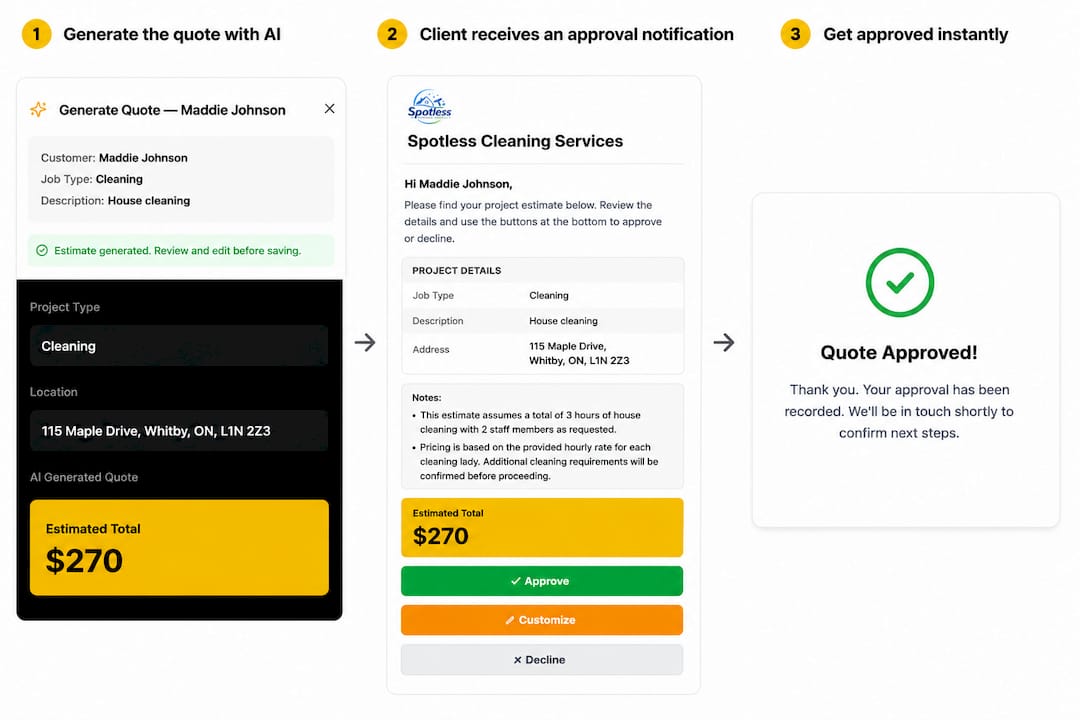
Every recommendation above maps directly to a feature already built into the platform. Set your discount and margin thresholds once, and ServlyPro routes routine quotes to instant approval while flagging exceptions for a real review. Follow-up automation keeps customers from going quiet on quotes that are just sitting in an inbox. Service businesses in plumbing, HVAC, electrical, cleaning, and over a dozen other trades use it to cut the administrative drag between sending a quote and getting it signed. Start a 7-day free trial and set up your first approval rule before your next quote goes out.