Published August 2, 2026
Invoice Email Templates for Small Businesses and Freelancers

Use these copy-paste invoice email templates plus five quick actions to get paid faster. Whether you’re sending a first invoice, chasing a late payment, or confirming receipt, the right format cuts friction and moves money. Here are the six templates you’ll use most:
-
First invoice (new client)
-
Invoice with payment link
-
Project completion invoice
-
Recurring subscription notice
-
Friendly pre-due reminder
-
Overdue notice
Before you send any of them, confirm your email includes these five things:
-
Invoice number (e.g., INV-2041)
-
Total amount due (bolded)
-
Due date or payment terms (Net 14 or Net 30)
-
Payment link or instructions (bank transfer, check, or online portal)
-
Your contact info for billing questions
That’s the baseline. Everything below builds on it.
Table of Contents
How to write an effective invoice email
The goal of a professional invoice email is simple: give the reader everything they need to pay you without asking a single follow-up question. CMDK advises that the top two lines of your email should contain the amount, due date, and invoice number. Accounts payable staff process dozens of invoices a week; if they have to open an attachment just to find the total, your invoice goes to the bottom of the pile.
Subject line: Mailchimp recommends a descriptive subject that includes the word “Invoice,” your invoice number, and your business name. Three formats that work well in practice:
-
Invoice #2041 from Apex Electrical — Due March 28 -
Invoice #1087 | [Your Business] | $1,250 Due Net 14 -
[Project Name] Invoice #3302 — Payment Due April 5
Keep the subject line consistent across every invoice you send. Accounts payable teams often search their inbox by keyword, and a predictable format means your invoice gets found and filed without a phone call.
Body structure: Open with one line stating the purpose, then list the amount and due date in bold. Follow with a short payment instruction block, a note that the PDF is attached, and a closing contact line. Keep paragraphs to two or three sentences. On mobile, long blocks of text push the payment link below the fold, which costs you time.
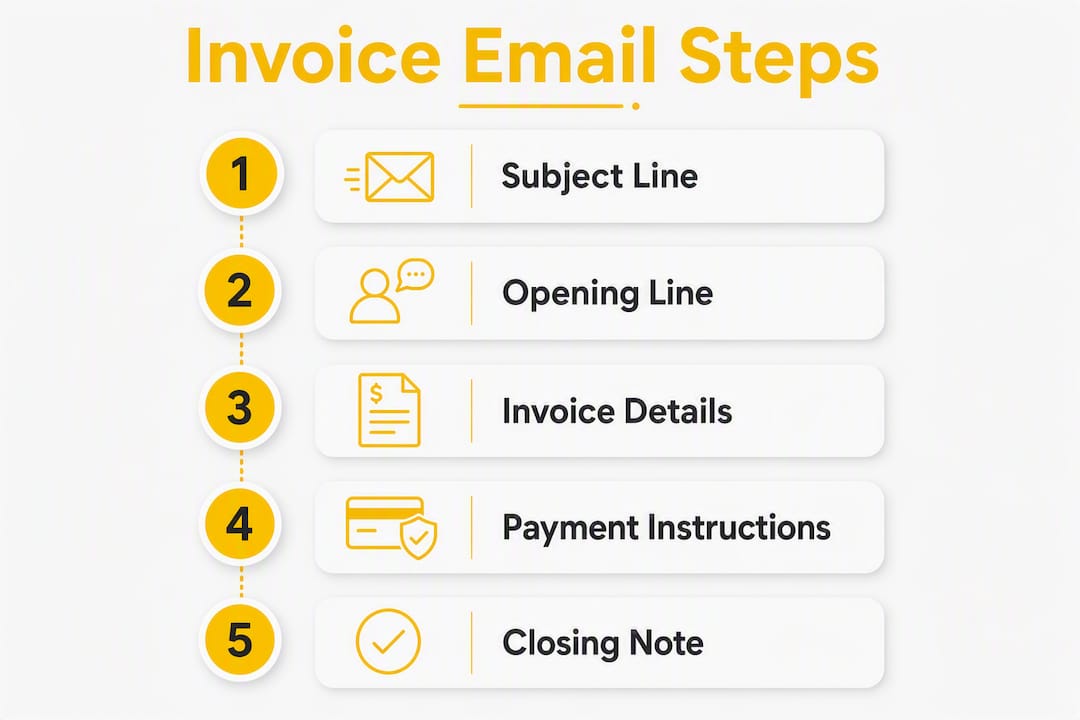
Formatting for mobile: Bold the amount and due date. Use a short bulleted summary in the body rather than asking the reader to open the attachment for basic details. Name your PDF file to match the subject line (e.g., apex-electrical-invoice-2041.pdf) so it’s easy to save and retrieve.
Pro Tip: Set a standard filename convention for every invoice PDF: [businessname]-invoice-[number].pdf. Accounts payable staff can file it without opening it, and you’ll never get a “which attachment was this?” reply.
Shopify’s invoicing guidance confirms that reducing decision friction by summarizing the invoice in the email body and adding a payment link increases on-the-spot payment rates. A focused email with a visible payment link is one of the simplest changes you can make to your billing workflow.
Copy-paste invoice email templates for every scenario
Each template below includes a suggested subject line, a ready-to-paste body, and a one-line customization note. Adjust the bracketed fields before sending.
1. First invoice (new client)
Subject: Invoice #[Number] from [Your Business] — Due [Date]
Hi [Client Name],
Thank you for choosing [Your Business]. Please find Invoice #[Number] for $[Amount], due [Date] (Net [14/30]).
You can pay online here: [Payment Link] Alternatively, [bank transfer / check instructions].
The invoice PDF is attached for your records. Please include the invoice number in your payment memo.
Questions? Reach me at [email] or [phone].
Thanks again, [Your Name]
Customize: Add a brief project description in line two for context.
2. Invoice with payment link
Subject: Invoice #[Number] | $[Amount] Due [Date] — Pay Online
Hi [Client Name],
Invoice #[Number] for $[Amount] is ready. Payment is due [Date].
[Pay Now — Secure Link]
PDF attached. Reply to this email with any questions.
Best, [Your Name]
Customize: Ideal for repeat clients. Keep it short; the link does the work.
3. Project completion invoice
Subject: Project Complete — Invoice #[Number] from [Your Business]
Hi [Client Name],
The [project name] is complete. Invoice #[Number] for $[Amount] is attached, due [Date] (Net [14/30]).
A summary of work completed is included on the invoice. Payment options: [online link / bank transfer / check].
Please include Invoice #[Number] in your payment memo if paying by transfer.
Thank you, [Your Name]
Customize: For electrical or HVAC jobs, add a one-line note referencing the job address or work order number.
4. Recurring subscription notice
Subject: Monthly Invoice #[Number] from [Your Business] — Due [Date]
Hi [Client Name],
Your monthly invoice for [service name] is attached. Invoice #[Number] totals $[Amount], due [Date].
[Pay Online] or reply if you have any questions about this cycle.
Thanks, [Your Name]
Customize: Reference the billing period (e.g., “March 2026 service”) in line two.
5. Friendly pre-due reminder
Subject: Friendly Reminder: Invoice #[Number] Due [Date]
Hi [Client Name],
Just a quick note that Invoice #[Number] for $[Amount] is due on [Date].
[Pay Online Here] — or let me know if you have any questions.
Thanks, [Your Name]
Customize: Send this 3 days before the due date. Keep the tone light.

6. Overdue notice (first)
Subject: Overdue: Invoice #[Number] from [Your Business] — Please Advise
Hi [Client Name],
Invoice #[Number] for $[Amount] was due on [Date] and remains unpaid. Could you let me know when to expect payment?
[Pay Online] or reply to confirm a payment date.
Thank you, [Your Name]
Customize: Keep the tone professional and neutral. Avoid accusatory language on the first notice.
7. Second overdue notice
Subject: Second Notice: Invoice #[Number] — [X] Days Past Due
Hi [Client Name],
Invoice #[Number] for $[Amount] is now [X] days past due. Please arrange payment or contact me to discuss options.
[Pay Online] | [Your Phone/Email]
Customize: If your contract includes late fees, reference them here: “A late fee of [X%] applies per your agreement.”
8. Final notice before escalation
Subject: Final Notice: Invoice #[Number] — Action Required
Hi [Client Name],
This is a final notice for Invoice #[Number] totaling $[Amount], now [X] days overdue. Payment is required by [Date] to avoid further action.
[Pay Online] or contact me immediately at [phone/email].
Customize: State your next step clearly (collections, pausing service) without threats. Factual and firm.
9. Payment received confirmation
Subject: Payment Received — Invoice #[Number] | Thank You
Hi [Client Name],
Payment of $[Amount] for Invoice #[Number] has been received. Thank you.
A receipt is attached for your records. Looking forward to working with you again.
Best, [Your Name]
Customize: A brief, warm close builds goodwill for the next project.
A note on attachments vs. inline summaries: Always attach the PDF as the document of record. Include a brief inline summary (amount, due date, payment link) in the body so the reader doesn’t need to open the file to take action. For multi-page invoices, include page numbers and a cover summary on page one.
When and how to follow up on unpaid invoices
Timing your reminders is as important as the wording. CMDK’s reminder cadence gives a clear framework: send a friendly nudge 3 days before the due date, a first notice 1 day after the due date, a firmer second notice 7–14 days late, and a final notice at 21–30 days past due.
Each step in the ladder calls for a small shift in tone. The pre-due nudge is warm and brief. The day-after notice is neutral and factual. By the 7–14 day mark, your subject line should name the overdue status directly: Second Notice: Invoice #2041 — 10 Days Past Due. At 21–30 days, state your next step plainly.
When payment is missing and you’re not sure why, ask directly: “Could you confirm a payment date, or let me know if there’s an issue I can help resolve?” This opens the door to a payment plan without burning the relationship. If a client genuinely can’t pay in full, a structured payment plan is often better than a collections referral.
Escalation triggers worth knowing: pause new work when an invoice is 30+ days overdue and your contract allows it. Apply late fees only if your agreement specifies them, and reference the clause by name. At 60+ days with no response, a collections agency or small claims court becomes a realistic option. This is procedural guidance, not legal advice; consult a qualified professional for your specific situation.
Automating your reminder cadence removes the manual tracking burden entirely. Set the schedule once, and the system sends each notice at the right interval without you having to remember.
What your invoice attachment should always include
The email body gets the client’s attention. The PDF attachment is the legal and financial record. Both need to be right.
Required invoice fields:
-
Invoice number and invoice date
-
Your business name, address, and contact info
-
Client name and billing address
-
Line-item descriptions with quantities and unit prices
-
Subtotal, applicable taxes, and total due
-
Payment terms (Net 14, Net 30, or due date)
-
Accepted payment methods and instructions
-
Payment link or remit-to bank details
-
PO number (if the client requires one)
InvoiceSonic recommends explicitly asking the payer to include the invoice number in the payment memo for bank transfers. Missing memos cause reconciliation delays that can take days to untangle.
| Field | Why it matters |
|---|---|
| Invoice number | Lets both sides track and reference the document |
| Due date / payment terms | Maps to the client’s AP cycle; Net 14/30 is clearer than “due on receipt” |
| Line-item descriptions | Prevents disputes about what was billed |
| Payment instructions | Eliminates follow-up calls about how to pay |
| Contact info | Gives AP a direct line for questions |
| PO number | Required by many corporate clients for processing |
File best practices: Save as PDF, not Word or Excel. Name the file to match your subject line (apex-electrical-invoice-2041.pdf). If the invoice runs more than one page, add page numbers and a total-due summary on page one. If you use invoicing software, include a direct payment link in the PDF and reference the client portal in the email body.
Why tone and cognitive load affect whether you get paid on time
The fastest path from “invoice sent” to “payment received” is an email the reader can act on in under 30 seconds. Shopify’s invoicing research shows that reducing decision friction by listing the amount and payment link in the email body increases immediate payment rates. When a client has to open an attachment, scroll to find the total, and then search for payment instructions, each extra step is a reason to defer.
Key insight: Placing the invoice number, total, and due date in the first two lines of your email body reduces the time an accounts payable processor spends on your invoice, which directly improves how quickly it gets approved and paid.
Mailchimp’s invoicing guidance frames invoice emails as customer-service touchpoints. Tone matters. A warm, professional message that thanks the client and offers a clear next step reads differently than a terse demand. Both can be firm; only one builds the kind of relationship that leads to repeat work.
The two-line rewrite rule: move the amount, due date, and invoice number to the top of your email body. Bold them. Then add the payment link on the very next line. Everything else (project notes, terms, contact info) goes below. Apply this to any existing template you’re using and you’ll notice fewer “can you resend the invoice?” replies.
Pro Tip: Save your best-performing invoice email as a snippet in your email client or invoicing software. Consistent formatting across every send builds familiarity with your clients’ AP teams, which speeds approval.
Key Takeaways
Clear, front-loaded invoice emails with a visible payment link and a consistent follow-up cadence are the most reliable way to reduce late payments for small businesses and freelancers.
| Point | Details |
|---|---|
| Front-load key details | Put the invoice number, amount, and due date in the first two lines of every email. |
| Use Net 14 or Net 30 | Defined payment terms map to AP cycles better than “due on receipt.” |
| Follow a reminder cadence | Send nudges at 3 days before, 1 day after, 7–14 days late, and 21–30 days past due. |
| Name your PDF consistently | Match the filename to the subject line so AP can file it without opening it. |
| ServlyPro automates the process | ServlyPro’s invoice software sends invoices, payment links, and follow-up reminders automatically. |
The ServlyPro perspective on invoice emails
At ServlyPro, we built our invoicing tools around one observation: service businesses lose more money to slow follow-up than to bad pricing. Electricians, HVAC techs, and plumbers finish a job and move to the next one. The invoice sits in a draft folder. The reminder never gets sent. The client pays 45 days late, or not at all.
The templates in this article reflect the workflows our customers actually use. A project-complete invoice sent the same day the job closes, with a payment link embedded and a reminder scheduled for day 3, is the pattern that consistently produces faster payment. Our free Online Invoice Generator lets you build a professional invoice in minutes, and the follow-up automation handles the reminder cadence without manual tracking.
The best invoice email is the one that goes out the same day the work is done.
ServlyPro handles invoicing so you can stay on the job
Copying templates into your email client is a solid start. Automating the entire process is what actually frees up your time. ServlyPro’s invoice management software generates invoices directly from completed jobs, attaches payment links, and sends follow-up reminders on a schedule you set once. For U.S. service businesses in electrical, HVAC, plumbing, cleaning, and a dozen other trades, that means no more chasing payments manually and no more invoices falling through the cracks.
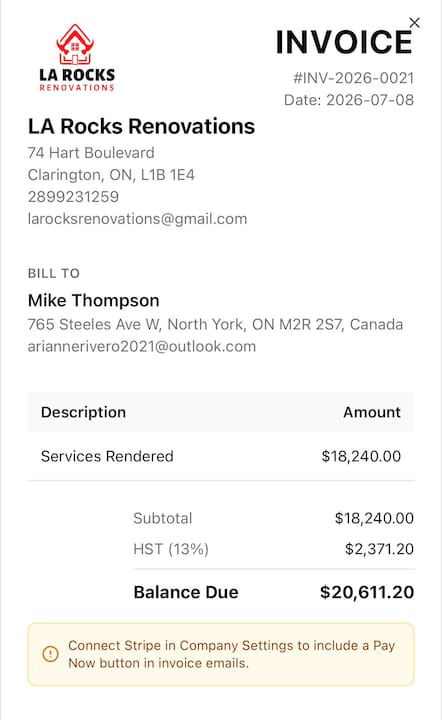
Your team can trigger an invoice the moment a job is marked complete, with the client’s details, line items, and payment link already populated. The follow-up automation sends reminders at the right intervals without you lifting a finger. Try the free Online Invoice Generator today, or start a 7-day trial of ServlyPro at getservlypro.com to see how automated invoicing fits your workflow.
Useful sources and further reading
-
How to Create an Invoice Email: Templates and Tips | Mailchimp
-
How To Write an Invoice Email: Simple Invoicing Do’s and Don’ts | Shopify
Save your preferred templates with an author name and last-updated date in your email snippets or invoicing software. Payment method details change; review your templates whenever you add or remove a payment option.