Published August 28, 2026
Field Service Software Cost: A Real Budget for 1-50 Techs

Most small field service teams pay between a low three-figure to mid three-figure range per month for management software, mid-market crews with 5 to 15 users typically pay a few hundred to low thousands per month, and enterprise deployments regularly cross into the thousands monthly before onboarding fees, according to Fieldservicetools. The spread exists because vendors price on different models. Some charge per technician, some charge per office seat, and some bundle everything into a flat team rate that barely moves as you add trucks.
Your actual number depends less on the software itself and more on how many people touch it, which features you turn on, and how the vendor counts a “user.” A platform that looks cheap at the demo can double in price once your dispatcher, your part-time bookkeeper, and your three new hires all need logins.
Here’s what that looks like in practice:
-
A solo technician running one van typically pays a starter plan rate within the several tens of dollars monthly range for scheduling and basic invoicing.
-
A five-tech crew with a dispatcher and simple job tracking usually pays somewhere in the low to mid hundreds per month, depending on whether GPS tracking and inventory management are included or sold separately.
-
A 20-technician mid-market operation with dispatch, reporting, and payment processing often pays in the low to mid thousands per month, per the Field Service Guide’s pricing analysis, which notes the broader market range starts around the several tens of dollars per month or more.
Key Takeaways
Field service software costs $29 to $600+ per month depending on team size and pricing model, but the real budget number includes onboarding, integrations, and processing fees most vendors leave off the sticker price.
| Point | Details |
|---|---|
| Know your real range | Small teams pay $100-$300/month, mid-market $500-$1,500/month, enterprise $2,000+/month before fees. |
| Watch the growth tax | Per-user pricing scales linearly with headcount, so flat-rate models often win past 15-20 seats. |
| Budget hidden fees separately | Onboarding, integrations, and card processing markups can rival or exceed the subscription cost. |
| Run a 3-year comparison | Model per-user versus flat-rate costs at your projected headcount before signing any contract. |
| ServlyPro offers predictable pricing | Flat team tiers with AI quoting and invoicing built in avoid the per-seat cost creep this article outlines. |
Table of Contents
What Does Field Service Software Cost by Team Size?
The headline numbers only mean something once you attach them to your actual headcount and feature list. A five-person plumbing outfit and a 40-tech HVAC company are not shopping in the same price tier, even if both call themselves “small business.”
The table below breaks down what you can expect to pay at each size, along with the features that typically come bundled at that price point.
| Business Size | Monthly Range | Typical Included Features |
|---|---|---|
| Micro (1-2 techs) | Starter plan priced at several tens of dollars monthly | Scheduling, basic invoicing, mobile app |
| Small (3-5 techs) | Hundreds of dollars monthly range | Dispatching, customer CRM, quote generation |
| Growing (6-15 techs) | Mid-hundreds monthly range | GPS tracking, inventory, reporting dashboards |
| Mid-market (15-30 techs) | Low thousands monthly range | Multi-location support, advanced automation, integrations |
| Enterprise (30+ techs) | Thousands monthly range | Custom workflows, dedicated support, API access |
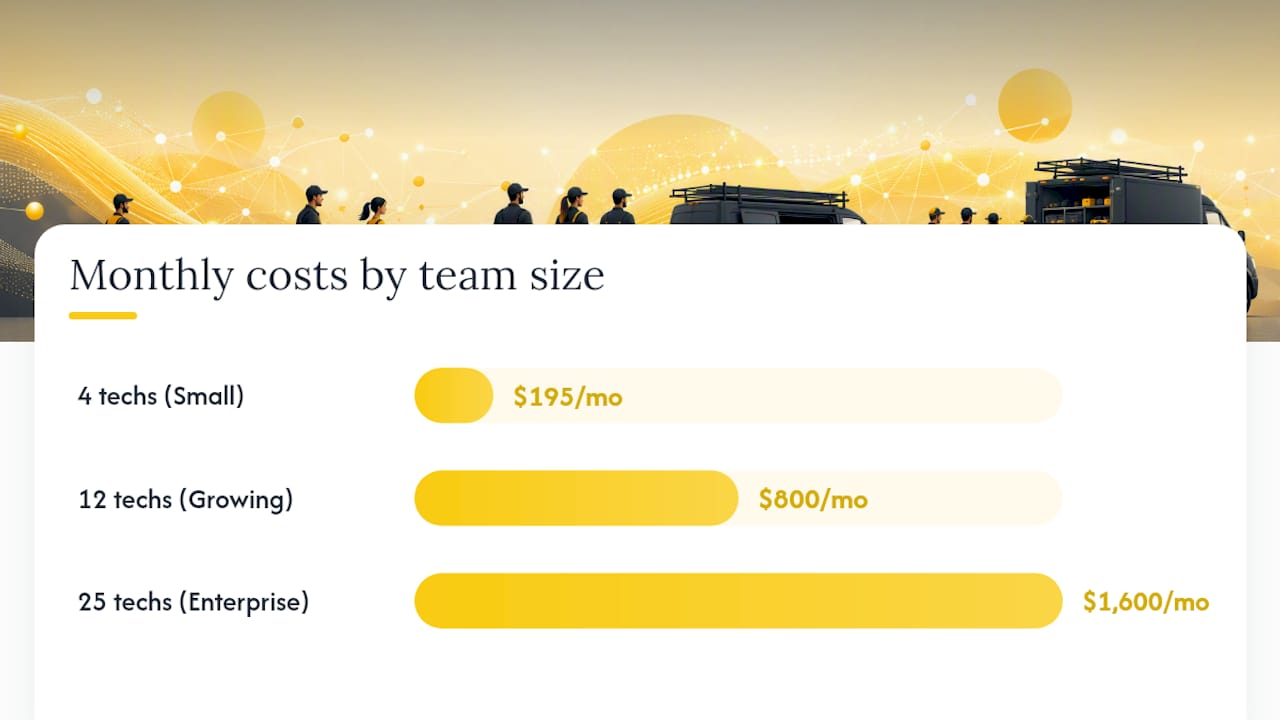
To see how those bands play out in real budgets, walk through three worked examples:
-
A four-person cleaning company picks a per-tech plan at $45 per month per user. Four licenses run $180 monthly, plus a $15 add-on for online booking, landing near $195 per month total.
-
A 12-technician electrical contractor pays $60 per user for a mid-tier plan covering dispatch and GPS. That’s $720 monthly, plus roughly $80 in card processing fees on invoiced jobs, bringing the real total closer to $800.
-
A 25-truck landscaping company on an enterprise plan pays a $1,200 base fee for unlimited core users, plus $400 for a custom integration with their accounting software, landing at $1,600 monthly before payment processing.
One detail trips up almost every buyer: vendors don’t all count “users” the same way. Some charge only for technicians in the field, others bill for every login including dispatchers, office admins, and even read-only owner accounts. Ask this question before you compare two quotes side by side, because a $99-per-user plan that bills five roles can cost more than a $150 flat-team plan that covers ten.
Which Pricing Model Fits Your Business?
Field service software vendors sell access to their platform through a handful of recurring structures, and knowing which one you’re being quoted changes how you negotiate.
-
Per-user pricing charges a flat rate for every technician, dispatcher, or office employee who logs in. It’s the most common model for small teams because it’s easy to understand, but it scales linearly, so your 15th hire costs exactly as much as your first.
-
Per-tech or per-truck pricing charges based on active field units rather than every login, which works well for businesses with lean back-office staff but many trucks on the road.
-
Flat team pricing bundles unlimited users into one tier, often with caps on job volume or storage. This model favors companies that expect to add office staff faster than field staff.
-
Per-location pricing charges by branch or service area rather than headcount, which suits franchises or multi-site operations more than single-location shops.
-
Module or add-on pricing keeps a low base price but charges separately for GPS tracking, inventory management, or advanced reporting, which can make an attractively cheap quote balloon once you turn on the features you actually need.
Pro Tip: Watch for what we’d call a “growth tax”: a per-user model that looked cheap at five employees but becomes your biggest line item at 25. If you’re planning to double headcount within two years, ask the vendor to model your cost at that future headcount before you sign anything. A flat-rate or per-location model often wins once you cross roughly 15 to 20 paid seats.
What Actually Drives Your Total Software Cost?
Team size gets most of the attention, but it’s rarely the only factor pushing your bill higher. Here are the levers that matter most, ranked roughly by how much they typically swing your monthly total.
-
Team size and role count — every added technician, dispatcher, or office user typically adds a recurring per-seat charge, making this the single biggest driver of month-to-month cost.
-
Feature tier — scheduling and basic invoicing usually come standard, but GPS tracking, advanced dispatch, and inventory management are frequently gated behind higher-priced plans or sold as add-ons, a structure the Field Service Guide’s pricing analysis calls out directly.
-
Integrations — connecting your field service platform to QuickBooks, a payroll system, or a custom CRM often requires paid API access or a one-time integration project.
-
Onboarding and customization — heavier customization work (custom fields, workflow automation, branded customer portals) adds one-time setup fees on top of your subscription.
-
Hardware — rugged tablets, barcode scanners, or vehicle-mounted GPS units are one-time or amortized costs that some businesses forget to budget for.
-
Payment processing — every invoice paid through the platform typically carries a card processing fee, which recurs indefinitely and scales with revenue, not headcount.
A quick way to sort these for your own budget:
-
If you’re under 10 technicians, prioritize team size and feature tier first. Those two drivers account for most of your monthly bill at that scale.
-
If you’re integrating with existing accounting or CRM systems, budget integrations as a one-time cost, not a recurring one.
-
If your business processes high transaction volume (think HVAC emergency calls or high-ticket renovation jobs), model payment processing fees as carefully as the subscription itself.
What One-Time and Hidden Fees Should You Expect?
The subscription price on a vendor’s homepage almost never reflects your true first-year cost. Onboarding and implementation fees frequently range from a few hundred dollars for self-serve tools up to several thousand dollars for enterprise platforms with dedicated setup teams, according to the Field Service Guide’s pricing breakdown.
Here’s what tends to show up after the sales call, not during it:
-
Onboarding and implementation: minimal or no cost for self-serve small plans, with fees escalating to several thousand dollars for guided enterprise rollouts.
-
Data migration: moving customer records, job history, and invoices from your old system can incur modest to several-thousand-dollar costs depending on data volume and format.
-
Custom integrations: connecting proprietary or industry-specific software typically requires developer time. Integration and migration projects can be multi-week efforts costing multiple thousands of dollars, as seen in MuleSoft’s integration case studies.
-
Training: some vendors include it free; others charge per session or per seat for live training beyond a basic video library.
-
Hardware: tablets, mounted GPS units, and barcode scanners are rarely included in the subscription price.
-
Card processing markups: a few percentage points on every transaction, which sound small until you calculate them against your annual invoiced revenue.
Field service management software commonly costs from several tens to several hundreds of dollars or more per month, but that range only reflects the subscription. Payment processing markups can sometimes exceed the subscription fee entirely on high-volume accounts, since every dollar invoiced through the platform carries a percentage cut.
Before you sign, ask every vendor on your shortlist for a written breakdown of onboarding costs, per-transaction processing rates, and any fee that isn’t billed monthly. If they hesitate to put it in writing, that hesitation tells you something.
How Do You Estimate Your Own Monthly Cost?
Building your own number takes fifteen minutes and a spreadsheet. Here’s the worksheet structure, followed by a worked example.
-
Count your paid users. List every technician, dispatcher, and office employee who will need a login, since vendors count these differently and this number drives most of your recurring cost.
-
Get the per-user or per-tier rate. Ask the vendor for their rate card, including what happens at your specific headcount, not just their advertised starting price.
-
Add expected add-ons. List GPS tracking, inventory management, or advanced reporting separately if they’re not included in your base tier.
-
Estimate monthly card processing volume. Multiply your average monthly invoiced revenue by the processor’s percentage rate, typically 2.5% to 3.5%.
-
Amortize hardware costs. Divide any tablet, scanner, or GPS hardware purchase by 24 or 36 months to get a monthly equivalent.
-
Add one-time onboarding, divided by 12. This spreads a $1,200 setup fee into $100 per month for year-one budgeting purposes.
-
Sum everything for your true monthly total, then multiply by 12 for an annual figure.
Here’s how that math looks for a 10-technician plumbing company:
That puts this company’s realistic annual cost near $15,500, well above the sticker price of $60 per user that appeared in the original sales quote. A tool like ServlyPro’s dashboard and reporting features can help you track these line items against actual usage once you’re live, so surprises like unused add-ons get caught early.

When Does Per-User Pricing Get More Expensive Than Flat-Rate?
Pricing model choice matters more over three years than it does in month one. A per-user model that looks competitive at five employees can become the more expensive path once you scale, especially if you’re paying processor markups on top.
Consider three scenarios for a company growing from 8 to 20 technicians over three years:
The mid-market per-user scenario assumes the company grows from 8 to 20 technicians and pays a consistent $60 per user throughout, which is a conservative estimate. In practice, many vendors raise per-seat rates at renewal, which would push that 3-year total even higher.
The crossover point is worth watching closely. Off-the-shelf SaaS pricing typically runs $30 to $300 per technician monthly, while a custom-built platform often costs $60,000 to $250,000 or more upfront, according to the SaaS versus custom cost breakdown from Digital Heroes. That same analysis notes custom builds tend to become cheaper than per-seat licensing once a company passes roughly 40 to 50 technicians, since the fixed cost of ownership stops scaling with headcount while SaaS subscriptions keep climbing.
Statistic Callout: Per-seat SaaS pricing typically overtakes flat-rate or ownership costs somewhere between 40 and 50 technicians, a scale point Digital Heroes’ research frames as the practical trigger for a formal build-versus-buy comparison.
For nearly every business reading this, that crossover point tends to be years away, if it ever arrives. But knowing where the line sits helps you evaluate whether a vendor’s per-seat pricing will still make sense at your five-year headcount, not just your current one.
How Do You Negotiate a Lower Software Price?
Vendors expect negotiation, and most have room to move on price even when their pricing page looks fixed. The tactics that consistently work:
-
Prepay annually. Vendors commonly discount annual commitments compared to month-to-month billing, sometimes substantially, since it locks in revenue and reduces churn risk on their end.
-
Commit to a longer term. A two-year or three-year contract often unlocks a better rate than a rolling monthly agreement, particularly for mid-market and enterprise deals.
-
Bundle modules instead of buying à la carte. Asking for GPS, inventory, and reporting as a package deal frequently costs less than adding each one individually after the fact.
-
Leverage multi-location commitments. If you operate or plan to open multiple branches, ask for a blended rate across all sites rather than negotiating each location separately.
Onboarding fees and first-year support charges are the two most commonly waived items when you ask directly, particularly if you’re willing to sign an annual contract or provide a testimonial once you’re live.
Pro Tip: Before you sign anything, get these four items in writing: a price lock for the contract term, clear exit terms if the software doesn’t perform, a guarantee that you can export your customer and job data on request, and confirmation of how much live training is included versus billed separately. A vendor unwilling to put these in the contract is telling you something about how they’ll handle disputes later.
What Should You Verify in Every Vendor Demo?
A demo exists to sell you the platform, which means it’s on you to steer it toward the questions that actually matter for your budget. A structured checklist keeps you from getting dazzled by a slick dashboard and paying for features you’ll never touch.
Cover these items in every demo, in this order:
-
Mobile app workflow. Have the rep walk a technician through a full job, from dispatch notification to invoice, on an actual phone, not a desktop screen share.
-
Offline access. Ask what happens when a technician loses signal mid-job, since rural and basement service calls happen constantly in this industry.
-
Invoicing and payment flow. Watch how long it takes to turn a completed job into a paid invoice, and ask what percentage the payment processor takes.
-
Integrations. Confirm whether your accounting software, CRM, or parts supplier connects natively or requires a paid custom build.
-
Actual role-based user counts. Ask directly: “If I have 12 field techs, 2 dispatchers, and 1 bookkeeper, how many billable seats is that?”
-
Reporting. Request a live report using your expected user counts and job volume, since that live-number check often reveals hidden dispatcher or admin seat rules the sales deck glossed over.
-
Time-to-deploy. Ask how long a business your size typically takes to go live, from contract signature to first completed job in the system.
Additional questions worth asking directly:
-
What triggers an upgrade to the next pricing tier, and what does that tier cost?
-
Are transaction fees flat or a percentage, and do they change with volume?
-
What exactly counts as a “user” for billing purposes?
Score each vendor on a simple scale for these seven items, then compare totals side by side. A platform that scores well on mobile workflow and reporting but poorly on offline access might still be the right call for an office-heavy business, but a field-heavy crew should weight that differently. ServlyPro’s own approach to job scheduling and dispatch is built around exactly this kind of real-world walkthrough, since a scheduling tool that looks good in a demo but breaks down on a job site helps no one.
Budgeting Pragmatically: What Actually Moves the Needle
The biggest mistake we see service business owners make isn’t picking the wrong software. It’s picking software based on a feature list instead of a cost curve. A platform with forty features sounds impressive in a sales call, but if only six of those features touch job conversion, invoicing speed, or customer follow-up, the other thirty-four are just future upsells waiting to happen.
Buy what directly improves how fast you turn a lead into a paid job. Everything else is secondary, no matter how good it looks in a demo. Reduce variable fees wherever you can, particularly payment processing markups, since those scale with your revenue whether you notice them or not. And favor predictable total cost of ownership over a cheap headline price that balloons once you add the third dispatcher or the GPS module you didn’t realize was an add-on.
Feature FOMO, the fear that you’ll miss some capability a competitor has, is the single most expensive habit in this buying process. It pushes small teams onto enterprise-tier plans they don’t need for years, if ever.
Why ServlyPro Simplifies Field Service Software Budgeting
If you’ve read this far, you already know the real cost of field service software rarely matches the number on the pricing page. ServlyPro was built around flat, predictable team pricing specifically to avoid the per-seat growth tax that turns a $150 monthly quote into an $800 surprise once your crew doubles.
The platform combines AI-powered quote generation, visual job tracking, automated invoicing, and payment processing into one subscription, so you’re not stitching together add-on modules to get basic functionality. That matters for budgeting specifically: businesses know their monthly number upfront instead of discovering GPS tracking or reporting costs extra after they’ve already signed. ServlyPro customers have reported revenue growth of up to 60% alongside meaningful time savings on quoting and admin work, which changes the ROI conversation from “what does this cost” to “what does this replace.” Explore ServlyPro’s field service software built for contractors to see current pricing tiers, or start a 7-day free trial to test the AI-powered quote generator and invoicing flow against your actual job volume before committing to anything.
Sources
Vendor marketing pages rarely disclose how they count users or bundle fees, which makes independent pricing analysis more reliable for apples-to-apples comparisons. These sources informed the ranges and scenarios throughout this article:
-
How Much Does Field Service Management Software Cost? (2026 Pricing Guide) - Field Service Guide
-
Field Service Management Software Cost: SaaS vs Custom - Digital Heroes
Before comparing quotes from any two vendors, confirm each one’s counting rules for billable users and ask for their processing rate in writing. Those two details cause more budget surprises than any feature list ever will.