Published September 2, 2026
Field Service Automated Quote Generation: Quotes in Minutes, Not Hours

Automated quote generation turns your price book, job notes, and configuration rules into a branded, accurate quote in minutes instead of hours. It works best for businesses that send repeatable, configurable quotes at volume, plumbing, HVAC, landscaping, cleaning, and similar trades. The payoff shows up fast: quicker turnaround, fewer pricing errors, and a better shot at winning the job before a competitor even calls back.
TL;DR:
Automated quote generation speeds up the process, with some platforms producing quotes from voice notes in under a minute, reducing turnaround times significantly.
Ensuring real-time integration with your CRM, inventory, and accounting systems minimizes errors caused by disconnected or outdated data sources.
Using branded, itemized templates with support for discounts and approval tracking improves accuracy and professionalism in customer-facing documents.
Building a canonical, clean price book and implementing human review thresholds for high-value jobs help prevent costly mistakes and over-automation.
Choosing a platform tailored for field service and testing its AI parsing with real, complex quotes is crucial for reliable, scalable implementation.
Table of Contents
-
Key Features to Evaluate When Choosing Automated Quote Software
-
Integrations and Data Sources That Make Automated Quoting Reliable
-
Why a Field-Service-First Platform Changes the Automation Equation
What Is Automated Quote Generation and How Does It Work?
Automated quote generation is the process of software converting raw job data into a finished, priced document without a person manually typing line items into a spreadsheet or template. The term “quote automation software” and “automated estimation tools” describe the same category, and you’ll see all three used interchangeably across vendor sites and industry write-ups.
The workflow breaks into four stages, and understanding each one helps you evaluate whether a platform actually solves your bottleneck or just moves it.
-
Data collection. The system pulls from your CRM, price book, inventory counts, and sometimes photos, CAD files, or voice notes captured on-site. Contractor-focused AI tools increasingly convert voice or short field notes into itemized quotes in under a minute, which matters when a technician is standing in someone’s basement, not sitting at a desk.
-
Normalization. Raw inputs get matched against standardized items, units, and labor codes so a “3/4 inch copper elbow” scribbled in a note lines up with the same part in your catalog.
-
Configuration and pricing logic. Rules apply: labor rates by trade, material markups, seasonal pricing, volume discounts, and any conditional logic (say, an emergency call-out fee after hours).
-
Generation and approval. The engine assembles a branded document, routes it through any required approval gate, and delivers it, usually as a PDF, a shareable link, or an update pushed straight back into the CRM record.
CPQ (configure, price, quote) vendors describe this last step as a direct output of completed configuration, which eliminates the re-entry errors that creep in when someone copies numbers from one system into another by hand. That re-entry step is where a surprising number of pricing mistakes originate, not in the pricing logic itself, but in the manual transcription between disconnected tools.
Delivery channels vary by business type. A plumbing company might text a link the homeowner can approve with one tap. A commercial HVAC contractor might need a formal PDF with signature fields for a facilities manager. The best systems support both without forcing you into a single output format.
Key Features to Evaluate When Choosing Automated Quote Software
Not every quoting tool covers the same ground, and the gaps tend to surface only after you’ve committed to a platform. Run through this list before you sign anything.
-
Templates and line-item pricing. You need branded templates that support itemized breakdowns, not just a lump-sum total, since customers increasingly expect to see what they’re paying for.
-
Price-book support with pricing rules and discounts. The tool should hold your full catalog of parts, labor rates, and services, and apply markup or discount rules automatically based on job type, customer tier, or volume.
-
Approvals, versioning, and audit trails. When a quote changes after a customer pushes back on price, you need a record of who approved what and when, especially for commercial work where change orders get scrutinized later.
-
Branded document output. A quote that looks like it was generated in five seconds (because it was) undercuts trust. Logo placement, consistent formatting, and professional layout matter more than they get credit for.
-
Mobile inputs. Voice capture and photo uploads let field techs generate quotes without returning to an office, and AI parsing accuracy on these inputs varies widely between vendors, so test this specifically rather than taking a demo’s word for it.
-
File support. PDF and CAD compatibility matters for trades that quote off blueprints or spec sheets, particularly in electrical and larger renovation work.
-
Integration readiness. The platform needs to talk to your CRM, accounting software, inventory system, and payment processor. A quoting tool that lives in isolation just creates a new data silo.
Pro Tip: Ask any vendor to show you a quote generated entirely from a voice memo during the demo, not a pre-built example. If the AI parsing chokes on real field language, you’ll find out before your team does.
Some platforms also flag line items where live pricing couldn’t be verified rather than guessing. That kind of price-source transparency is worth asking about directly, since a confidently wrong number is worse than an honest “needs review” flag.
What Results Should You Expect From Quote Automation?
Speed is the most immediate benefit, and it’s the one most businesses notice first. Turning a quote around in minutes instead of a day or two changes the customer’s experience of your business before the job even starts.
Vendor case studies in the CPQ space report order-of-magnitude reductions in quote turnaround time alongside measurable gains in pricing accuracy once configuration-based generation replaces manual drafting.
Accuracy improves for a straightforward reason: pricing rules applied consistently by software don’t forget a markup or transpose a digit the way a rushed estimator might at 6 p.m. on a Friday. Fewer pricing mistakes means fewer awkward calls back to a customer explaining why the invoice doesn’t match the quote, and fewer disputes that eat into a job’s actual margin.
Conversion tends to rise too, largely because speed and simplicity compound. A customer who receives a clear, professional quote within an hour of the initial call is far more likely to say yes than one who’s still waiting three days later and has, in the meantime, called two other contractors.
Track these numbers during and after rollout so you have real evidence of what changed, not just a feeling that things got better:
-
Turnaround time from job inquiry to delivered quote
-
Win rate on quotes sent versus quotes accepted
-
Average quote value, which can shift as itemized pricing replaces rough lump-sum guessing
-
Rework incidents, meaning quotes that had to be corrected or reissued after the fact
User reviews on platforms like G2 consistently call out integration ease and mobile usability as top purchase drivers for quoting software, which tells you those two factors, more than raw feature count, tend to decide whether a tool actually gets adopted by a team.
Implementation Checklist: From Planning to Full Rollout
Rolling out automated quoting isn’t a flip-the-switch project. Teams that skip steps here usually end up fighting the software instead of using it.
-
Scope the project. Identify your actual quote types (repair, install, maintenance contract), your monthly quote volume, and which existing systems, CRM, accounting, inventory, need to connect on day one versus later.
-
Prepare your data. Build a canonical price book with clean, deduplicated line items. This is the least glamorous part of the project and the one that determines whether everything downstream works. A price book with three versions of “service call fee” floating around different spreadsheets will poison every quote generated from it.
-
Align service templates with your actual SOPs. If your team already has informal habits, standard callout language, common upsell combinations, build those into templates rather than starting from a blank slate.
-
Design a pilot. Choose one team, trade, or region. Set clear guardrails for AI-suggested pricing (a margin floor, a required human review above a certain job value) before letting the pilot group loose.
-
Train users on the actual workflow, not just the software. Show technicians how to capture a voice note that parses cleanly, not just how to click through the interface.
-
Measure pilot KPIs against the benchmarks from your current manual process: turnaround time, error rate, and customer response time.
-
Roll out in phases, expanding by team or region only after the pilot’s numbers hold up, and communicate the change clearly so field staff understand why the process is shifting.
Pro Tip: Run your pilot with your highest-volume, most repetitive quote type first. That’s where automation shows the clearest before-and-after contrast, and clear early wins make the rest of the rollout an easier internal sell.
Resources like OnsiteAI’s guide to designing SaaS workflows that scale are worth a read if your team is building internal processes around a new platform rather than just adopting one out of the box.
Integrations and Data Sources That Make Automated Quoting Reliable
A quoting tool is only as good as the data flowing into it, and most quoting failures trace back to a disconnected or stale data source rather than a flaw in the quoting logic itself.
-
CRM and opportunity linkage. Connecting your CRM lets quotes personalize automatically (correct customer name, service history, prior job notes) and pushes quote status back into your sales pipeline without manual updates.
-
Price book and inventory sync. If your quoting tool doesn’t sync with real-time inventory, you risk quoting a part that’s out of stock or pricing last quarter’s material costs. Integration-first platforms that connect CRM, price book, and inventory data in one pipeline consistently deliver the largest operational gains, largely because they remove the manual re-entry step that introduces errors in the first place.
-
Accounting and ERP handoff. Quotes need to carry accurate tax treatment and payment terms into the invoice stage. A disconnect here means your finance team ends up re-keying data that should have flowed through automatically.
-
Field inputs and their limits. Photos and voice notes are genuinely useful, but AI parsing still struggles with heavy background noise, regional accents, or highly technical jargon specific to a niche trade. Build a manual override into your workflow rather than assuming the AI gets every field note right.
Equipment dealers and distributors face a related version of this problem, where CPQ and quote-to-order processes need to reflect complex pricing matrices tied to configuration options, not just flat per-unit pricing.
What Does Automated Quoting Cost, and How Do You Prove ROI?
Most quote automation tools price on a per-user, per-month subscription basis, similar to other SaaS categories. What catches teams off guard isn’t the sticker price. It’s the hidden costs: connector fees for linking legacy accounting software, the internal labor required to clean up a messy price book before launch, and the cost of building custom pricing rules that don’t come standard.
Calculating ROI doesn’t require elaborate modeling. Start conservative:
-
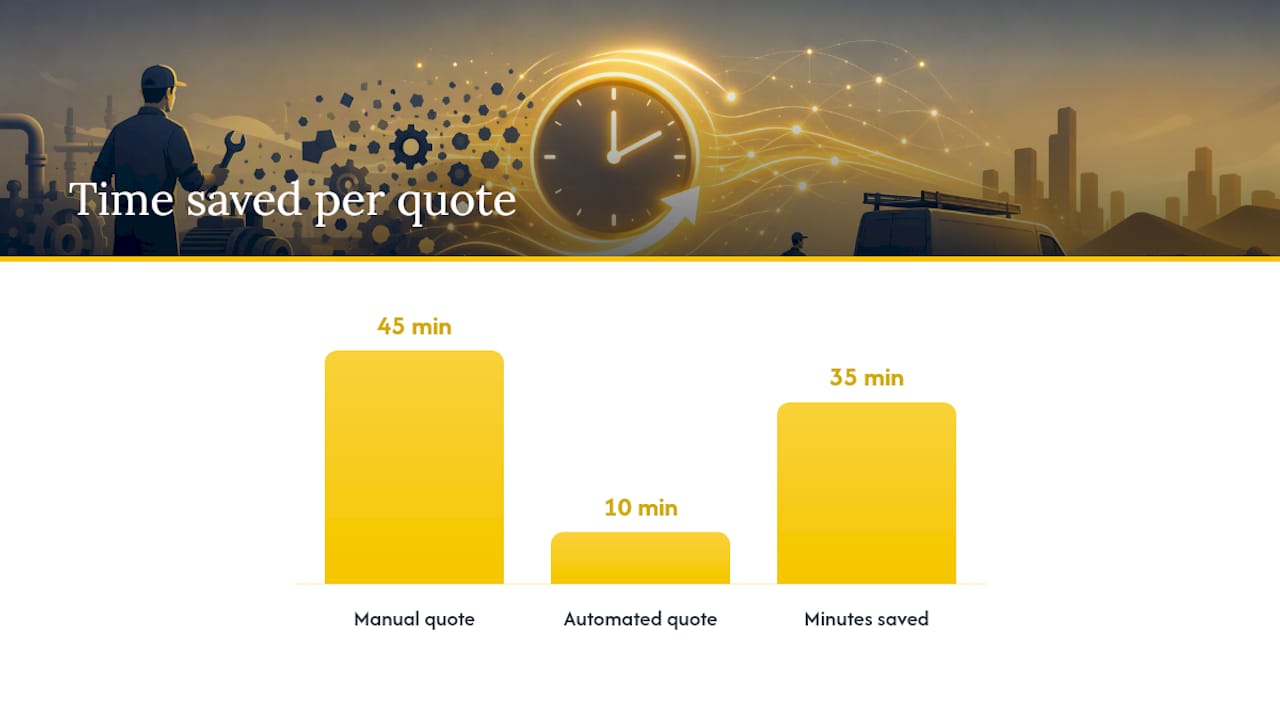
Time saved per quote. If a manual quote takes 45 minutes and automation cuts that to 10, multiply the difference by your monthly quote volume to get hours reclaimed.
-
Conversion lift. Even a small percentage increase in win rate, driven by faster response time, compounds meaningfully across a year of quotes.
-
Error reduction. Fewer repriced or reissued quotes means less rework time and fewer awkward customer conversations.
Dynamic pricing tools like Amazon’s Automate Pricing illustrate the underlying principle well: rule-based systems can update pricing within minutes to an hour of a trigger event, a speed no manual process can match, and that responsiveness is exactly what field service businesses gain when pricing rules run automatically instead of waiting on someone to notice a cost change.
During a pilot, collect a simple KPI table each week: quotes sent, average turnaround, win rate, and rework count. That gives you a clean before-and-after comparison to justify expanding the rollout, rather than relying on anecdotal impressions from the team.
Common Pitfalls and Best Practices for Automated Quoting
The mistakes that derail quote automation projects are rarely about the software itself. They’re about governance.
-
Dirty price books. Feeding inconsistent, outdated, or duplicated pricing data into an automated system just automates the errors faster and at greater scale.
-
Over-automation. Not every quote should skip human review. High-value jobs, unusual configurations, or first-time customers often warrant a second look before the quote goes out.
-
Ignoring approval gates. Skipping approval workflows to save time tends to backfire the first time a quote goes out with an incorrect discount applied.
Best practice is straightforward: assign clear ownership of the price book to one person or team, use rule-based pricing engines with margin floors to prevent AI-suggested discounts from eroding profit, and keep version control tight so everyone’s working from the current catalog, not last quarter’s export.
Pro Tip: Set a dollar threshold above which every quote requires human sign-off, regardless of how confident the AI parsing seems. This one guardrail catches the majority of costly mistakes before they reach a customer.
Why a Field-Service-First Platform Changes the Automation Equation
Generic quoting tools built for software sales or manufacturing rarely translate cleanly to a plumber standing in a crawlspace or an HVAC tech quoting a replacement unit from a driveway. ServlyPro was built around that specific reality, combining AI-powered quote generation with visual job tracking so a quote doesn’t just get created quickly, it gets tied directly to scheduling, dispatch, and invoicing without anyone re-keying data between systems.
The proof points matter here more than the feature list. That’s not a marginal improvement over a spreadsheet-and-email workflow. It’s a different operating rhythm entirely.
If you’re evaluating a demo, come prepared with a real price book export and a couple of your messiest, most complicated recent quotes. The platforms worth adopting handle those cases cleanly. The ones that only work on tidy demo data will show their limits fast.
— ServlyPro
Ready to See Automated Quoting Work on Your Own Jobs?
If you’ve been comparing standalone CPQ tools, generic pricing software, or a patchwork of spreadsheets and email templates, the honest tradeoff is this: those tools quote well in isolation, but they don’t connect what happens after the customer says yes. ServlyPro closes that gap for trades specifically, plumbing, HVAC, electrical, cleaning, landscaping, and more, by linking AI-powered quote generation directly to job scheduling, approvals, and follow-up automation in one platform.
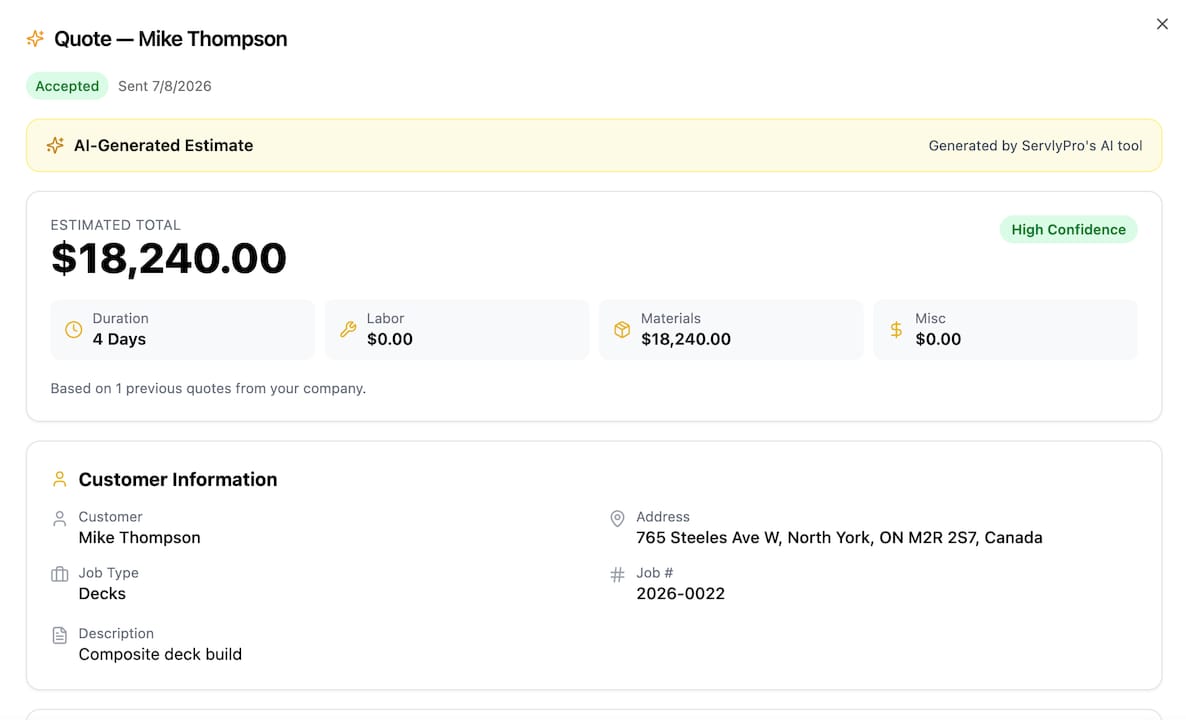
That means a quote generated from a technician’s voice note doesn’t just get sent, it flows into quote approval workflows with a full audit trail, and into automated follow-ups that chase down a customer who hasn’t responded yet, without anyone on your team having to remember to do it manually. Before you book a demo, pull together a sample of your current price book and a few recent quotes, ideally your messiest ones, so you can see exactly how the AI handles real jobs instead of a polished sales example. Visit ServlyPro’s product page to start a free trial or schedule a walkthrough built around your trade.
Sources
For teams that want to go deeper on the technical side of quote automation, a few resources are worth bookmarking. MuleSoft’s integration case studies show how connecting CRM, price book, and ERP systems removes the manual re-entry that causes most pricing errors. Amazon’s Automate Pricing tool documentation offers a clear look at how rule-based pricing engines react to real-time signals, a concept that applies directly to service-business quoting even outside e-commerce.
If you’re ready to see how these principles apply specifically to field service, ServlyPro’s AI quote generator and job scheduling pages walk through how quoting, approvals, and dispatch connect in a single workflow built for trades.
- MuleSoft case studies